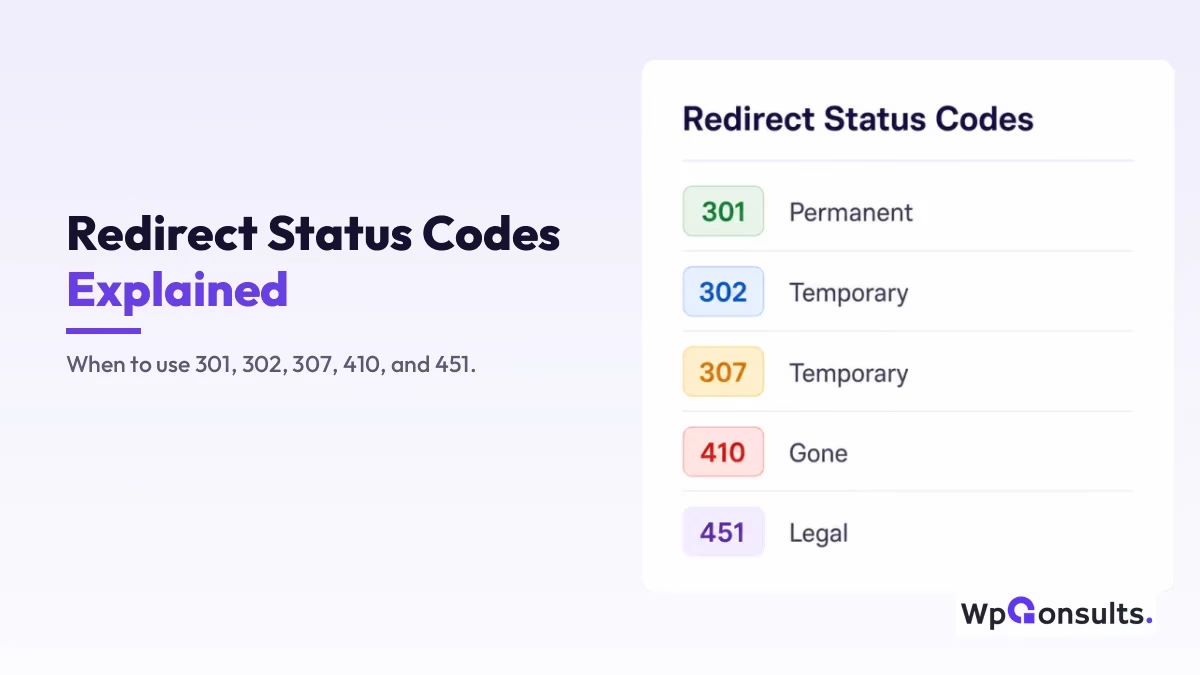
Redirects look simple, but the status code you choose decides whether your rankings survive a URL change or quietly bleed away. A 301, a 302, a 307, a 410, and a 451 each tell Google something different, and mixing them up is one of the quietest ways a site loses traffic.
So here is the plain-English breakdown of every major redirect status code, what each one does, when to reach for it, and exactly how it affects your SEO. Simple enough that a complete beginner can follow, detailed enough to keep you out of trouble.
Key Takeaways
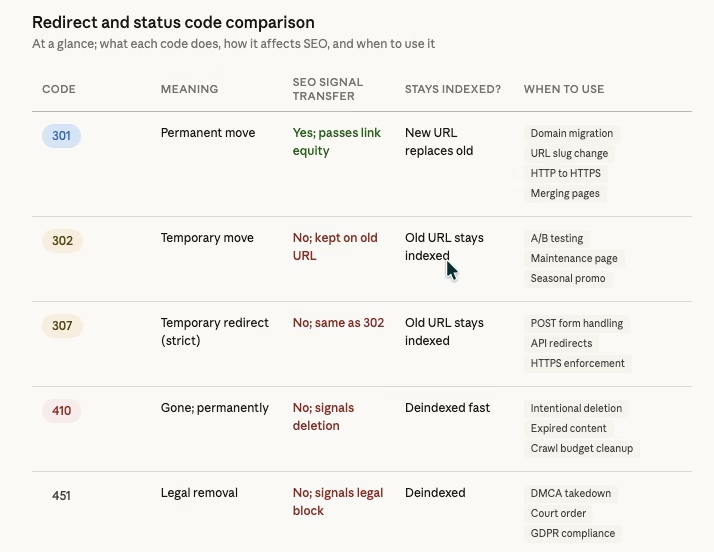
- A 301 means permanently moved; it passes most of your ranking signals to the new URL and is the one you will use most.
- A 302 and a 307 are temporary; Google keeps the old URL indexed and passes nothing, so never use them for a permanent change.
- A 307 differs from a 302 only on a technical detail (it preserves the HTTP method); for SEO they behave identically.
- A 410 says “gone for good” and deindexes faster than a 404, which frees up crawl budget on dead pages.
- A 451 is removal for legal reasons; Google treats it like a 410 but logs the legal context.
- Most ranking damage comes from three habits: redirect chains, sending everything to the homepage, and using a 302 where a 301 belonged.
What actually happens when you redirect a URL?
Before we get into the specific codes, it helps to know what a redirect really is.
When someone (or Googlebot) visits a URL on your site, your server sends back a response, and that response carries a status code: a three-digit number that tells the browser or search engine what is going on. If the code starts with a 3 (301, 302, 307), the content has moved and the server is pointing the visitor to where it lives now. If it starts with a 4 (like 410 or 451), the content is gone and there is no new place to send anyone.
That is the whole idea. A redirect is just your server saying “this page is not here anymore, go look over there,” or “this page is gone for good.” Now let’s break down each code.
What is a 301 redirect and when should you use it?
A 301 means permanently moved. It tells browsers and search engines that the old URL has been replaced by a new one, for good, and it is the redirect that matters most for SEO.

What a 301 does to your SEO: when you set one up, Google passes the ranking signals (the backlinks, authority, and trust people loosely call link juice) from the old URL to the new one. It is not a perfect transfer, there is always a little signal loss, but it is the closest thing to keeping your rankings intact when a URL changes. Google’s own documentation on redirects confirms a 301 is the right signal for a permanent move.
When to use a 301:
- You changed a page’s URL slug (for example, from /old-post to /new-post).
- You moved your entire site to a new domain.
- You switched from HTTP to HTTPS.
- You merged two pages into one.
- You restructured your site’s URL format.
- You consolidated the www and non-www versions of your site.
Think of a 301 as a permanent change of address: you moved house, you are not going back, and you want every piece of mail forwarded to the new place. For the practical scenarios, I go deeper in our guide on proper use cases for 301 and 302 redirects.
What is a 302 redirect and why does it confuse Google?
A 302 means temporarily moved. It tells search engines the page has moved to a different URL, but only for now, and that the original will come back. Here is the key difference from a 301: with a 302, Google keeps the old URL in its index and does not transfer ranking signals to the new URL, because it expects the original to return.
What a 302 does to your SEO: Google keeps indexing the original URL. If you use a 302 when you meant a 301, the old URL lingers in search results while the new one gets ignored, and you end up with two URLs competing, or worse, the wrong one ranking. This is one of the most common SEO mistakes I see: people use 302s for permanent changes because they do not know the difference, then wonder why the new URL never ranks.
When to use a 302:
- You are running an A/B test on a landing page.
- A page is temporarily under maintenance.
- You are showing a seasonal or promotional page that will revert later.
- You need to send users somewhere temporarily while you fix something.
Think of a 302 as a “temporarily closed for renovation” sign on your shop. The shop is still yours, you are just sending customers next door while you repaint. One warning though: if a “temporary” redirect stays live for months, Google may eventually start treating it like a 301 anyway, but you are leaving that call to Google’s guesswork, and that is never a good strategy.
What is a 307 redirect and how is it different from a 302?
A 307 also means temporarily moved, just like a 302, so why does it exist? The difference is purely technical. With a 302, older browsers and servers sometimes turned POST requests into GET requests during the redirect, which could break form submissions and API calls. A 307 was introduced to fix that, because it guarantees the HTTP method stays the same through the redirect.
What a 307 does to your SEO: exactly what a 302 does. Google treats both as temporary, the original URL stays indexed, and no ranking signals move to the new URL.
When to use a 307:
- You need a temporary redirect and your site handles POST requests (form submissions, payment processing).
- You are working with APIs and need to preserve the original HTTP method.
- Your server or framework automatically uses 307 for HTTPS enforcement.
For most people running a standard WordPress site, you will rarely set up a 307 by hand; it is more relevant to developers working with web applications. If you are not sure whether to use 302 or 307, go with 302 for simplicity.
What is a 410 status code and why is it better than a 404?
A 410 is not technically a redirect. It is a status code that means gone, permanently. Unlike a redirect, it does not send anyone to a new URL; it simply says “this page used to exist, it has been intentionally removed, and it is never coming back.”
How is a 410 different from a 404? A 404 means “not found,” which is ambiguous: the page may never have existed, the URL might be mistyped, or the page was deleted by accident. Google does not know why it is missing, only that it is. A 410 is the stronger, clearer signal: “we deliberately removed this, stop looking for it, drop it from the index.”
What a 410 does to your SEO: Google deindexes the URL faster than it would with a 404. With a 404, Google may keep checking back for weeks hoping the page returns; with a 410, it takes the hint quickly and moves on. That matters most on large sites, because hundreds or thousands of deleted pages returning 404s is wasted crawl budget, with Googlebot revisiting dead URLs instead of your real content. Switching those to 410 tells Google to stop wasting time.
When to use a 410:
- You intentionally deleted a page or post and there is no replacement.
- You removed outdated content for good (expired promotions, discontinued products).
- You want Google to deindex a URL as fast as possible.
- You are cleaning up the site and want to free crawl budget.
What is a 451 status code and when would you ever need one?
A 451 means unavailable for legal reasons. It is a niche code, but a useful one. It tells search engines the content was removed because of a legal requirement, whether a court order, a DMCA takedown, government censorship, or compliance with a privacy regulation like GDPR.
What a 451 does to your SEO: Google treats it much like a 410 and deindexes the URL, but the 451 adds context about why the content is gone. Google can log the legal reason, and in some cases it may show a notice in search results that the content was removed due to a legal complaint.
When to use a 451:
- You received a DMCA takedown notice for specific content.
- A court order requires you to remove certain pages.
- Content must be blocked in specific regions because of local laws.
- You need to comply with a GDPR right-to-be-forgotten request.
Most small business websites will never need a 451, but if you ever face a legal removal, this is the correct way to handle it.
Does using the wrong redirect actually hurt your rankings?
Yes, and it happens more often than you would think. Here are the mistakes I run into most, and how each one quietly damages your SEO.
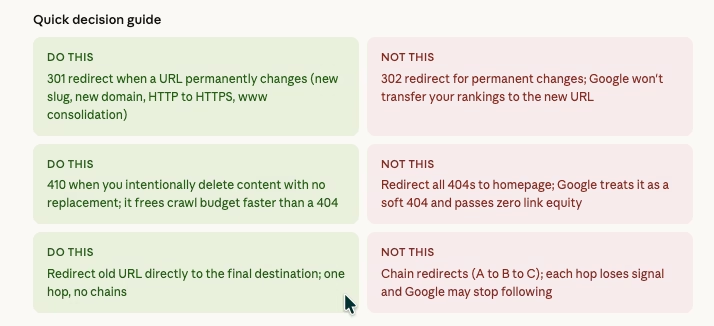
Using a 302 when you need a 301. The old URL stays in Google’s index, the new URL never picks up the ranking signals, and you lose traffic gradually without an obvious cause.
Redirect chains (A goes to B, B goes to C). Every hop sheds a little signal, and after two or three hops Google may stop following the chain entirely. Always redirect straight from the old URL to the final destination.
Redirecting everything to the homepage. Google reads this as a soft 404 and passes no ranking signal, because the homepage is not a relevant replacement for a specific page, so those rankings simply disappear.
Leaving 404s where a 301 or 410 belongs. If a deleted page had backlinks, those links now point at nothing and that authority is wasted. Either redirect to a relevant page (301) or confirm the deletion (410).
Not redirecting HTTP to HTTPS. If both versions load, you have a duplicate content problem and Google does not know which to rank, so always 301 HTTP to HTTPS.
How do you set up redirects in WordPress?
There are a few ways to do it, depending on how hands-on you want to be.
Using a plugin is the easiest route for most people. Options like Yoast Premium, the Redirection plugin, or Rank Math let you manage every redirect from the WordPress dashboard: choose the redirect type, set the source URL, and define the destination, all without touching code.
Using your .htaccess file is more direct. If you are comfortable editing server files, you can add redirect rules there, and it is faster because the redirect happens at the server level before WordPress even loads. The catch is that a mistake in .htaccess can take down the whole site, so back up first.
Using your hosting panel works too. Plenty of hosts offer redirect management right in the dashboard, including Cloudflare, Kinsta, SiteGround, and Hostinger.
Whichever method you pick, always test the redirect afterward. A tool like httpstatus.io or the redirect checker in Screaming Frog will confirm the correct status code is actually being returned.
FAQ: redirect questions every website owner asks
Should I redirect all my 404 pages to the homepage? No, and this is a very common mistake. Google treats mass redirects to the homepage as soft 404s, recognizes the homepage is not a real replacement, and passes no ranking signal, so the redirect does nothing for SEO. Redirect each 404 to the most relevant existing page instead, and if none fits, use a 410 to confirm the content is gone.
Should I redirect HTTP to HTTPS? Yes, always. If your site loads on both http:// and https://, you have a duplicate content problem, so set up a site-wide 301 from HTTP to HTTPS to consolidate every ranking signal on the secure version. Most hosts make this easy, and some do it automatically.
Should I redirect www to non-www, or the other way around? Yes. Pick one version and 301 the other to it. It does not matter which you choose, what matters is consistency, because if both www.yoursite.com and yoursite.com load, Google sees two competing sites.
How long should I keep a 301 active? Ideally forever, or at least as long as the old URL might still pull traffic or hold backlinks. Remove it too early and anyone clicking an old link, or Google following an old backlink, hits a 404 and you lose that traffic and authority.
Can too many redirects slow down my site? A single redirect adds only milliseconds, but redirect chains stack those delays and confuse search engines, so keep every redirect direct, from the old URL straight to the final destination, with no chains.
What is the difference between a redirect and a canonical tag? A redirect physically sends users and search engines to a different URL; a canonical tag is just a suggestion in the HTML that says “the preferred version is over here.” Redirects are the stronger signal. Use a redirect when the old URL should not be visited at all, and a canonical when both URLs exist but you want Google to favor one. If you are wrestling with canonicals, our guide on fixing canonical URL errors goes deeper.
Does a 301 pass 100% of link equity? Not exactly. Google has confirmed 301s pass ranking signals, but has never said it is a full transfer, and in practice there is always a little loss. It is still the best tool you have for preserving SEO value when a URL changes.
I changed my domain. Should I use 301s? Yes. On a domain migration you need a 301 from every old page to its matching new page, page to page, not everything to the homepage. This is one of the most SEO-critical jobs you can do, and getting it wrong can wipe out years of progress, so plan the mapping carefully before the switch.
My old URLs still show in Google after I set up redirects. Is that normal? Yes. Google does not update its index instantly, so after a 301 it can take days, weeks, or months to fully process the change and swap the old URL for the new one. Be patient and confirm the redirects work using Google Search Console.
So, which redirect should you actually reach for?
The whole decision comes down to one honest question: is this change permanent or not? If the old URL is never coming back, use a 301 and let it pass your authority forward. If the page is genuinely gone with no replacement, a 410 is cleaner than leaving a 404 to rot. Reserve 302 and 307 for the rare cases that are truly temporary, and treat 451 as the legal-removal special case it is.
Redirects are one of those invisible factors that quietly make or break a site, and most people only notice them once traffic drops and they cannot explain why. Get the type right, keep the path direct, and you remove a whole category of silent ranking loss.
Want your redirects audited properly?
If you are migrating a site or cleaning up years of messy redirects, work with WpConsults or email me directly. A clean redirect map is one of the cheapest ways to protect rankings you already earned.
Update Logs
27 Jun 2026
- Refreshed for 2026 with Google Search Central and MDN references for each status code, and a clearer verdict on which redirect to reach for.
Want our posts to show up more often on Google?
One step & Google will surface this site in your Top Stories.