If Search Console is showing “Duplicate without user-selected canonical” on a pile of your URLs, the advice you will find almost everywhere is the same: add canonical tags. Plenty of people do exactly that, wait, and watch the number sit where it was.
Here is my short answer. Google’s own documentation calls a canonical preference “a hint, not a rule”, and the Search Console help page says this status is working as intended. So most of the URLs in that report need nothing from you, and the few that genuinely do need more than a tag.
Key Takeaways
- Google’s canonicalization documentation says it plainly: “indicating a canonical preference is a hint, not a rule.” That single sentence explains most of the confusion around this report.
- The Search Console help page calls this status “not an error, but working as intended”, and says a page marked duplicate is usually a good sign, because it means the canonical was found and indexed.
- Protocol variants, www and non-www, parameter and tracking URLs, sort and filter views, print views and stray staging copies are the URLs that genuinely cluster. Google picking one of them is the outcome you want.
- Paginated archives usually do not belong on that list. Page 2 lists different posts than page 1, so it is not a near-duplicate. Three paginated archives on my own site came back self-canonical when I inspected them on 7 August 2026, and two of the three are indexed.
- A canonical tag pointing at a page that is not similar to the tagged page can never be honored. The tag is not weak in that case, it simply does not apply.
- Google says re-evaluation can take up to two weeks after a real fix. That is Google’s figure, not a number I have measured.
- The live URL test in Search Console does not check canonical conditions, so read the indexed-version fields instead or you will think you confirmed something you did not.
What does “Duplicate without user-selected canonical” actually mean?
It means Google found a group of URLs on your site that look like the same page, none of them declared which one was the main version, so Google picked one itself and shelved the rest.
The Page indexing report help page defines it in its own words: “This page is a duplicate of another page, although it doesn’t indicate a preferred canonical page. Google has chosen the other page as the canonical for this page, and so will not serve this page in Search.”
Notice what that definition does not say. It does not say the page is broken, it does not say you lost anything, and it does not say you have work to do.
Why does Google call this status normal rather than an error?
Because on most sites it is normal. The same help page says so in one sentence: “This is not an error, but is working as intended, because Google does not serve duplicate pages.”
Now, that is Google grading its own report, and I would not take a vendor’s self-assessment as settled on its own. So look at the independent reason it holds up.
If your product page is reachable at four URLs because of a sort parameter and a tracking tag, serving all four would give the searcher four identical results. One of them showing up is the correct behavior, and it is the behavior you would ask for if you were designing the index yourself.
Google puts the same point more directly elsewhere on that page: “Having a page marked duplicate or alternate is usually a good thing; it means that we’ve found the canonical page and indexed it.”
How does Google choose a canonical when you have not chosen one?
It clusters URLs that look alike, then picks one out of the cluster using several signals at once. The canonicalization documentation describes the first half like this:
“When Google indexes a page, it determines the primary content (or centerpiece) of each page. If Google finds multiple pages that seem to be the same or the primary content very similar, it clusters them together.”
The word doing the work there is similar. If the primary content of two URLs is not close, they never enter a cluster, and none of this applies to them.
For the second half, Google says it then chooses the page that is “objectively the most complete and useful for search users”. I would treat that one carefully, because it is a claim about Google’s own judgment being sound, and that judgment is a machine judgment that misses sometimes. The proof is that Google built a whole separate report status for the cases where you disagree with the pick.
The signals themselves are listed in the guide on specifying a canonical URL, and they are ordered by strength, which is the part almost nobody quotes.
| Signal | How much it moves the decision | What that means for you |
|---|---|---|
| 301 redirect | Strong. Google calls it “a strong signal that the target of the redirect should become canonical”. | The most decisive tool you have, because the duplicate stops existing as a servable page. |
| rel=”canonical” | Strong, and Google’s preferred solution for pages that must stay reachable. | Usually honored, but it is a preference you are expressing, not a command. |
| Sitemap inclusion | Weak. Google’s own word. | Worth getting right, never worth relying on alone. |
| HTTPS, cleaner URL, internal links | Contributing factors named in the documentation, with no strength given. | If your internal links all point at the URL you want indexed, you are already voting for it. |
Why did adding a canonical tag change nothing?
Four reasons cover almost every case, and only one of them is a mistake you made.
- The tag is a hint, so Google is allowed to overrule it. The documentation says: “You can indicate your preference to Google using these techniques, but Google may choose a different page as canonical than you do, for various reasons. That is, indicating a canonical preference is a hint, not a rule.” Nothing in the report changes if Google weighed your hint and went another way.
- You pointed the tag at a page that is not a near-duplicate. This is the one that catches people, because the tag looks correct in the source. Google states the rule flatly: “A duplicate page must be similar to the canonical. (That’s what duplicate means.)” Point a thin filter page at your homepage and the tag will be passed over every time, no matter how often you re-add it.
- The tag is somewhere Google will not read it. The annotation only counts inside a valid
<head>section, and versions carryinghreflang,lang,mediaortypeattributes are not used for canonicalization at all. A plugin that injects the tag late, after some invalid markup has already closed the head, produces exactly this outcome. - It did work and you are checking too early. Google says pages can sit in a duplicate cluster for “up to two weeks” even after the content issue is fixed, and that validation “typically takes up to about two weeks, but in some cases can take much longer”. That is Google’s stated timing rather than something I have timed myself, so treat it as a ballpark and stop refreshing the report daily.
One correction while we are here, because the overcorrection is as wrong as the original mistake. Google does not ignore canonical tags. It calls them a strong signal and the preferred solution, and it follows them most of the time.
Which of the reported URLs should you leave alone?
Most of them, on a typical site. The documentation lists the reasons duplicates legitimately exist: region variants, device variants, protocol variants, site functions like sorting and filtering, and accidental variants such as a demo copy left crawlable.
That taxonomy is a better sorting tool than the generic fix lists, because it separates the URLs your site was always going to produce from the ones that point at a real problem. Here is how I would work through the list.
| What the URL is | Why it is in the report | What to do |
|---|---|---|
| HTTP version of an HTTPS page, or non-www against www | A protocol or host variant. The classic cluster. | Leave alone. If the redirect is in place, this is already solved and the report is just telling you so. |
The same page with ?utm_source=, a session id, or a tracking tag | Parameter variants of one page. | Leave alone in most cases. Add a self-referencing canonical on the clean URL if you want to be explicit. |
| Sort, filter and view options on a category or collection | Site functions, exactly as Google describes them. | Leave alone, unless a filtered view targets a real query and deserves to rank in its own right. |
| Print views, AMP-style alternates, mobile variants of one page | Device and format variants. | Leave alone. These are supposed to consolidate. |
| A staging, demo or duplicate-domain copy that is crawlable | An accidental variant. | Fix it, and not with a canonical tag. Block or password-protect the copy so it stops competing. |
| Two real pages you wrote that cover the same ground | Genuine content overlap. | Consolidate. Merge them, redirect the weaker one, and keep the internal links pointing at the survivor. |
| A page you need indexed that Google clustered anyway | The selection went against you. | This is the short list worth your evening. Make the content genuinely different, then declare the canonical and wait. |
On a store, the sort and filter rows tend to dominate the list. If that is your situation, the URLs themselves are worth understanding before you touch anything, and I went through where they come from in the piece on Shopify duplicate content from collections.
One tool that keeps appearing in fix lists is noindex, and Google specifically advises against it here: “We don’t recommend using noindex to prevent selection of a canonical page within a single site, because it will completely block the page from Search.” If you still want a page out of the index for a different reason, that is a separate job, and I covered it in how to deindex a page from Google.
Are paginated archives really duplicates?
Usually not, and this is worth saying because pagination gets listed as a duplicate-content problem constantly.
Page 2 of a category archive lists different posts than page 1. Its primary content is not “the same or very similar”, so it does not enter a duplicate cluster in the first place.
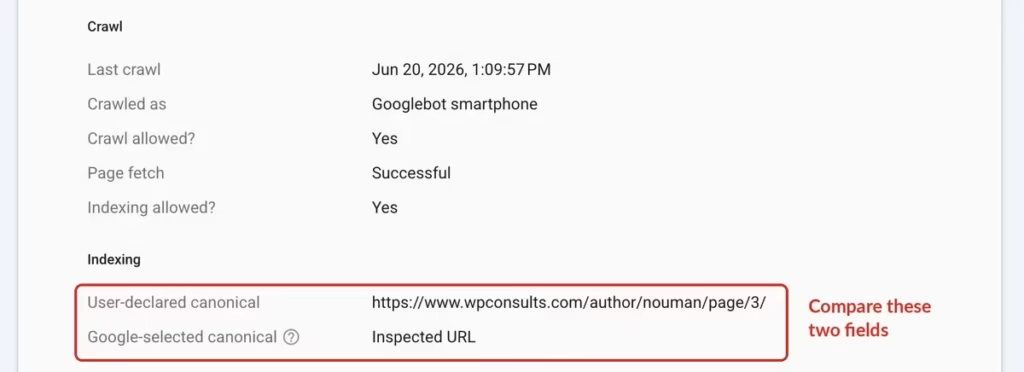
I checked that on my own site rather than assuming it. On 7 August 2026 I inspected three paginated archives on wpconsults.com and every one came back self-canonical, with the user-declared and Google-selected canonical matching.
/author/nouman/page/3/: submitted and indexed, canonical is the URL itself./category/best-seo-practices/page/2/: submitted and indexed, canonical is the URL itself./blogs/page/5/: also self-canonical, but sitting at crawled, currently not indexed, which is a completely different status with a completely different cause.
That third one is the useful contrast. A paginated archive can absolutely have an indexing problem; it just will not be this one.
This is one site, so I am not going to stretch it into a universal law. A category archive and a tag archive listing the same posts is a plausible cluster, because their primary content genuinely does match. A page 2 is a different animal.
How do you check which canonical Google picked?
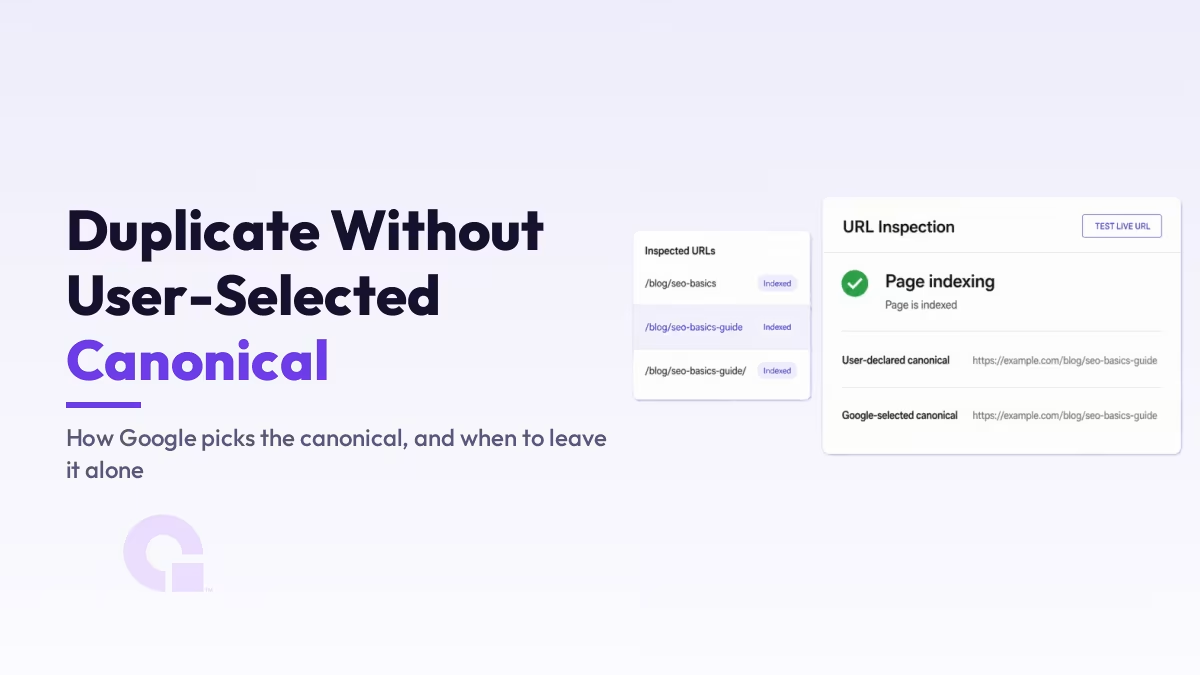
Use URL Inspection and read two fields. It takes about thirty seconds per URL and it settles the question that the report itself leaves open.
- Open Search Console and paste the URL into the inspection box at the top.
- Expand the Page indexing section in the result.
- Read User-declared canonical. This is what your page is asking for, and “N/A” here means no tag was found, which is the plain reading of “without user-selected canonical”.
- Read Google-selected canonical directly underneath. “Inspected URL” means Google picked the URL you are looking at, so nothing is being suppressed.
- If the two disagree, open both pages side by side in your browser and ask honestly whether they are near-duplicates. If they are not, your tag was never going to apply.
There is a trap in step two that will waste your afternoon if you hit it. The Test Live URL button feels like the way to confirm a fix, but Google says the live test “doesn’t test all the issues covered by the Page indexing report” and that “duplicate or canonical conditions are not tested in the live test”.
So run the live test for crawlability and rendering, and read the indexed-version fields for anything canonical. Otherwise you will see a green result and conclude the problem is gone when nothing about it was checked.
One more thing to watch for while you are in there. If the Google-selected canonical sits on a domain or subdomain you do not have verified, you will not see traffic data for it at all, which is a different message with its own confusion attached, and I wrote that one up in how to fix “Canonical URL not in property”.
What does “Duplicate, Google chose different canonical than user” mean?
It is the same mechanism, one stage further along. You declared a canonical, Google read it, and Google went with something else.
Google’s wording: “This page is marked as canonical for a set of pages, but Google thinks another URL makes a better canonical. Google has indexed the page that we consider canonical rather than this one.”
Most articles treat these two statuses as separate problems with separate fix lists. They are one process at two stages, and seeing that connection is what stops the loop of adding tags and rechecking.
Before you go to war over the pick, Google asks a fair question in its troubleshooting guide: “Before troubleshooting, think about whether the Google-selected canonical makes more sense than your preferred canonical URL for your users coming from Google Search.” Often it does, and then the honest move is to accept it.
There is a third status people find in the same report and panic about unnecessarily. “Alternate page with proper canonical tag” means your page correctly points at an indexed canonical, and Google’s own line on it is that “there is nothing you need to do”.
When is this status actually urgent?
Rarely, but the cases exist and they are serious, so it is worth two minutes to rule them out.
Google’s troubleshooting page names six causes for a genuinely wrong selection, and these three are the ones I would check first on a site I did not build.
- An injected cross-domain canonical. Google lists “malicious hacking” that adds a
rel="canonical"pointing at another domain, either in the head or in the HTTP header. If your pages are quietly handing themselves to a site you have never heard of, that is not a canonical problem, it is a compromise, and it needs a security response first. - A misconfigured server. Google names servers that return another host’s content, or identical soft 404s across many URLs. Both produce clusters that look inexplicable until you view the raw response.
- A copycat or a syndication deal. If someone republishes you and outranks you, Google may pick their copy. Syndication partners should be pointing a canonical back at you, and it is worth checking whether yours actually do.
If you run a store on supplier feeds, the duplicate question shows up in a slightly different shape, and I worked through the checks for that case in the piece on duplicate supplier descriptions.
What does Google’s AI Overview say about this error?
It gives the same incomplete answer as the rest of the results page, which is worth showing because it is now the first thing most people read.
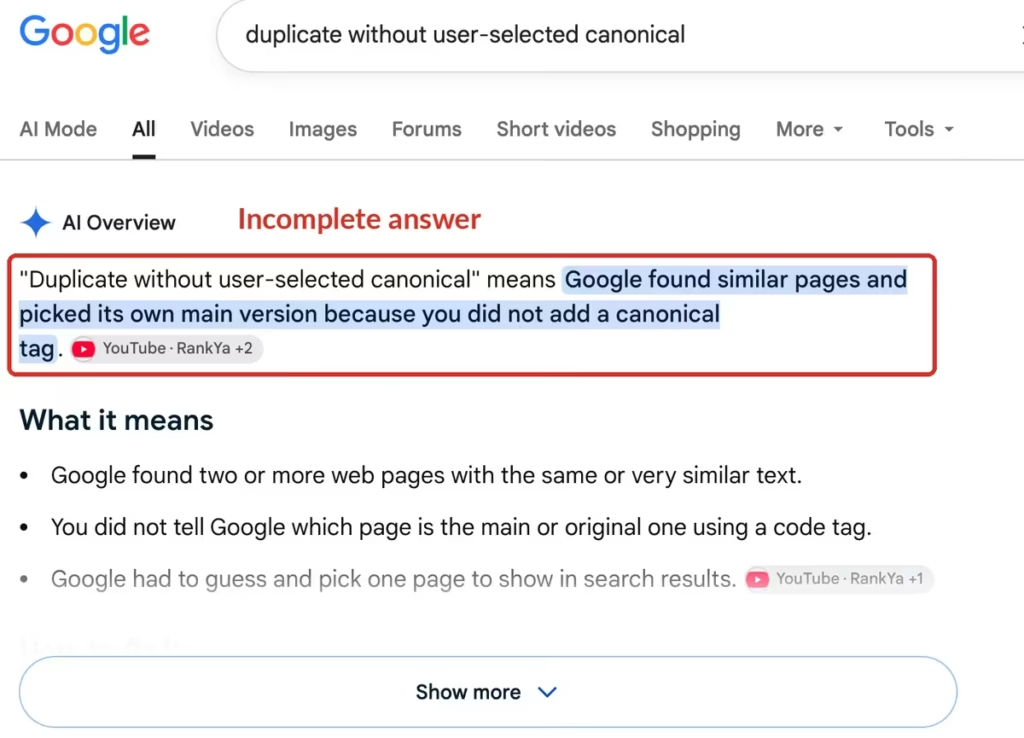
Its definition reads: “Duplicate without user-selected canonical” means Google found similar pages and picked its own main version because you did not add a canonical tag.
The description is accurate as far as it goes, and the fix list underneath it is reasonable too. What is missing is the part that decides whether any of it will work for you.
It never says a canonical is a hint rather than a rule. It never says a tag pointing at a page that is not similar will be passed over. And it never says the status is usually working as intended, which is the single most useful thing Google’s own help page tells you.
Read as instructions, “add a canonical tag” sends someone off to tag forty URLs, and most of that work was never needed.
So do you really have forty problems?
Almost certainly not. On most sites I look at, the large majority of that list is Google handling parameter, protocol and filter variants exactly as it should, and the honest recommendation is to close the tab and go do something that moves the needle.
What I would actually do is spend twenty minutes sorting the list with the table above, then inspect only the URLs left over. That group is usually small enough to count on one hand.
For those, skip the tag as a first move. Ask whether the two pages deserve to be separate pages at all, because if they do not, a merge and a redirect settles it permanently, and if they do, making them genuinely different is the thing that changes Google’s decision. A canonical tag on top of that is a good idea; a canonical tag instead of it is the loop people get stuck in.
And when the selection still goes against you after all that, sit with the possibility that Google picked the better page. It is not always right, but it is right often enough that “I disagree” is not by itself a reason to spend another week on it.
Common questions about duplicate without user-selected canonical
Does “Duplicate without user-selected canonical” hurt my rankings?
Not by itself. Google’s help page describes the status as working as intended, and says a page marked duplicate usually means the canonical was found and indexed. The ranking you care about lives on the canonical page, which is in the index. It only costs you something when the page Google suppressed was the one you needed serving.
How long does it take for the status to clear after I fix a page?
Google says pages can stay in a duplicate cluster for up to two weeks after the content issue is resolved, and that validation typically takes about the same, sometimes longer. It also notes that pages split out faster when the difference between them is clear and significant, so a decisive change beats a light edit.
Should I use noindex to stop a page being picked as canonical?
No. Google recommends against it for this purpose, because noindex blocks the page from Search entirely rather than consolidating it, and rel=”canonical” is the preferred solution. Google also says not to use robots.txt or the URL removal tool for canonicalization, since neither one does what people expect here.
Why does my canonical tag not appear in the User-declared canonical field?
The most common reasons are placement and attributes. The annotation is only accepted inside a valid head section, so invalid markup that effectively closes the head early will hide it. Versions carrying hreflang, lang, media or type attributes are not used for canonicalization either, so they will not show up as your declared preference.
Do paginated pages cause duplicate without user-selected canonical?
Usually not, because page 2 lists different items than page 1, so the primary content is not similar enough to cluster. When I inspected three paginated archives on my own site on 7 August 2026, all three were self-canonical and two were indexed. If a paginated page is missing from the index, look at a different status such as crawled, currently not indexed.
Still stuck on it?
Not sure which of your reported URLs are actually a problem?
Send me the export from your Page indexing report and I will tell you which rows to leave alone, which to consolidate, and which few are genuinely costing you something.
Update Logs
07 Aug 2026
- First published. Written from four Google documents read in full on 7 August 2026: the canonicalization overview, the guide to specifying a canonical URL, the canonicalization troubleshooting page, and the Search Console Page indexing report help page. Own data comes from URL Inspection on wpconsults.com the same day, including the three paginated archives, and from a signed-out search with no location set.
Want our posts to show up more often on Google?
One step & Google will surface this site in your Top Stories.