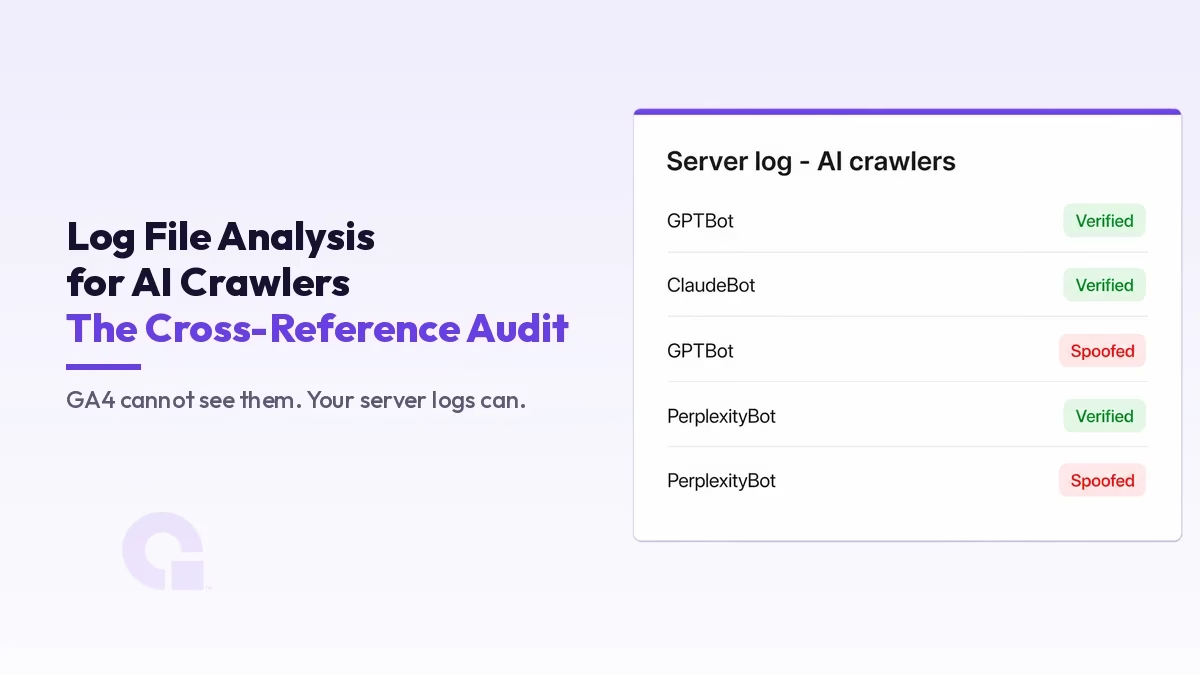
Here is the uncomfortable truth most “AI visibility” dashboards will not tell you: the analytics tool you trust cannot see the crawlers you are trying to measure. GA4 fires on JavaScript, and AI crawlers almost never run it, so log file analysis for AI crawlers is the only honest record of who fetched what, when, and whether they were even real.
This is the audit playbook I run when a client wants to know what the answer engines are actually doing to their site, how to separate a real bot from a spoofed one, and why a lot of the “our content is being trained on” worry turns out to be unverified or overstated.
Key Takeaways
- GA4 and most analytics cannot see AI crawlers, because the crawlers do not run the JavaScript that fires the tag; the server access log is the only complete record.
- Training crawlers (GPTBot, ClaudeBot, CCBot) and live retrieval agents (ChatGPT-User, OAI-SearchBot, PerplexityBot) do different jobs; blocking a retrieval agent removes you from live answers, while blocking a training crawler only affects future models.
- A user-agent string can be forged in one line, so a large share of “AI bot” hits are spoofed; verify by published IP ranges or forward-confirmed reverse DNS before you count anything.
- AI crawler volume has jumped fast (GPTBot up about 305%, ChatGPT-User up about 2,825% in a year, per Cloudflare), so this is now a real load and crawl-budget issue, not a footnote.
- The method that actually produces decisions is a three-way cross-reference: server logs against your crawl or sitemap against analytics, keyed on URL, where the insight lives in the disagreements.
- Pair the logs with what bytes you actually serve: AI crawlers ignore JavaScript and stop reading past byte limits, so a clean 200 does not mean your content was ingested.
Why GA4 and most analytics are structurally blind to AI bots?
GA4 is a client-side measurement tool. It loads a tag, the tag runs in a browser-like environment, and an event is sent. No JavaScript execution, no event.
AI crawlers behave like classic HTTP clients: they issue a GET, parse the markup server-side, and never touch your tag. So your behavioral analytics will show zero sessions from GPTBot even while your logs show tens of thousands of its requests. People then conclude that AI is not crawling them, when it is; they are just measuring with the wrong instrument.
This is the same architectural reason your critical content has to live in the raw HTML, not in a client-rendered shell. If a passage only appears after JavaScript hydration, an AI crawler that does not execute JS will never ingest it. The logs make this visible in a way no rendering test does: you see exactly which URLs the bot hit and, by cross-referencing the response your server returned, exactly what bytes it received.
Training crawlers vs live retrieval agents: stop treating them as one thing
The biggest analytical error I see is lumping every AI user-agent into one “AI bot” bucket. They serve completely different functions and demand different decisions from you, so it helps to think of two broad classes.
Training crawlers harvest content to build or refine foundation models. They are bulk, systematic, and indifferent to whether a human is waiting. This group includes GPTBot (OpenAI), ClaudeBot (Anthropic), CCBot (Common Crawl, which many models ingest downstream), and the access controlled by Google-Extended (Google’s token for Gemini training, which is a robots.txt directive rather than a separate crawling user-agent). Blocking these affects whether your content feeds the next model, but it does not affect whether you appear in a live answer today.
Live retrieval agents fetch a page because a user just asked a question and the engine needs a citation right now. This is the group that actually drives AI referral visibility: ChatGPT-User (OpenAI’s on-demand fetch when a user prompts ChatGPT to browse), OAI-SearchBot (OpenAI’s index for ChatGPT search results), and PerplexityBot (Perplexity’s retrieval). If you block these, you remove yourself from the answer.
This is where the lumping really hurts. Many sites blanket-block “AI” in robots.txt, which kills OAI-SearchBot and ChatGPT-User along with GPTBot, and then they wonder why they vanished from ChatGPT citations. By blocking the retrieval agents alongside the training crawler, they cut off the very bots that were putting them in front of users. The same appetite for a quick file-level fix drives llms.txt, though what the llms.txt data actually showed is far less flattering.
OpenAI’s own overview of its crawlers documents this separation and the independent control it gives you: you can allow OAI-SearchBot to appear in search while disallowing GPTBot to opt out of training. Treat the two classes as one and every downstream decision you make is wrong.
A working user-agent cheat sheet
| User-agent token | Operator | Class | What blocking it costs you |
|---|---|---|---|
| GPTBot | OpenAI | Training | Out of future model training data only |
| OAI-SearchBot | OpenAI | Retrieval / index | Out of ChatGPT search results |
| ChatGPT-User | OpenAI | Live retrieval | Cannot be fetched when a user asks ChatGPT to browse |
| ClaudeBot | Anthropic | Training | Out of future Claude training data |
| PerplexityBot | Perplexity | Retrieval / index | Out of Perplexity answers and citations |
| CCBot | Common Crawl | Training (upstream) | Out of a dataset many models ingest |
| Google-Extended | Training control (robots token) | Out of Gemini training; does not affect Search |
The growth that makes this non-optional
This was a footnote two years ago, and it is now a budget line. Cloudflare’s network-wide analysis found that between May 2024 and May 2025, GPTBot requests grew roughly 305% while overall Googlebot requests grew about 96%. The more striking number is the live-retrieval side: ChatGPT-User requests surged roughly 2,825% over the same period, reflecting how often users now ask ChatGPT to go fetch a live page.
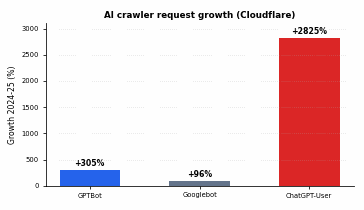
A near 30x increase in one retrieval agent is not noise you can ignore on a shared host. It is real bandwidth, real origin load, and real crawl-budget competition. Which brings us to the second hard truth: a large share of traffic claiming to be these bots is not what it says it is.
Reverse-DNS verification: most “AI bot” traffic in your logs is spoofed
A user-agent string is just a request header, and anyone can set it. Setting User-Agent: GPTBot is a one-line change, and scrapers, paywall-jumpers and competitors do it constantly because the entire allow-by-user-agent model naively trusts the claim. If you build a crawl report straight off the user-agent field, you are reporting fiction, so verification is the first filtering step before any number you produce means anything.
There are two reliable methods, in order of preference.
1. Published IP range files. The serious operators publish machine-readable IP lists you can match against. OpenAI publishes gptbot.json, searchbot.json and chatgpt-user.json; Common Crawl publishes its ranges; Google publishes its crawler IP lists. Match the request’s source IP against the relevant file, and if it is not in the list, the user-agent is forged. This is the cleanest check because it does not depend on DNS at all.
2. Reverse-DNS plus forward-confirm. For vendors that do not publish IP files (Anthropic’s ClaudeBot is the notable case), use the same forward-confirmed reverse DNS technique Google has recommended for verifying Googlebot for years.
The logic: do a reverse lookup on the source IP to get a hostname, confirm the hostname belongs to the claimed operator, then do a forward lookup on that hostname and confirm it resolves back to the original IP. Both directions must agree.
# Step 1: reverse lookup the IP that claimed to be a bot
dig -x 66.249.66.1 +short
# -> crawl-66-249-66-1.googlebot.com.

# Step 2: forward lookup that hostname
dig crawl-66-249-66-1.googlebot.com +short
# -> 66.249.66.1   (matches: verified)

# If the hostname does not belong to the operator,
# or the forward lookup does not return the original IP,
# the request is spoofed. Discard it before reporting.
Run this against a sample of every user-agent you care about. On most sites I audit, a meaningful slice of “GPTBot” and “PerplexityBot” hits fail verification. Reporting unverified user-agents as real AI crawl activity is, in my experience, one of the most common ways an audit ends up misleading the client who paid for it.
The cross-reference: logs vs crawl vs analytics
A single data source lies by omission. The method that actually produces decisions is a three-way reconciliation. Each source answers a different question, and the gaps between them are where the insight lives.
- Server logs answer: what did bots and users actually request, and what status code did we return? This is ground truth for behavior.
- A crawler’s own crawl (Screaming Frog, Sitebulb, or your sitemap export) answers: what URLs do we believe exist and should be reachable?
- Analytics and Search Console answer: what did humans engage with, and what drove value?
Lay the three side by side, keyed on URL, and read the diffs:
| In logs? | In crawl/sitemap? | In analytics? | What it means |
|---|---|---|---|
| Yes (AI bot) | Yes | No human traffic | AI ingests it but humans do not land. Candidate for AI-only value, or thin content the bot wastes budget on. |
| Yes (AI bot, heavy) | No | No | Bot is hammering URLs you do not even list: parameter explosions, faceted filters, old paginated junk. Crawl-budget waste. |
| No | Yes | Yes | Important page no AI crawler has fetched. Check robots.txt, internal links, and that it lives in raw HTML. |
| Yes (returns 404/5xx) | Yes | n/a | You are feeding errors to AI crawlers. They learn your site is broken; retrieval agents drop you from answers. |
A concrete, repeatable methodology: export your access log for a clean 30-day window, filter to verified bot hits only, normalise the URL (strip session params you do not want counted), then left-join your sitemap and your Search Console export on the URL key. Group by user-agent class (training vs retrieval) and by status code.
In an afternoon you will know which URLs the answer engines actually fetch, which ones they waste requests on, and which of your money pages they have never touched. That is a far cry from “AI is crawling us a lot.”
Spotting crawl-budget waste before it costs you
Crawl budget was a Googlebot conversation. It is now an AI-bot conversation too, and the AI crawlers are far less disciplined. The waste signatures to hunt in the verified-bot logs:
- Parameter and facet explosions. Count distinct URLs per template. If a bot fetched 12,000 variants of
/shop/?color=&size=&sort=, that is budget spent on near-duplicates instead of your category and product pages. - Status-code distribution per bot. A healthy profile is mostly 200s. A rising share of 301/302 chains means the bot burns requests on redirects; a rising share of 404/410 means it is chasing dead URLs; 5xx means your origin is buckling under the load.
- Repeat fetches of unchanged URLs. If a retrieval agent re-fetches the same page hourly with a 200 and you are not changing it, your caching and conditional-request headers (ETag, Last-Modified) are not being honored or sent.
- Bot hits to URLs disallowed in robots.txt. Well-behaved bots respect it; hits to disallowed paths from a verified IP are worth a closer look, and hits from unverified IPs confirm the spoofing problem above.
This matters even more on shared or modest hosting. A 30x jump in one retrieval agent, multiplied across all of them, is a load profile your stack was not provisioned for. If you are seeing origin strain from bot traffic, the fix is partly architectural, not just robots.txt edits: caching, conditional requests, and knowing whether your WordPress setup can actually handle the request volume before you invite more of it.
Why the logs and the 2MB rule reinforce each other
Two facts compound here. First, AI crawlers do not run JavaScript, so anything not in the raw HTML is invisible to them. Second, crawlers have byte limits on how much of a document they will actually read: Googlebot, for instance, only reads the first 2MB of a page, and bloated markup pushes your real content past the cut-off.
Your logs will show the fetch as a clean 200, which looks fine, while the bot quietly ingested only the first slice of a 4MB page. The status code lies by being too generous. This is exactly why log analysis has to be paired with knowing what bytes you actually serve: a 200 is necessary but not sufficient.
So, what should you actually do
Most AI-visibility reporting is built on the two weakest possible foundations: an analytics tool that cannot see the traffic, and a user-agent string that anyone can forge. The server log is the only artifact that records what genuinely happened, and even it is worthless until you verify the requester and separate training from retrieval.
In my view, the move is simple even if the work is not glamorous: do the three-way cross-reference, and verify every bot before you count it. Do that and you stop guessing about AI crawlers and start managing them. Skip it, and you are making robots.txt decisions that quietly remove you from the answers your customers are already getting somewhere else.
Update Logs
22 Jun 2026
- Opened with a short gist, added a Key Takeaways summary and a table of contents.
- Blended the OpenAI, Cloudflare, and Google Search Central sources inline as citations.
- Re-voiced the framing into a measured consultant tone and gave the closing section an opinion-led ending.
Want our posts to show up more often on Google?
One step & Google will surface this site in your Top Stories.