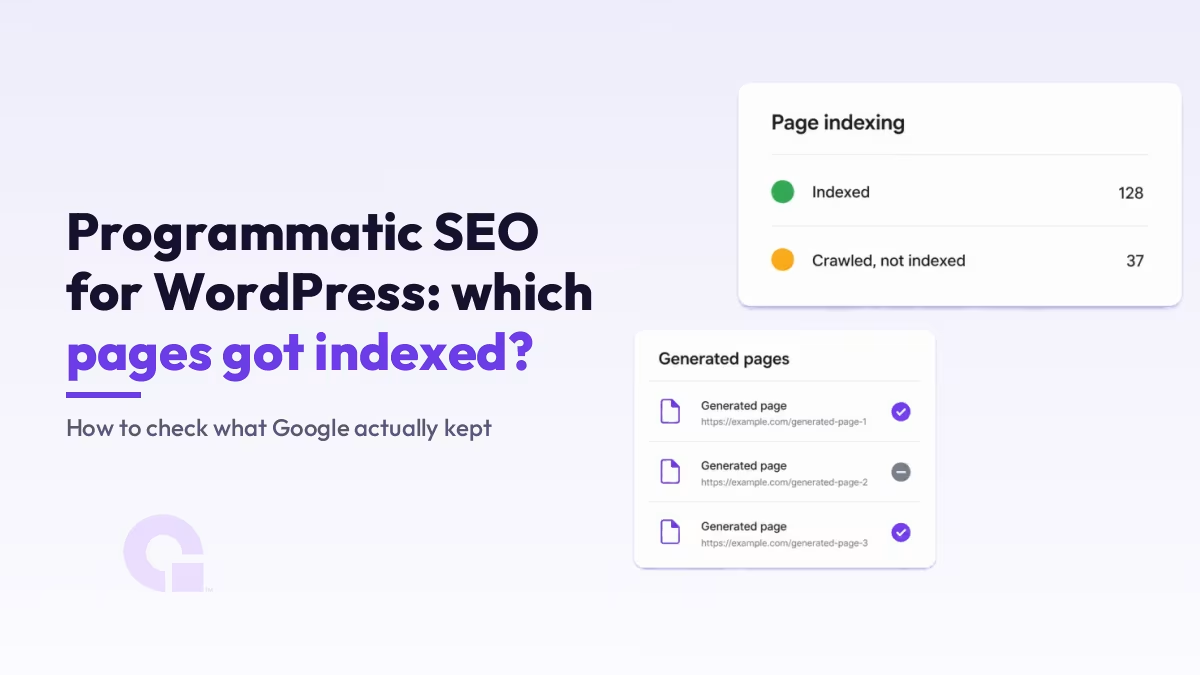
Building programmatic pages on WordPress is the easy half, and it is the half almost every guide covers well. The harder question is what Google did with those pages afterwards.
This walks the build honestly, then gives you the part that is missing everywhere else: how to see which generated pages Google actually kept, and what the “Crawled, currently not indexed” bucket is telling you when it lands on a template batch.
Key Takeaways
- Programmatic SEO on WordPress means one template, one structured data source, and a generator that writes one page per row.
- The build is a solved problem. Checking what Google kept is where almost every guide stops.
- Two vendors ranking for this query both sell scheduled publishing as the indexation fix, and neither one sources the mechanism behind it.
- Google’s spam policies describe what generated pages are (doorway abuse, scaled content abuse) and say nothing at all about how fast you publish.
- A
site:query on your URL pattern plus the Search Console page indexing report settles it for your own site in about a minute. - A large “Crawled, currently not indexed” count after a template run usually means the pages repeat each other, not that you shipped them too quickly.
- Four hundred pages built from one pattern is the most reliable way to make your own pages compete with each other.
What is programmatic SEO in WordPress?
Programmatic SEO in WordPress means building one page template, pointing it at a structured data source such as a CSV file, a Google Sheet or an Airtable base, and letting a generator produce one page per row. Each row becomes a real WordPress page with its own URL, title, meta description and content, all built from the same layout.
The variable is whatever sits in your columns. A city, a service, a product, a competitor name, an integration partner.
WordPress suits this better than most platforms because the pieces are already there. Custom post types (usually through Custom Post Type UI) give the pages a home, Advanced Custom Fields holds the per-row data, and you can lay the template out in Gutenberg, Elementor or Divi like any other page.
Worth saying early, because the reputation of this tactic depends on it: the template only speeds up publishing. The difference between one page and the next still has to come from your data, and if the data does not carry it, nothing downstream will.
What do programmatic pages look like for a SaaS company?
For SaaS, the pattern is usually integration pages, alternative pages and comparison pages, generated from a list you already keep somewhere. One row per integration, one row per competitor.
The common shapes look like this:
- Integration pages ([your product] + [their product]), because people search for whether two tools they already use talk to each other, and that is a genuinely different answer per row.
- Alternative pages ([competitor] alternative), which work when you have a real per-competitor comparison to make and fall flat when you do not.
- Head-to-head comparisons ([tool] vs [tool]), where the data source is your own feature and pricing matrix.
- Directory or listing entries generated from a structured database, which is the same mechanic with a different label.
WP Zinc’s guide names the same set in its own words, calling out “SaaS and directories, integration pages, feature comparisons, or listing entries generated from structured databases”. That is a fair description of where this play actually earns its keep.
One thing to expect before you start: these queries are usually low volume individually. That is the point of the play, and it is also why measuring them needs a different approach, which I went through in more detail on auditing B2B pages built on low-volume keywords.
How do you build programmatic pages in WordPress?
The build is five stages: prepare the data, build the template, set the URL and meta rules, generate a sample, then publish. Nothing about it is exotic, and the order matters more than the tool you pick.
The programmatic build, start to finish
- Prepare the data source: one row per page, one column per variable
- Build the template with a placeholder tag for each column
- Set the URL pattern, title, meta description and canonical rules
- Generate a small sample and read it before anything goes live
- Publish, then check what Google actually kept
Stage one is where the work really is. If two rows produce pages that say close to the same thing, no amount of template polish will save them, so the honest test is whether each row carries something a reader could not get from the row above it.
Stage three is the one people skip. Decide the URL pattern before you generate, because changing it afterwards means redirecting several hundred URLs you just created.
Stage four is cheap insurance. Generate ten pages, open three of them, and read them as a visitor would; if you are bored by page three, Google will be too.
Which programmatic SEO tools work with WordPress?
There are two routes, and the choice is mostly about where you want the pages to be created. Either a plugin generates them inside WordPress, or an external service writes them in over the WordPress REST API.
| Route | How it works | What to watch |
|---|---|---|
| A plugin inside WordPress Page Generator Pro, Multiple Pages Generator, LPagery, WP All Import | The template lives in WordPress, the data comes in as a CSV or a connected sheet, and the plugin writes posts or a custom post type directly. | Your data lives in two places once you start editing rows in WordPress. Decide early which copy is the real one. |
| An external service over the REST API SEOmatic and similar platforms | The dataset and the template live in the vendor’s tool, and finished pages are pushed into WordPress through an application password. | Subscription cost, and the fact that your page templates now depend on a service outside your site. |
Either way, the settings that decide whether the pages survive stay with your SEO plugin: canonicals, noindex rules, schema markup, and whether the new URLs make it into the sitemap.
That holds whichever one you run, whether it is Yoast, All in One SEO, SEOPress or Rank Math.
I am deliberately not calling any of these generators safe or risky. I have not run a controlled test on any of them, and neither has anyone else publishing on this topic as far as I can find.
Do programmatic SEO pages get indexed by Google?
Yes. Generated pages are indexed the same way any other WordPress page is, provided each one has a unique URL, its own title and meta description, content that is genuinely its own, and a place in your sitemap. There is no separate index and no special penalty for pages that came out of a template.
The complication is not the answer. It is who is giving it.
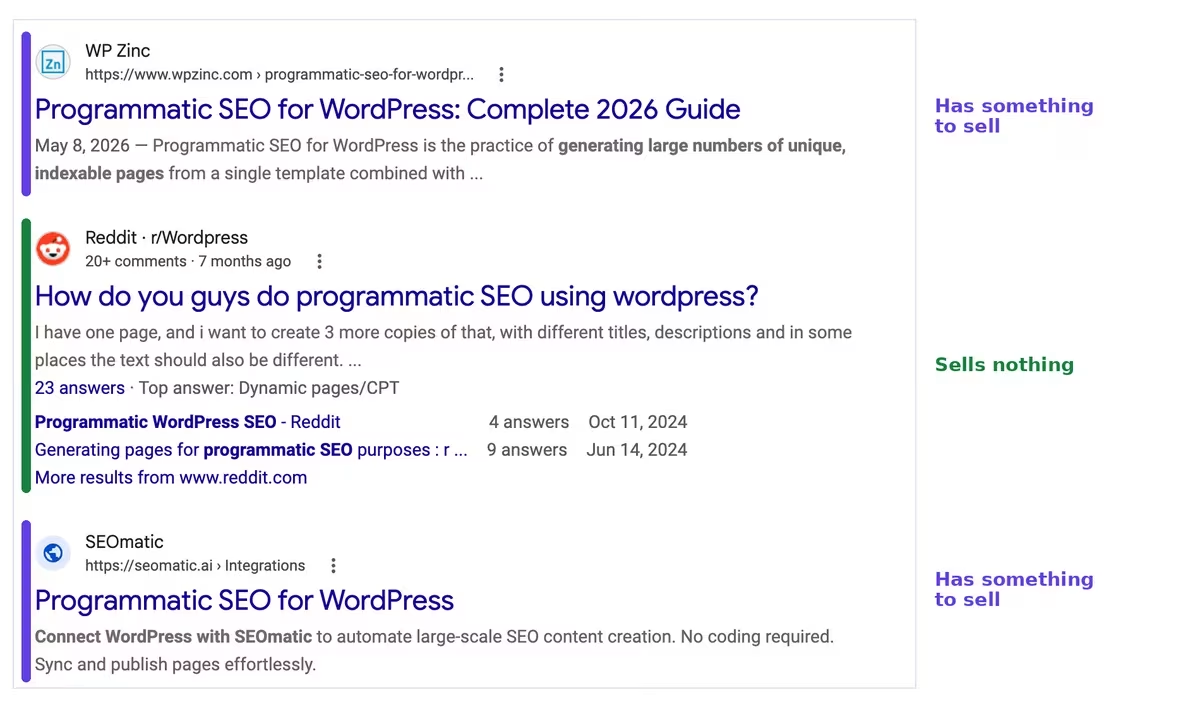
I read that page one properly, and it carries eight organic results. Seven of the eight belong to a company with a commercial stake in the answer:
- WP Zinc sells the page generator its guide is built around.
- Reddit r/WordPress is the one exception, a thread of practitioners selling nothing.
- SEOmatic sells the subscription platform the page describes.
- WordPress.org is a plugin’s own directory listing.
- Codeable sells developer hire, so the answer routes toward hiring one.
- Practical Programmatic is itself a programmatic SEO property.
- PageForge ranks a listicle of its own category, competitors included.
- InstaWP sells hosting and development environments.
That is not an accusation. A plugin company writing the best guide to its own category is completely normal, and WP Zinc’s is genuinely the strongest build guide on that search.
It does, though, change what happens to one specific answer.
The common answer to “will these get indexed” is a product feature
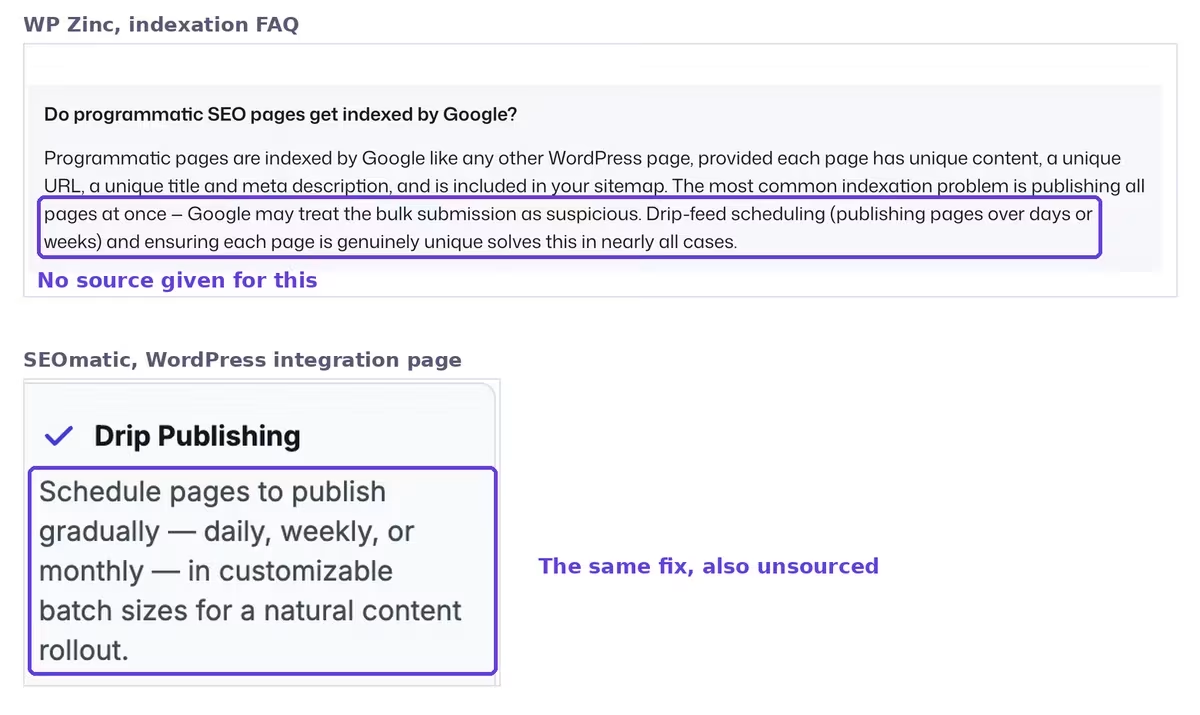
Here is how the top-ranking result answers it, quoted from its own FAQ, read live on 4 August 2026:
“The most common indexation problem is publishing all pages at once — Google may treat the bulk submission as suspicious. Drip-feed scheduling (publishing pages over days or weeks) and ensuring each page is genuinely unique solves this in nearly all cases.”
Drip-feed scheduling is a feature of the plugin that page is selling. No source is given for the mechanism, and I could not find one.
If it were one vendor, I would call it a coincidence. It is not one vendor.
SEOmatic’s WordPress page, third in the same results, sells a “Drip Publishing” feature and describes it as scheduling pages “in customizable batch sizes for a natural content rollout”. Same fix, same reassuring word, and again nothing behind it.
Staggering a large release is not a bad idea. It may well help a big batch get crawled more evenly, and I have no evidence that it hurts.
What I would not accept is the promise attached to it. “Solves this in nearly all cases” is a claim about outcomes, sitting exactly where evidence should be, on a page selling the feature that supposedly does the solving.
What Google’s spam policies actually say about generated pages
Two sections of Google’s spam policies bear on a template batch, and I re-read both on 4 August 2026 to be sure of the wording.
On doorway abuse, which it defines as pages “created to rank for specific, similar search queries”, two of its listed examples are the ones that touch this play:
“Having multiple domain names or pages targeted at specific regions or cities that funnel users to one page”
“Creating substantially similar pages that are closer to search results than a clearly defined, browseable hierarchy”
On scaled content abuse, the definition is about intent and value:
“Scaled content abuse is when many pages are generated for the primary purpose of manipulating search rankings and not helping users.”
Read those bullets together and they are all conditioned on the same three things: sameness, absence of value, or funnelling people somewhere else.
None of them mentions how fast you publish. The policy is about what the pages are, not the rate at which they arrive.
I want to be careful about what that silence means. It is not Google telling you that publishing speed is fine; it is Google not addressing publishing speed at all, and those are different things.
WP Zinc gets this part right, and I will happily quote them agreeing with the policy read: “Google’s spam policies target ‘scaled content abuse’ (low-value pages generated purely to manipulate rankings), not legitimate programmatic pages backed by real data. The risk is in execution”.
That is more careful than most of what ranks for this. It is also, notably, a different answer from the one their FAQ gives.
The deletion test: a quick way to judge your own template
This one is mine rather than Google’s, and it is the fastest sanity check I know. Take one generated page, delete the variable from it, and see what is left.
Strip out the city name, the competitor name, the integration name. If the page still reads as a complete, useful page, you have built something. If what remains is a hollow shell that could belong to any row, you have built one of those bullets.
How to check which generated pages Google actually indexed
Four checks, in this order, and the whole thing takes about a minute once your pages have been live long enough to be crawled. Give it two to four weeks after publishing before the numbers mean anything.
- Run a
site:query on the URL pattern. Searchsite:yourdomain.com/integrations/and read the result count as a rough number, because it tells you in seconds whether Google kept roughly all of the batch, roughly half, or almost none of it. - Open the Search Console page indexing report and compare the indexed count against how many pages you actually generated. The gap is the real answer, and it is the number nobody else will give you.
- Read the “Why pages aren’t indexed” table underneath it, because the reason matters far more than the count. A batch sitting in “Crawled, currently not indexed” is a different problem from one sitting in “Discovered, currently not indexed”.
- Run URL Inspection’s live test on one suspect page to confirm Google can fetch and render it, which separates a template that is genuinely broken from a template that is simply not compelling.
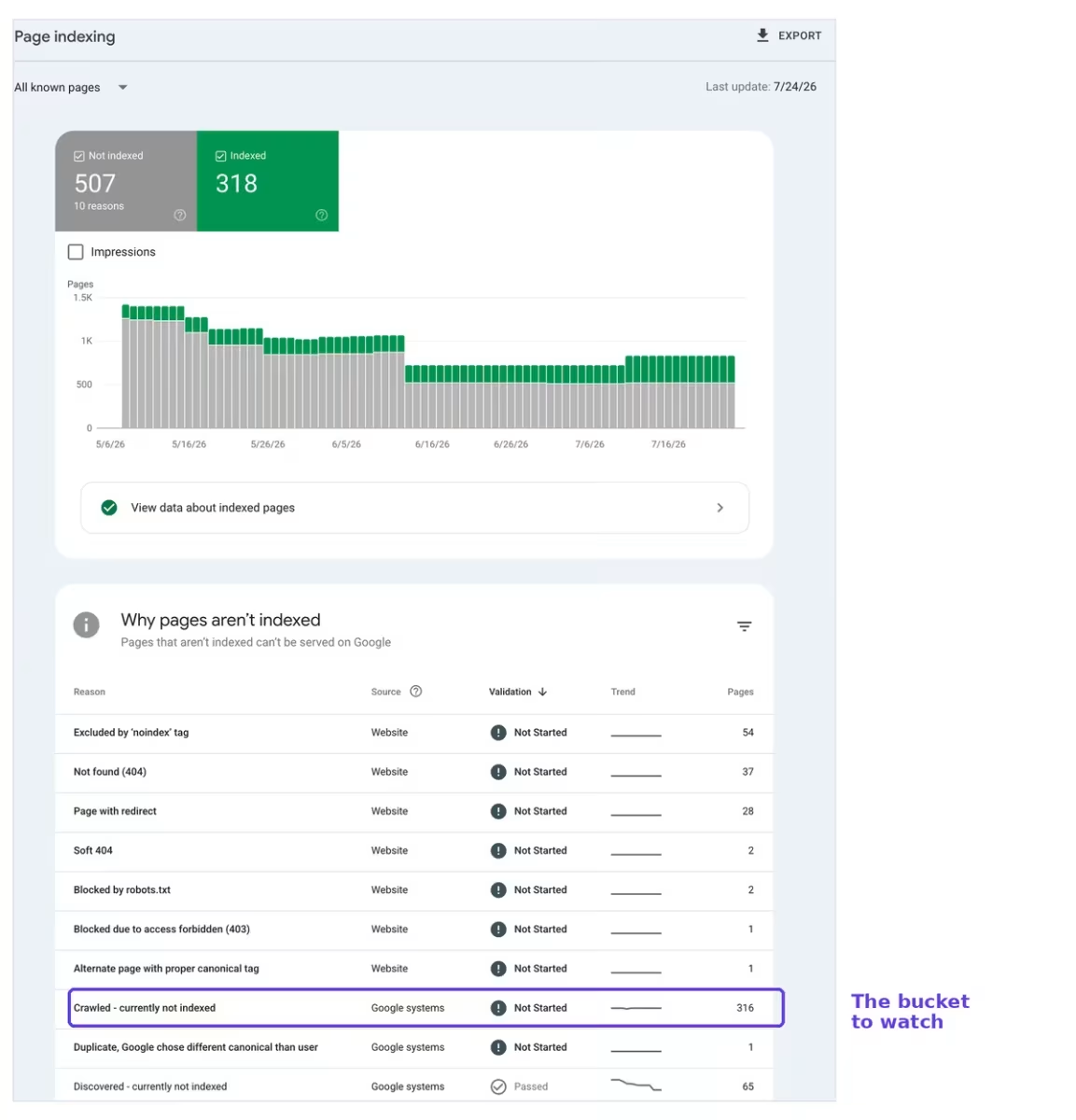
The reason column is where the diagnosis lives, so here is what each state is actually telling you after a template run.
| What Search Console says | What it means for a template batch | What to do about it |
|---|---|---|
| Indexed | Google kept the page and it can appear in results. | Check it actually ranks for the variable it was built on, not just that it exists. |
| Crawled, currently not indexed | Google fetched the page and decided not to store it. On a template batch this is the most common outcome by a distance. | The pages are almost certainly too alike. Add something per row that a reader could not get from the row above. |
| Discovered, currently not indexed | Google knows the URL exists but has not fetched it yet. | Usually a crawl capacity problem on a large batch. Link to the pages properly from somewhere that gets crawled, and wait. |
| Duplicate, Google chose a different canonical | Google decided another page already answers the same thing. | Two of your own pages are competing. Merge them, or make the difference between them real. |
The second row is the one that matters most here, and it has its own diagnosis path that is worth reading properly if a large slice of your batch lands there. I went through it in detail in this piece on crawled, currently not indexed.
If your indexed count was healthy and then fell after the batch went live, that is a different signal again, and a dropping indexed-pages count usually points at something other than the new pages themselves.
Why do template-built pages end up competing with each other?
Because they were built from the same pattern, and the pattern is what Google matches against a query. Four hundred pages that differ only by one word will look, to a search engine, like four hundred candidates for the same search.
This is the failure mode a programmatic run produces most reliably, and it is not the one the vendor guides warn you about.
You see it as a specific pattern in Search Console: impressions spread thinly across many URLs for the same query, positions that wobble as Google swaps which of your pages it shows, and a “Duplicate, Google chose a different canonical” count that grows with the batch.
What settles it is deciding which page owns which query, then making the others clearly about something else or removing them. There is a full walkthrough of how to find and resolve those collisions in this keyword cannibalization audit.
So, is programmatic SEO on WordPress worth building?
If you already own the data that makes each page different, yes, and WordPress is a good place to do it. If you are hoping the template will manufacture that difference for you, the pages will get crawled and quietly dropped, and no publishing schedule will change that.
What I would push back on is the industry’s habit of answering “will these get indexed” with a scheduling feature. The policy that governs this points somewhere else entirely, at whether the pages are substantially similar and whether they help anyone, and that is a question about your spreadsheet rather than your publishing calendar.
Honestly, the most useful thing you can do is stop guessing. Generate fifty pages instead of five hundred, wait a month, read the page indexing report, and let your own numbers tell you whether the template is good enough to scale.
The vendors cannot run that test for you, and the ones ranking for this query have very little reason to want the answer.
Common questions about programmatic SEO indexation
How long should I wait before checking whether generated pages were indexed?
Give it two to four weeks after publishing before you read the numbers as meaningful. Google needs to discover, crawl and then decide on each URL, and a report read three days after launch is measuring crawl speed rather than the quality of your template.
Should I noindex some of the generated pages myself?
It is worth doing when you know certain rows are thin and you would rather not have them representing the set. Noindexing the weakest rows also makes the report far easier to read afterwards, because whatever is left in the not-indexed bucket is then genuinely Google’s decision rather than yours.
Does spintax count as scaled content abuse?
Google’s policy mentions “synonymizing” but it does so inside its scraping example, and qualifies it with “where little value is provided to users”. So the word alone is not a verdict on spintax, and rewording a sentence four ways across pages that are otherwise identical is a value problem regardless of what you call the technique.
Does a sitemap guarantee that generated pages get indexed?
No. A sitemap tells Google the URLs exist, which affects discovery, not the decision to keep them. Plenty of pages sit in “Crawled, currently not indexed” while listed perfectly in a sitemap, and that is precisely the case where the sitemap has done its job and the page has not.
Work with WpConsults
Stuck on a batch of pages Google will not keep?
If you have generated pages sitting in “Crawled, currently not indexed” and you cannot work out why, send me the URL pattern and I will take a look at what is going on.
Update Logs
05 Aug 2026
- First published, with Google’s spam policy wording and both vendor indexation answers read live on 4 August 2026.
Want our posts to show up more often on Google?
One step & Google will surface this site in your Top Stories.