Two of your own URLs keep showing up for the same search, and you cannot tell which one Google is going to keep or which one you are supposed to kill. That is keyword cannibalization, and it is what a lot of people are actually looking at when they decide a post has quietly stopped working.
Two searches settle it in about ninety seconds. The second one answers a question almost nobody asks: who is holding the positions above your post, and what changes when the answer turns out to be one of your own pages.
Key Takeaways
- Keyword cannibalization is wider than two blog posts fighting. Four different things can be sitting above your post, and each one takes a different fix.
- The four causes: another post of your own, one of your own category or archive pages, your own copy of the post on another platform, or a stranger.
- A
site:yourdomain.com "Your Exact Post Title"search tells you the page is indexed. The same title with no operator tells you who is above it. - Three of the four causes are not fixed by merging anything, which is a problem, because merging is the fix almost every guide leads with.
- Consolidation has a recorded way to lose: pages merged without proper redirect mapping and traffic analysis have ended up ranking worse together than they did apart.
- On my own post, the article held position 1 on the
site:search and position 2 on the open search, sitting behind my own LinkedIn repost of it. - The reflex advice to noindex your category archives would have fixed nothing in my case, because those archives ranked below the post on both searches.
- Google’s “we have omitted some entries very similar to the 10 already displayed” notice is evidence that your URLs are crowding the page, not that they pushed your post down.
What is keyword cannibalization?
Keyword cannibalization is when more than one of your own URLs competes for the same search, so Google picks between them and you do not get a say in which one it picks. British English spells it keyword cannibalisation, and it is the same problem.
Every guide ranking for that phrase defines it the same way, as two of your blog posts targeting one keyword, and prescribes the same three fixes: consolidate them, canonicalize one to the other, or de-optimize one. That definition is correct as far as it goes.
It is also narrower than what you find when you actually look at the search results. Two of the four causes I keep running into involve no second article at all, and one of them is a set of pages nobody on your team wrote.
So the useful first move is not a fix. It is finding out which of the four you have, because three of them do not respond to merging anything.
Is the page indexed, or not showing up on Google at all?
Almost always one of two things is true. Either Google has not indexed the page yet, or it is indexed and simply is not ranking high enough for the words you typed. A site:yourdomain.com search tells you which of the two you are dealing with in a couple of seconds.
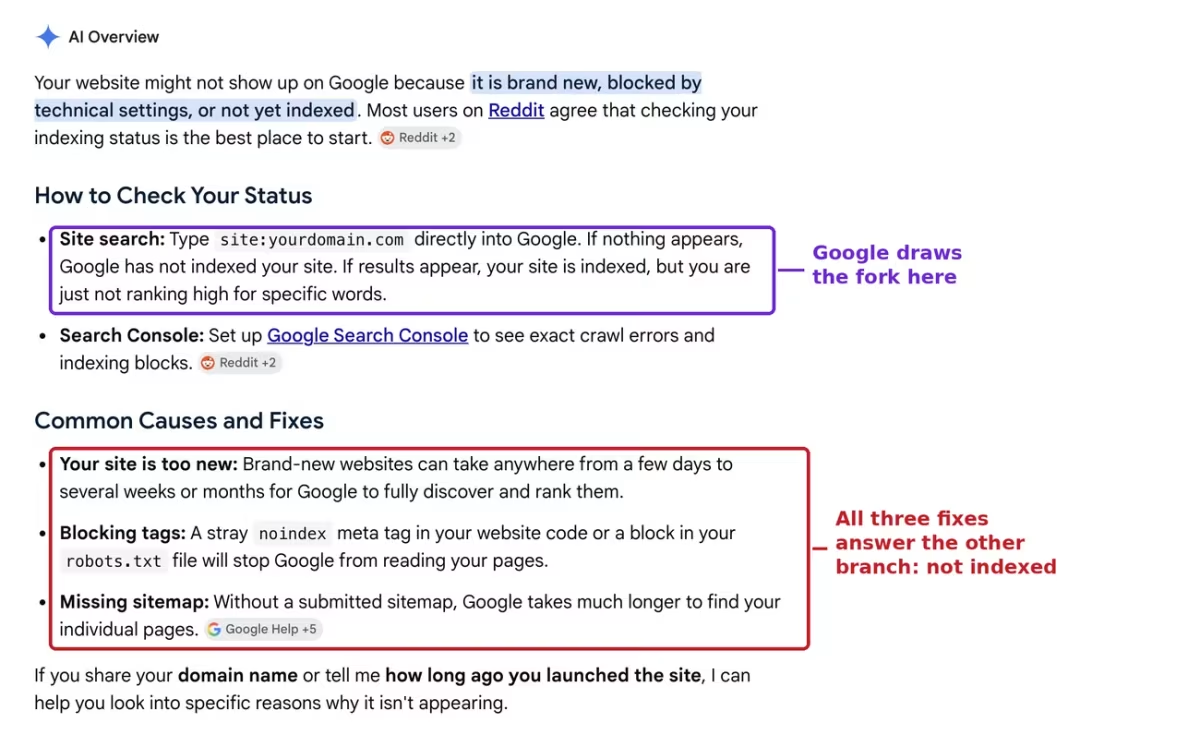
Google gives that check away for free. Here is what its own AI Overview printed on the query why is my website not showing up on google, on a signed-out US search I ran on 2 August 2026:
Site search: Type
site:yourdomain.comdirectly into Google. If nothing appears, Google has not indexed your site. If results appear, your site is indexed, but you are just not ranking high for specific words.
That is a clean split, and it is correct. What happens next is the interesting part.
Directly underneath, the same answer lists its “Common Causes and Fixes”, and all three belong to the other branch: the site is too new, a stray noindex tag, a missing sitemap. It tells you which side of the line you are standing on, then only helps the people on the other side.
To be fair to Google, its own help page on this is sharper than the AI Overview. Why is my page missing from Google Search? opens Step 1 by saying that “many people assume that they are not on Google, when in fact their page simply appears low in Search results”.
So if your site search came back empty, you are on the not-indexed branch and this is the wrong article for you. Start with crawled, currently not indexed, which covers the case where Google has seen the page and decided against keeping it, and work through the blocking tags and sitemap questions there.
Everything from here is written for the other branch, where the page is in the index and something else is holding the positions you want.
What does “indexed but not ranking” actually mean?
It means Googlebot crawled the page, Google kept a copy of it in the index, and then picked other results for the query you ran. Being in the index is permission to compete, nothing more.
Google is unusually plain about this in the URL Inspection tool documentation, where it explains that a green result “means that the URL is eligible to appear in Search results, but is not guaranteed to be there”.
Three separate stages sit behind that sentence, and it helps to keep them apart when you are diagnosing:
- Crawling is Googlebot fetching the URL. A
robots.txtblock stops this, and if Googlebot never fetches the page it never reads anything on it, including anoindextag you added later. - Indexing is Google deciding to store the page. A
noindexmeta tag stops this, and so does Google simply judging the page not worth a slot. - Ranking is Google choosing, per query, which of the stored pages to show. This is where an indexed page can sit deep on page five and look, to you, exactly like a page that vanished.
That last stage is the one the deindexing guides skip, because it is not a fault. Nothing is broken when a page ranks poorly, which is precisely why the fixes for a broken page do nothing for it.
How do I check if a page is indexed?
Search site:yourdomain.com "Your Exact Post Title" in Google, with the quotes. If your post comes back in that result set, the page is indexed and you can stop reading deindexing guides. If nothing comes back, it is not indexed and that is a different job.
Here is the whole check, in order. It takes under two minutes and you need no tools beyond a browser and, for step three, Search Console.
- Run the site search. Type
site:yourdomain.com "Your Exact Post Title"into Google. Keep the quotes, because they force Google to match the phrase rather than the loose set of words, which is what stops half your blog coming back. - Read what comes back, not just whether anything did. Note which of your URLs appear and in what order. You will often see pages you never wrote, and that is normal, I will come to it.
- Confirm it in Search Console. Paste the exact URL into URL Inspection. “URL is on Google” settles the indexing question properly, because the
site:operator is a fast read rather than an audit and it can be wrong at the edges. - Now run the same title with no operator. Search
"Your Exact Post Title"on its own. This is the step people skip, and it is the one that tells you who you are actually losing to. - Look at who holds the positions above yours. Not how many, not what score a tool gave them. Who they are. The next section is what to do with that answer.
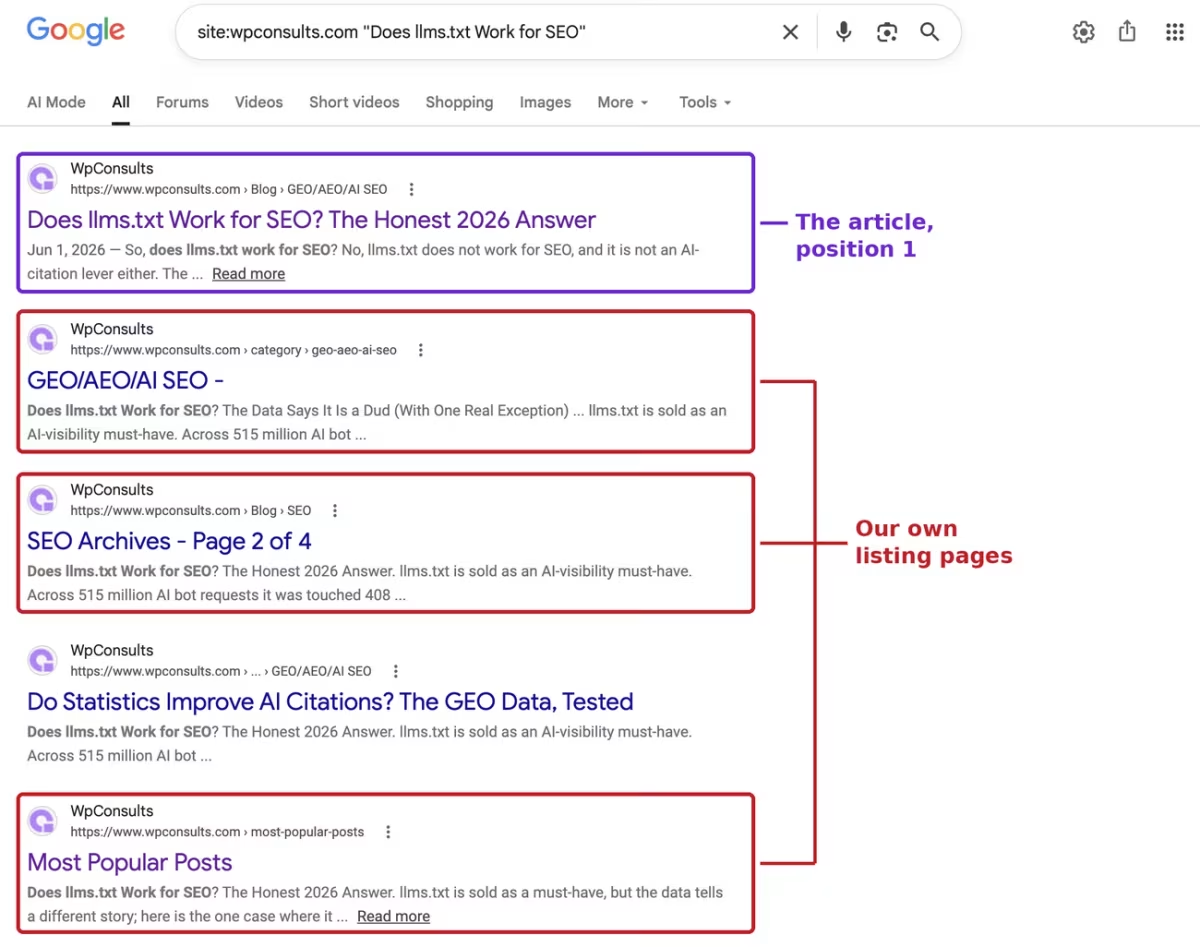
site: search, US market, signed out, 2 August 2026. The article is boxed at position 1; the listing URLs below it are auto-generated pages I never wrote.One practical note on step four. Do it signed out, in a private window, because a signed-in search is personalized and will happily show you your own site more favorably than a stranger sees it. If your audience is in another country, that matters too, and Google’s results move with the market you search from.
Who is outranking your post, and what happens when it is you?
One of four things is above you: another post of your own, one of your own listing pages, your own copy of the post published somewhere else, or a genuine competitor. Those look identical in a rank tracker and they need completely different responses, which is why reading the actual result set beats reading a position number.
That is the fork the whole audit turns on, and the arithmetic is worth saying plainly. Only the first of the four is the case the popular guides are written for, and only the first one is a candidate for merging.
I ran this on my own site, on the llms.txt post, in the US market, signed out, on 2 August 2026. Here is the open exact-title search.
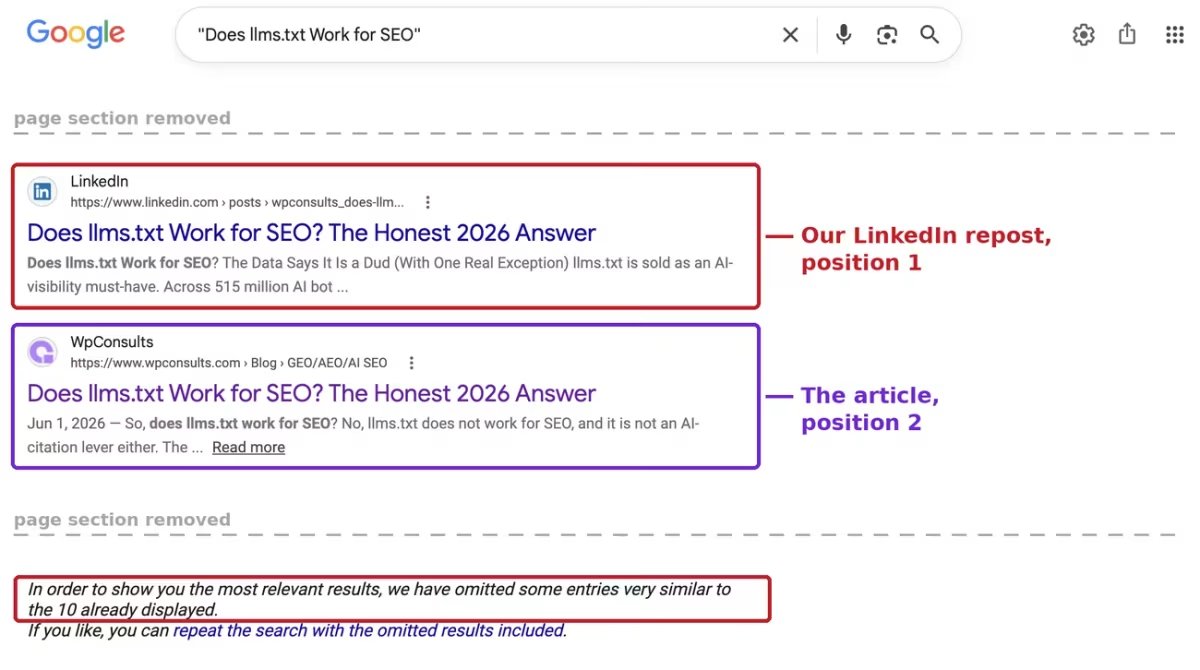
Position 1 is a full-text LinkedIn repost of that article, carrying the identical headline. The article itself is position 2.
Counting off the rest of that page, seven of the ten organic results are mine and I can confirm each one from the result itself: four URLs on wpconsults.com and three LinkedIn posts under my own profile. One more LinkedIn result does not show an author in its snippet, and one belongs to somebody else quoting the article.
Nothing here is broken. The post is indexed, it ranks on page one for its own title, and if I had only looked at a rank tracker I would have seen “position 2” and gone looking for a competitor who does not exist.
Here is the read, and the fix each cause calls for.
| What you see above your post | What it means | What to do |
|---|---|---|
| Another post of your own on a close topic | The classic cannibalization case. Two of your articles answer one intent, and Google is choosing between them. | Decide which page owns the intent. Then either split them so each answers a different question, or merge them with the redirects mapped and the traffic checked first. Read the merging section below before you touch either page. |
| Your own category, tag or paginated archive | Google reads the listing page as the better match for this phrase, usually because the listing carries the same opening text and more internal links. | Point more internal links at the post with the phrase as anchor text, and give the archive its own reason to exist rather than a stripped duplicate of the post’s first paragraph. |
| Your own post republished on another platform | Your copy on a stronger domain is winning your own title. The reader still gets your work, just not on your site. | Decide whether reach or the canonical page matters more for this piece, then either shorten the off-site version to an excerpt or accept the trade openly. |
| Pages from other websites | Ordinary competition, and not cannibalization at all. Your page is in the running and losing on merit for this query. | Compare intent and depth against those pages. This is a content and links job, and nothing about indexing or merging will move it. |
| Nothing of yours on page one, but the site search returned the post | Indexed and ranking a long way down. | Treat it as a ranking problem for a specific query, and check whether you are competing with yourself on it before anything else. |
| The site search returned nothing at all | Not indexed. | Different problem entirely. Start with the blocking tags, the sitemap, and crawled, currently not indexed. |
Do your own category and archive pages outrank your posts?
In my case they did not, and I went in expecting the opposite. On the site: search the article sat at position 1 with every archive URL below it, and on the open search the archives came in at 5, 7 and 9, still under the article.
What did happen is worth naming, because it looks like the same thing and it is not. Five of my own URLs came back carrying that article’s opening paragraph, and three of them are auto-generated listings I never wrote a word of: a category archive, a paginated archive titled “SEO Archives”, showing page 2 of 4, and a “Most Popular Posts” page. A fourth is a different post of mine whose page happens to surface the same text.
That is crowding, and Google says so itself at the foot of the open search: “In order to show you the most relevant results, we have omitted some entries very similar to the 10 already displayed.”
Crowding and displacement get treated as the same problem all over the web, and the usual advice that follows is to noindex your category and tag archives. On this evidence that would have changed nothing here, because those archives were never above the post to begin with.
If you do suspect two of your own URLs are being read as versions of one page, there is a proper check for it. Google’s guidance is to run the page through URL Inspection and see whether it is treated as a duplicate of another URL, which is a real answer rather than a guess about your archives.
Which is not to say archives never win. On an eCommerce store they often should, because a collection page is genuinely the better answer for a broad commercial phrase and the buying guide is the better answer for the question behind it. The point is that you can check which way round it is on your own site in ninety seconds instead of assuming.
One honest limit before anyone quotes this: that is one site, one post, one query, one market, on one day. It is a worked example of the check, not a rate, and I have no idea how common any of it is.
Should you merge two pages that compete for the same keyword?
Not until you know which of the four causes you have, and not automatically even when it is the one merging was designed for. Consolidation is the fix nearly every guide leads with, and it is also the fix with a recorded way to lose.
Pages merged without proper redirect mapping and traffic analysis have ended up ranking worse combined than the separate pages did apart. That is a documented failure mode, not a hypothetical one, and it is missing from most of the advice that recommends merging first.
The mechanism is not mysterious. Two pages each pulling their own long tail can become one page that answers the broad question well and neither of the specific ones, and the traffic that disappears is usually the traffic nobody was tracking.
The framing I trust here is one intent per page, not one keyword per page. If both of your pages answer the same underlying question, they are one page that got written twice and merging is honest. If they answer different questions that happen to share words, you have a titling and internal-linking problem, and merging destroys a page that was doing real work.
So the order matters more than the fix does. Identify the cause, decide whether the two URLs genuinely serve one intent, map the redirects, and write down what each page was earning before you touch it.
If you cannot say what you expect to gain, you are not consolidating. You are guessing with a 301.
What should you do when your own repost outranks your article?
Work out which one you actually needed to win, then act on that rather than on the sting of seeing another domain above yours. Both answers are defensible and the mistake is going straight to a fix without asking.
The case against leaving it: your own page is where your internal links, your schema, your related posts and your contact form live. A reader who lands on the LinkedIn copy instead reads your work inside somebody else’s product, and you get a follower rather than a session you can do anything with.
The case for leaving it: the copy on the stronger domain is reaching people your site would not have reached, and I captured what its AI Overview was doing across four markets partly because that off-site surface is where the audience already is. Reach you would not otherwise have is not a bug.
Where I land is somewhere in the middle, because this is a distribution consequence rather than a bug. If a piece exists to sell something, publish an excerpt off-site and send people home; if it exists to be read, let the stronger domain do its job.
Either way, publishing the full text somewhere with more authority than you and then being surprised when it wins is not a Google problem.
It is worth checking on the way out that you are not looking at a stale report rather than a real change. Search Console’s indexing chart moves in multi-day steps, which I went into when the indexed pages count dropped after the report freeze, so a number that fell yesterday is not always something that happened yesterday.
My new site shows nothing in Google. Is that the same as a post that will not rank?
No, and one search tells them apart. If site:yourdomain.com on its own returns nothing at all, no page of yours is indexed and you are at the start of the process rather than in the middle of a ranking fight.
New sites do take time, and Google’s line is to “allow at least a week” after submitting a sitemap or an indexing request before assuming a problem. I would not put a firmer number on it than Google does, and the wide vendor ranges you will find further down that search have no stated method behind them.
The thing worth checking first, especially on a new local business site or a fresh service-area page, is whether something is blocking Google rather than whether enough time has passed. A staging robots.txt that shipped to production, or a “discourage search engines” box still ticked in WordPress, will hold a site out of the index indefinitely and no amount of waiting fixes it.
And if you are here because you wanted a page gone and it is stubbornly still there, that is the mirror image of this problem, and removing a page from Google properly has its own trap in it.
So which cannibalization cause do you actually have?
Usually not the one you assumed. On the sites I audit, a genuinely deindexed healthy post is rare, and a post sitting behind something of its owner’s own making is not, which is roughly what Google says too when it notes that people assume they are not on Google when the page is simply ranking low.
What bothers me about the standard advice is that it stops one question short. Everyone will tell you to check whether you are indexed, and almost nobody will tell you to read who is above you when you are, which is where the answer on my own site had been sitting the whole time.
It also arrives at the fix too fast. A genre that defines keyword cannibalization as two competing posts will always prescribe merging, and three of the four things I actually find above a post are either untouched by merging or made worse by it.
So run both searches before you change anything. The one that costs you nothing is the one that tells you whether you are fixing a real problem or competing with yourself, and the diagnosis you skip is the one that decides whether the next hour is useful.
Common questions about keyword cannibalization
Does the site: operator show every page Google has indexed?
No, and Google has never claimed it does. Treat it as a fast read on whether a specific page is in the index, then confirm anything that matters with URL Inspection in Search Console, which reports on Google’s actual indexed version of that URL.
Will merging two pages fix keyword cannibalization?
Only when both pages genuinely answer one intent, and only with the redirects mapped and the current traffic written down first. Consolidations done without that step have produced a combined page that ranked worse than the two separate pages did, so it is a fix with a real downside rather than a default.
Will noindexing my category archives make my post rank better?
Only if those archives are genuinely above the post on the queries you care about, which is a thing you can check rather than assume. Run the exact-title search first, and if the archives are sitting below the post, noindexing them costs you pages that were doing no harm.
How long should I wait before treating this as a problem?
Waiting is only the right move on the not-indexed branch, and Google suggests at least a week after a sitemap submission before assuming a fault. If the site search already returns your post, waiting does nothing, because you are not waiting on indexing at all.
Work with WpConsults
Ran both searches and still cannot tell which cause you have?
Send me the query and the URL and I will tell you what I would look at next, whether it is an indexing problem, a ranking one, or your own pages competing with each other.
Update Logs
04 Aug 2026
- Reframed around keyword cannibalization, which is the name readers actually use for this problem. Added the four-cause fork as the spine of the audit, including the case the piece had been missing, another post of your own; and added the honest limit on consolidation, which is the most recommended fix and the one with a recorded way to lose. The two searches, both captures and the correction below are unchanged.
03 Aug 2026
- First published, built on two signed-out US searches run on my own post on 2 August 2026, both shown in full. The original read, that my category archives had taken the post’s slot, did not survive the check and the corrected version is what is published here.
Want our posts to show up more often on Google?
One step & Google will surface this site in your Top Stories.