A Google review that never appeared was almost always caught by Google’s automated filters rather than deleted by anyone. Since late July 2026, the person who wrote it may also have been emailed about it, and that email names the exact policy that fired.
So the fastest diagnosis available is sitting in your customer’s inbox, not in your dashboard. Below is the order to check the mechanisms that hide a review, who actually holds the fix, and the line in Google’s own appeal page saying the appeal link may not mean you can appeal.
Key Takeaways
- Most Google reviews that never show up were removed by Google’s automated spam and policy systems, not deleted by the business owner or a competitor.
- The notice Google sends the reviewer names the specific policy involved, and it varies by case: two published examples read “misrepresentation” and “fake engagement”.
- The appeal belongs to the reviewer, not the business. Only the person who wrote the review can file it, from their own Google Maps profile.
- Google’s appeal page states that “References to the appeals process in notifications from Google aren’t a confirmation of eligibility”, so the appeal link is not a promise you can appeal.
- Editing or deleting the review after filing cancels the appeal, and a content removal can only be appealed once.
- If the place itself carries posting restrictions, nothing the reviewer writes will post and no appeal changes that.
- Check the review while signed out before concluding anything, because a logged-in view can show you content other people cannot see.
Why is a Google review not showing up?
Almost always because Google’s automated systems filtered or removed it, not because someone deleted it. Google’s documentation on removed and rejected content confirms it removes content both for policy violations and for non-policy reasons, and says your content “may still be available in your Google Maps profile, but may be marked as ‘Not posted,’ ‘Private,’ ‘Not Accepted,’ or similar”.
That matters for what you see on your end. When a review comes down, the star average and the review count both settle back to where they were, which is why owners often notice the count before they notice the missing review.
Here are the causes worth checking, roughly in the order they actually happen:
- The automated spam and policy filters. This is the common case by a wide margin, and it is machine-driven, so a perfectly honest review can be caught by a pattern it happens to match.
- A named content-policy violation. Google’s systems match the review against a specific policy such as misrepresentation or fake engagement, and since July 2026 the notice tells the reviewer which one it was.
- The reviewer’s account looks untrusted. A brand new account with no photo, no name history, and no other contributions carries far less signal than an established one, so its first review is the easiest to filter.
- A duplicate or recently merged Business Profile. The review can be sitting on the copy rather than the profile you are looking at, which is worth ruling out early with a Google Business Profile audit; I wrote up the duplicate-at-one-address case in more detail on two profiles at the same address.
- Posting restrictions on the place itself. Google can switch off user content for a whole place, and when that is the cause nothing the reviewer writes will ever post.
- A non-policy removal. Google lists these separately: an unverifiable edit, quality issues, a place with posting restrictions, a business ineligible to be on Maps, or content that violates applicable law.
- A plain display or caching delay. Reviews do sometimes take a while to appear, which is why the signed-out check below comes before any conclusion, though a delay looks identical to a removal from the dashboard.
- Feature access restrictions on the reviewer’s account. Repeated or severe violations can restrict a whole Google Account, and Google notes that when that happens “other content posted by the Google Account may also be removed”, so several of their reviews vanish at once.
Notice what is missing from that list. There is no reliable way to have a competitor’s flag silently delete your review, and there is no published waiting period after which a filtered review is officially gone. Any specific number of hours you read on this subject is a vendor’s guess, because Google states no such window anywhere.
What does the “review not posted” notice mean?
It means Google’s automated systems removed that specific review, and the notice tells the reviewer which policy it matched.
As reported by Search Engine Roundtable, the email reads “Review not posted: Thank you for your contribution. Unfortunately, we’re not able to publish it at this time”, then “Our automated systems removed this content because it seems that the content may not follow our Maps content policies.”
Barry Schwartz Barry SchwartzFounder, Search Engine RoundtableFounder of Search Engine Roundtable and a long-running search industry news reporter, also News Editor at Search Engine Land.XLinkedInSearch Engine Roundtable reported these notices starting in the week of 20 July 2026, with practitioners seeing them globally.
Worth being precise here: the notice and the appeal are not new features. Google has documented that it may inform you when content is removed, and “Not posted” is Google’s own status label, so what changed in July was the volume of email landing, not the mechanism behind it.
The genuinely useful part is the third paragraph of that email, and almost nobody is talking about it. The notice names the specific policy involved, and it is different from case to case.
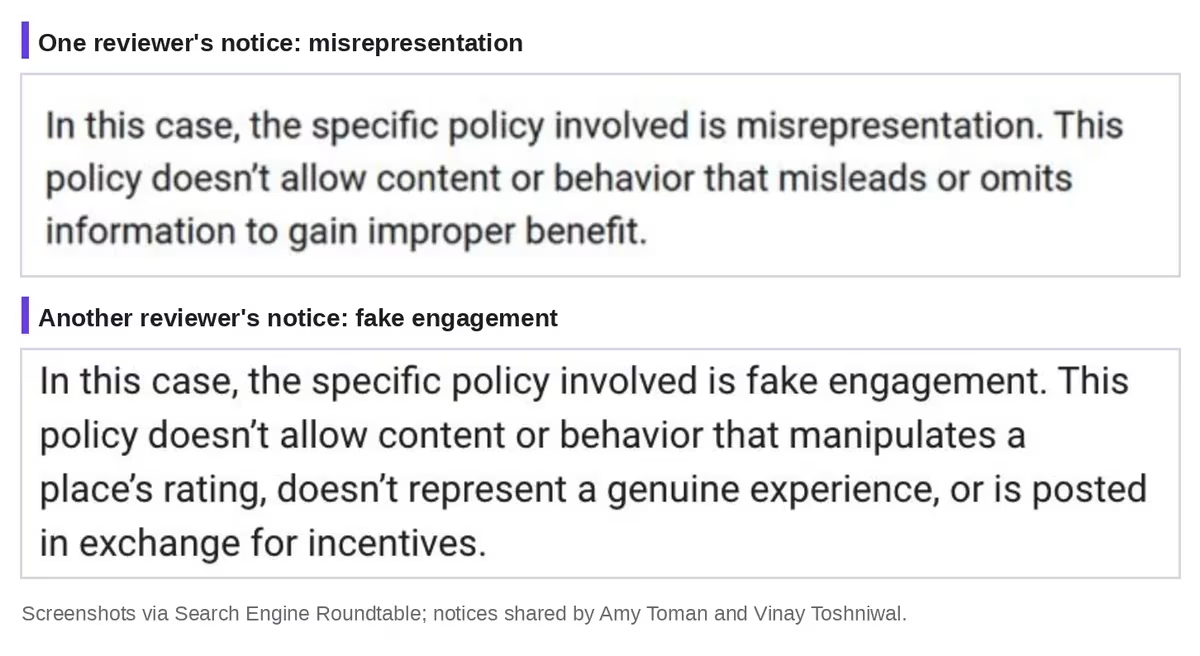
One notice reads “the specific policy involved is misrepresentation. This policy doesn’t allow content or behavior that misleads or omits information to gain improper benefit.” The other reads “the specific policy involved is fake engagement. This policy doesn’t allow content or behavior that manipulates a place’s rating, doesn’t represent a genuine experience, or is posted in exchange for incentives.”
Those are two different problems with two different fixes. That last one is worth reading closely if you run any kind of review campaign, because “posted in exchange for incentives” is exactly what Google Business Profile policy bans outright, and I covered where that line sits in Google’s rules on incentivized reviews.
So the first move when a review disappears is not to guess between a dozen causes. It is to ask your customer whether they got an email, and what the third paragraph says.
Where can the reviewer check the status of a removed review?
In their own Google Maps profile page, not in your Business Profile dashboard. Google’s appeal documentation is explicit: “You can find the status of your content, including whether or not the content has been removed or rejected due to a policy violation, in your Google Maps profile page.”
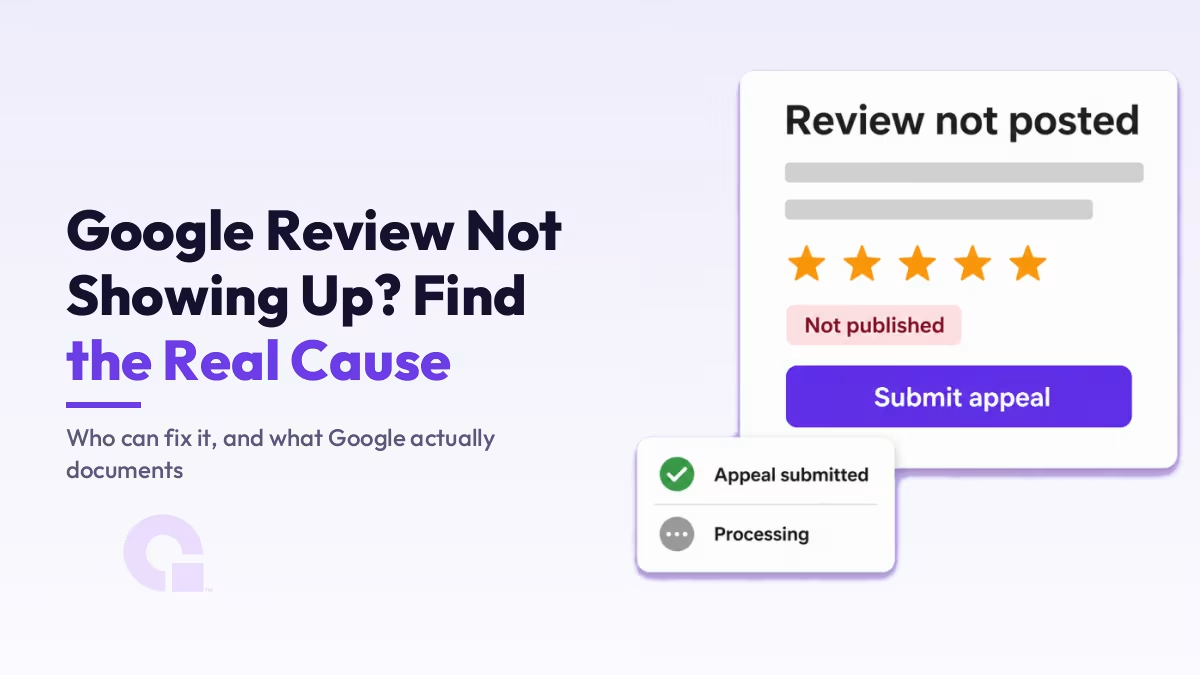
On that screen the reviewer sees a warning banner reading “Unfortunately, we’re not able to publish this content at this time”, with a “See details & actions” link, and the review itself carries a status tag beside the stars.
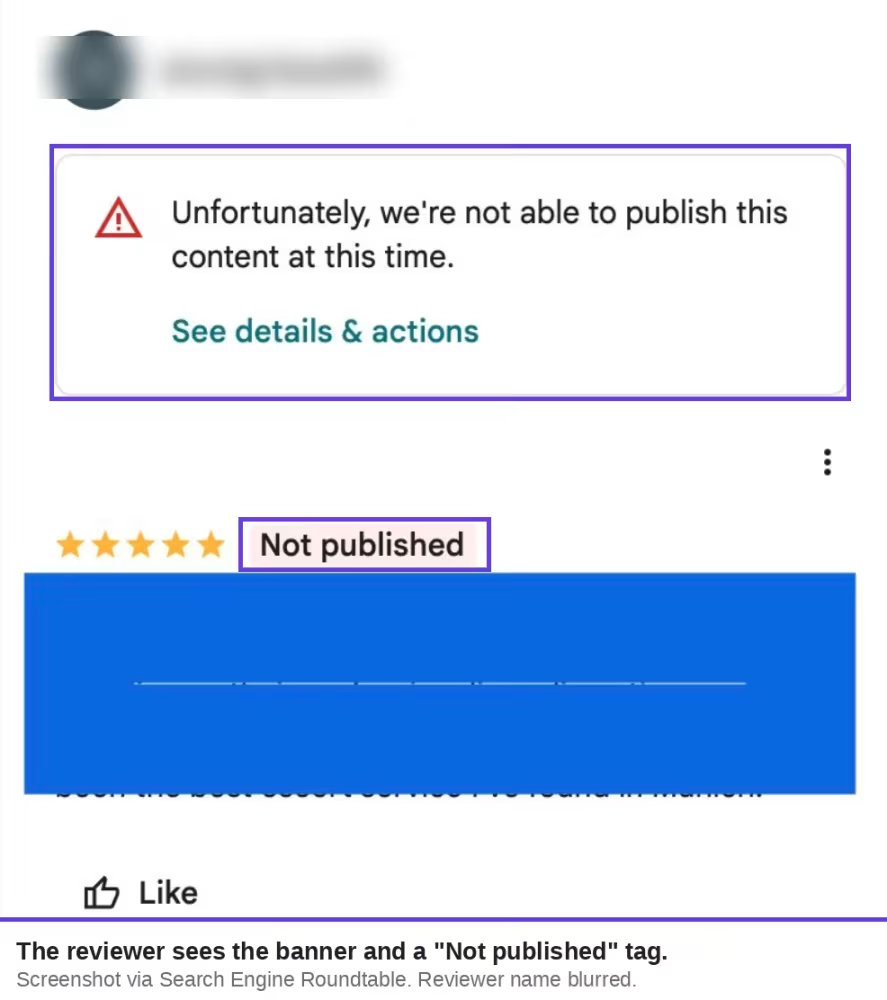
One small detail is worth knowing before you go looking for a particular word. Google’s documentation lists the label as “Not posted,” “Private,” “Not Accepted,” “or similar”, while the live screen in this case reads Not published. Match the meaning, not the exact string.
This is also the reason you cannot run this diagnosis alone. The status lives in an account you do not control, so the customer has to look for you, and how you ask them matters more than any dashboard setting.
Who can appeal a removed Google review, the owner or the reviewer?
The reviewer, and only the reviewer. Google’s appeal process for Maps content runs through the contributor’s own Maps profile, so a business owner has no route to appeal on a customer’s behalf.
This is where most of the advice on this topic goes wrong. The review-software guides send owners to Google Business Profile support tools, and those tools genuinely exist, but they are built for disputing reviews an owner wants removed. Getting a review restored runs the other way, and it is not your form to file.
There is also a caveat on Google’s own appeal page that I have not seen quoted anywhere, and it undercuts the cheerful reading of this rollout.
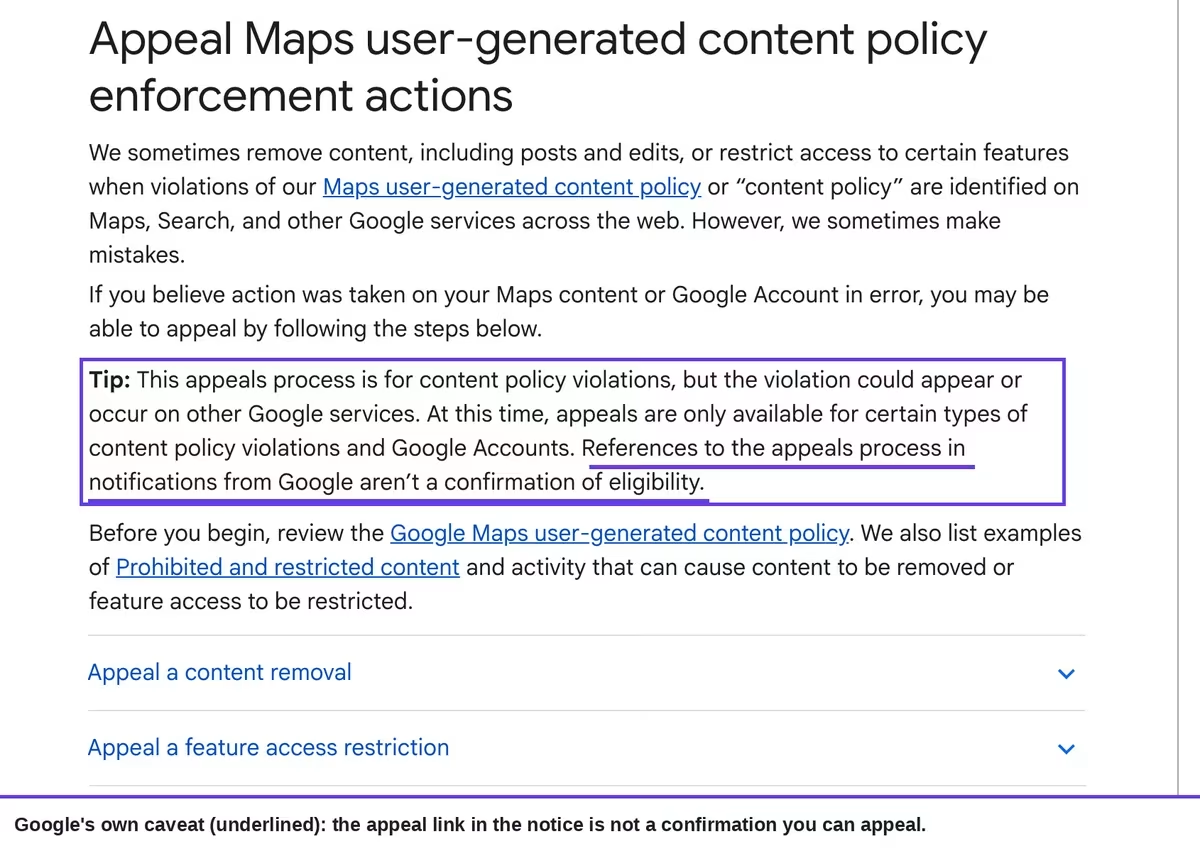
Verbatim from that page: “At this time, appeals are only available for certain types of content policy violations and Google Accounts. References to the appeals process in notifications from Google aren’t a confirmation of eligibility.”
Read that twice. The notice offers an appeal, and Google’s documentation says the offer is not confirmation that an appeal is available to you. That is a real limit on how much control anyone has here, and it is worth telling a client before they get their hopes up.
What happens after a Google review appeal is submitted?
Google rechecks the content and returns one of three outcomes: an approved appeal restores the review, a denied appeal leaves it down, and a canceled appeal ends the process without a decision.
The reviewer can follow the stages in their Maps profile, which shows “Appeal submitted” with a date, then “Processing” with the line “Your content is being rechecked to see whether it follows our policies.”
Two rules on that page can quietly cost your customer their one shot, and they are the practical reason to read this before acting:
- Editing the review after filing cancels the appeal. Google’s wording is “Deleting or editing violating content after you submit an appeal cancels the appeal”, which is a trap because rewriting the review is the instinctive next move for anyone who thinks they tripped a rule.
- You only get one. “Content removals can only be appealed once”, so there is no iterating toward a version that passes.
Put together, those two lines mean the reviewer has to choose a path rather than try both. Either edit and repost the review, or appeal it as written, but not one then the other.
One extra route does exist and it rarely gets mentioned. Google’s page notes that “Additional resolution options may be available” and links to European Union Digital Services Act resolution options, so a reviewer in the EU has somewhere to go after a single denied appeal that a reviewer elsewhere does not.
When do Google posting restrictions block reviews for a place?
When Google has applied posting restrictions to that location, which switches off user content for the place rather than rejecting one review. Google’s posting restrictions page explains it does this “when we find that user contributions for certain types of places are consistently unhelpful, harmful, or off-topic”.
There are two flavors, and the difference decides whether waiting helps at all. Short-term restrictions are applied to protect a place from a spike in irrelevant or offensive content, usually around a real-world event, and Google lifts them once the abuse subsides.
Long-term restrictions apply where a whole category or geographic area has a continuous pattern of low-value posts. Google’s named examples are “police stations, prisons, oceans, seas, and schools”, so if you run a school and no reviews are landing, this is the first thing to check rather than the last.
This branch matters because nothing else on this page fixes it. Not an appeal, not a better-written review, and not anything you do to your profile.
How to work out why your Google review is not showing up, in order
Run these five checks in sequence, because each one rules out a mechanism that looks identical to the others from your dashboard.
Five checks, in order, for a review that is not showing up
- Open your business on Google Maps in a private window while signed out, and look for the review there rather than in your dashboard or your own logged-in view.
- Ask the customer whether they received a “Review not posted” email, and specifically what the paragraph naming the policy says.
- Ask them to open their Google Maps profile and read the status tag on the review, which tells you whether it was removed or is simply still pending.
- Search your business name on Maps and check for a duplicate or recently merged profile that the review may have landed on instead.
- Check whether other people’s recent reviews are landing on the place at all, because if none are, you are looking at posting restrictions rather than one filtered review.
Once you know which mechanism you are in, the fix is usually obvious, and so is the fact that some of them have no fix at all.
| Mechanism | The signal that identifies it | Who holds the fix |
|---|---|---|
| Automated policy removal | The reviewer got a notice naming a specific policy, and the review shows a removed status in their Maps profile | The reviewer, through one appeal, if eligible |
| Reviewer account restricted | Several reviews from the same person vanish together, not just one | The reviewer, by appealing the account restriction |
| Duplicate or merged profile | The review is visible on another version of your listing | You, by resolving the duplicate |
| Place-level posting restriction | Nobody’s recent reviews are landing on the place | Nobody, until Google lifts it |
| Display or caching delay | The review appears signed out but not in one particular view, and it resolves on its own | Nobody, and no action is needed |
What business owners should stop doing when a review disappears
The instinct is to do something visible, and most of the visible options make things worse. These are the ones I would drop:
- Asking the customer to delete and repost the review. A fresh post from an account that just had content removed is more likely to be filtered again, and if they have already appealed, deleting it cancels the appeal outright.
- Offering anything in return for reposting it. “Posted in exchange for incentives” is named in the fake engagement policy that removed one of the reviews above, so this can turn a filtering problem into a policy problem attached to your profile.
- Only chasing your happy customers. Soliciting reviews selectively is treated as manipulation, and a burst of uniformly glowing reviews is the pattern the filters are built to catch.
- Filing owner-side complaints about a review you want restored. Those tools are for content you want taken down, so you are filling in the wrong form and reading the wrong outcome.
- Waiting a fixed number of days before deciding it is gone. No Google document gives a timeframe, so the honest position is that you find out from the reviewer’s status page, not from a clock.
What does work is unglamorous. Keep asking every customer for an honest review, and keep one clean profile rather than several.
If reviews matter to how you show up in AI answers as well as the map pack, our piece on local SEO and AI Overviews covers where that content actually surfaces.
Profile consistency does real work here too, which is the subject of what to keep consistent across a local SEO setup.
So can you get a removed Google review back?
Sometimes, and never by your own hand. The appeal exists, it is documented, and an approved one restores the review, but it belongs to your customer, it can be filed once, and Google says out loud that being shown the appeal link does not mean you qualify to use it.
Honestly, the July notices are still a genuine improvement, just not the one they were reported as. They did not hand owners a new lever; they replaced guesswork with a sentence naming the policy, which is worth more than any of the fifteen-reason checklists that have owned this topic for years.
The honest posture for a business owner is to treat a single filtered review as noise and a pattern of them as a signal about your own review-gathering habits. Chasing one review through a process you do not control is time you will not get back, and the filters are usually catching something real.
Common questions about a Google review not showing up
Can a competitor get my Google review removed?
Anyone can report a review, but a report does not remove it on its own; Google reviews the content against its policies. A single flag from a competitor is not a delete button, though a genuinely policy-breaking review will come down whoever reports it.
Does the business owner get an email when a review is removed?
No. The notice goes to the person who wrote the review, which is why asking your customer is the fastest diagnosis available to you. Your dashboard shows the review count change, not the reason behind it.
Work with WpConsults
Reviews disappearing more than once?
If this keeps happening rather than being a one-off, it is usually the profile setup or the way reviews are being asked for. Happy to take a look and tell you which one it is.
Update Logs
30 Jul 2026
- First version, written after the “review not posted” email notices spread in late July 2026, with Google’s appeal, removal and posting-restriction pages read and quoted from their live versions.
Want our posts to show up more often on Google?
One step & Google will surface this site in your Top Stories.