Alternate page with proper canonical tag means your site pointed a URL at a different canonical, Google agreed with that choice, and indexed the other URL instead. For most of the list that is correct and there is nothing to do.
The URLs worth checking are the handful in there that you actually wanted in Google, because your own site is what kept them out. Here is how I sort a list like that, plus the two rows sitting in my own Search Console right now.
Key Takeaways
- Alternate page with proper canonical tag is an informational status, not an error. Your site declared a canonical, Google accepted it, and indexed the canonical URL instead.
- The URLs in that list are not indexed and are not served on Google. That is fine as long as the canonical target is the page you wanted ranking.
- You only need to act when a page you want indexed on its own shows up in the list, which usually means its canonical is pointing at the wrong URL.
- Google’s help page names only AMP and mobile pairings as the cause, but the report collects more than that. Both rows on my own site are neither.
- The fix is a self-referencing canonical on the page you want indexed, then Request Indexing. Google treats a canonical as a hint rather than a rule, so it is not guaranteed.
What does “alternate page with proper canonical tag” mean?
Alternate page with proper canonical tag is Google reporting that it found a duplicate or a variation of one of your pages, saw a rel="canonical" tag pointing at your preferred URL, agreed with that choice, and indexed the preferred URL instead of this one. It is an informational message rather than an error, and for most URLs in the list there is nothing to fix.
Google’s Page indexing report documentation puts it like this:
This page is marked as an alternate of another page (that is, an AMP page with a desktop canonical, or a mobile version of a desktop canonical, or the desktop version of a mobile canonical). This page correctly points to the canonical page, which is indexed, so there is nothing you need to do. Alternate language pages are not detected by Search Console.
That is Google’s stated position, and it is worth reading next to what the report itself says one click deeper. When you open the status inside Page indexing, the panel reads “These pages aren’t indexed or served on Google”.
Both sentences are Google’s. The first one tells you to relax, the second one tells you these URLs are out of the index. If you have a page in there you care about, the second sentence is the one that matters.
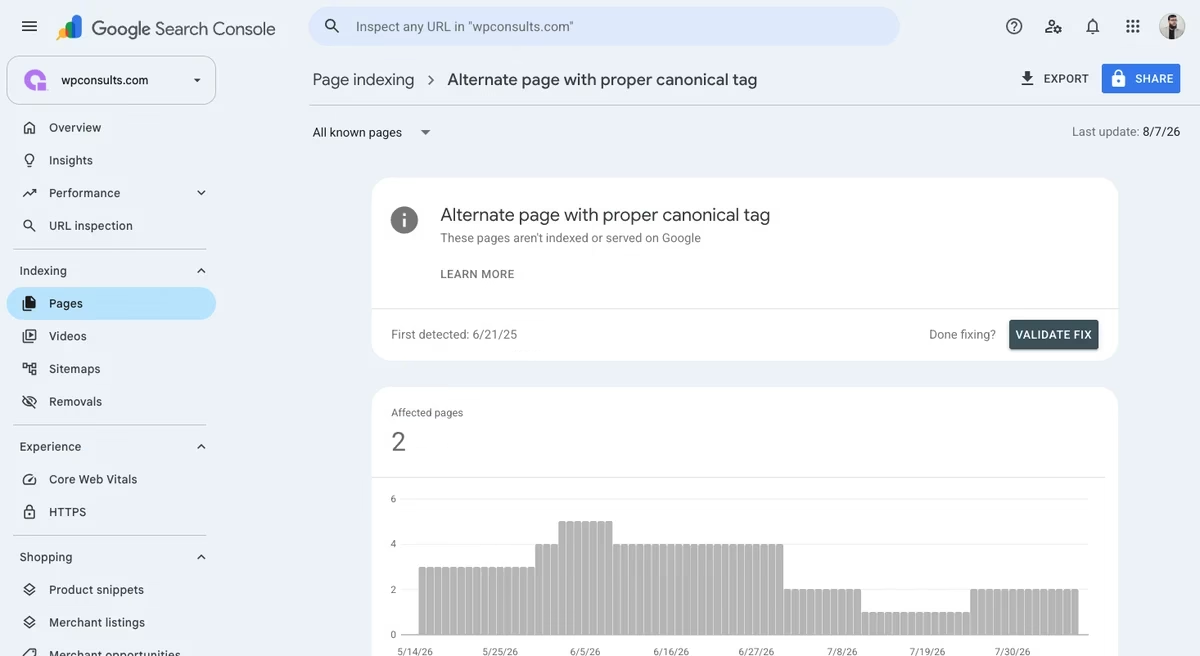
Is a page with this status really out of Google’s index?
Yes. A URL carrying the alternate page with proper canonical tag status is not in Google’s index and will not be served in search results, because the canonical target takes its place on purpose. Run the alternate through the URL Inspection tool and Search Console says “URL is not on Google” at the top, with “Page is not indexed: Alternate page with proper canonical tag” underneath.
So the honest answer to “is my page not indexed” is that it is not, and that this is usually the outcome you asked for. A parameter version of your login page does not need to be in Google. A product page you spent a week on does.
Which URLs in the list should you actually fix?
In the alternate page with proper canonical tag list, fix only the URLs you can name a search query for. If you cannot say which search you want a URL to win, it does not need its own place in Google’s index, and the status is working as designed.
Conductor, the SEO platform, is the only site on page one of Google that says this out loud, and it deserves the credit for it: there could be pages in there you do want indexed. What it does not do is tell you how to separate them from the rest, so here is the table I sort by.
| What the URL is | Does it need its own place in Google? | What to do |
|---|---|---|
A parameter, sorted, or filtered version of a page you already rank (?action=, ?sort=, tracking tags) | No | Leave it. This is the status working as designed. |
| An AMP page or a separate mobile URL paired with a desktop canonical | No | Leave it. This is the case Google’s documentation is describing. |
| A product variant or swatch URL on a store | Usually no | Leave it, unless that variant has its own demand and its own written content. |
| A duplicate slug pointing at another live page in the same language | No | Leave the canonical alone. Go fix the internal links that still send people to the old slug, because that is the actual problem. |
| A page you wrote, want ranking, and can name the query for | Yes | Fix the canonical so it points at this page itself. This is the row worth your time. |
| A URL that returns a 404 and still carries a canonical | No, and it should not be in your links either | The canonical is not your problem here. Remove the internal links pointing at a page that is gone. |
Most people read the first row, decide the whole list is noise, and close the report. That is the mistake, because two of these row types actually cost you something: the page you wrote and wanted ranking, and the URL that returns a 404 and is still linked from your own site.
How to fix alternate page with proper canonical tag, step by step
Change the canonical on the page you want indexed so it points at itself, then ask Google to recrawl it. The work is not the change, it is finding out which URLs need it and what put the wrong canonical there in the first place.
- Open the list and export it. In Search Console go to Indexing, then Pages, then click “Alternate page with proper canonical tag” and use the Export button. Do this in the report rather than in a crawler, because this list is Google’s own decisions and not a guess about them.
- Mark the keepers. Go down the export and flag every URL where you can name the search you want it to win. Everything you cannot name a query for stays unflagged, and you never look at it again.
- Inspect each keeper. Paste it into URL Inspection, open the Page indexing panel, and read the two fields: User-declared canonical and Google-selected canonical. The first is what your site said, the second is what Google did with it.
- Trace what declared it. Open the page source and find the
<link rel="canonical" href="..." />tag in the<head>. Then work out what wrote it: a theme template, an SEO plugin field somebody typed into, a translation layer, or your store’s variant handling. Skip this and you will be fixing the same page again next month. - Change it at the source, not in the HTML. In WordPress that is the Canonical URL field in Rank Math or Yoast, cleared or set to the page itself. On a store it is usually the template. A self-referencing canonical is what you want on a page that should stand on its own.
- Request Indexing, then re-inspect until the field changes. Use Request Indexing in URL Inspection, then inspect the same URL again every few days and read the Google-selected canonical field. Do not count days; that field is the only place the new decision shows up.
One honest caveat on that last step, the Request Indexing one. Google describes a canonical as a hint rather than a rule, so a self-referencing canonical is a strong request that Google can still refuse. Sometimes Google keeps its own pick, and then the page has to change before Google’s decision changes.
What causes a page to be marked as an alternate?
Something on your site emitted a canonical pointing at a different URL, and Google took it. The useful question is what that something was, because the answer decides whether you fix one page or a template that is doing the same thing to hundreds of URLs.
I have separated these by how well each one is actually established, because a lot of the advice on this topic lists causes nobody has sourced.
| Mechanism | How well established it is |
|---|---|
| An AMP page with a desktop canonical, or a mobile version paired with a desktop canonical | Named in Google’s own documentation, and it is the only cause the help page gives |
| A URL parameter version declaring a canonical to the clean URL | Seen on my own site, first-hand |
| A duplicate slug inside a translated section of the site, pointing at the translated slug | Seen on my own site, first-hand |
| Tracking tags on shared links, and extra URL variants created by internal linking | Reported by other operators, not documented by Google |
| Product variant, swatch and filter URLs on a store | Reported by store owners in Shopify’s own community threads |
| A Canonical URL field in an SEO plugin that somebody typed a URL into | Documented by the plugin vendors. Rank Math’s default is the page’s own URL, so this is an edited field rather than the stock setting |
Two things I want to be straight about, because they turn up on almost every list of causes and neither survived a check.
- Hreflang is not a cause of this status. Google’s help page says plainly that alternate language pages are not detected by Search Console, so a French version of an English page does not land here for being French.
- Pagination is not a documented cause either. It is not in Google’s help page, and on my own site the paginated archive at
/category/best-seo-practices/page/2/is self-canonical and sitting in “Submitted and indexed”. It may still show up on your stack, but nobody has sourced it as a rule.
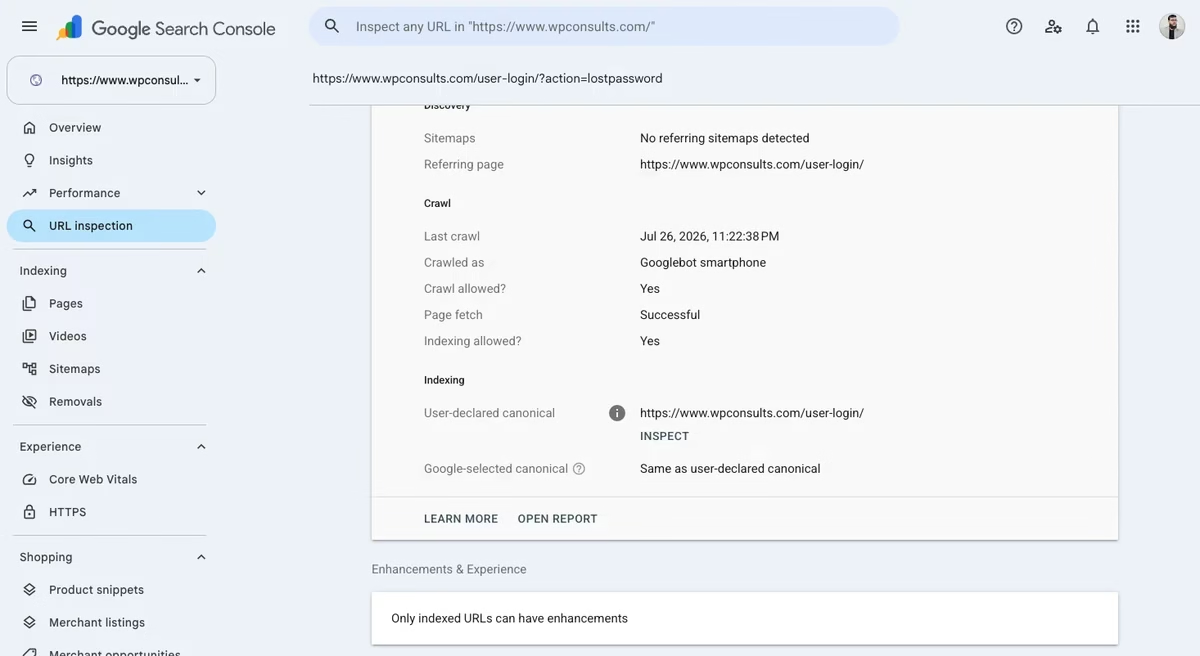
Here is the part I found more interesting than the causes. Google’s help page names AMP and mobile pairings and nothing else, and neither of the two rows on my own site is either of those. One is a lost-password parameter on a login page, and the other is an English slug sitting inside my French section, canonicalized to the French slug.
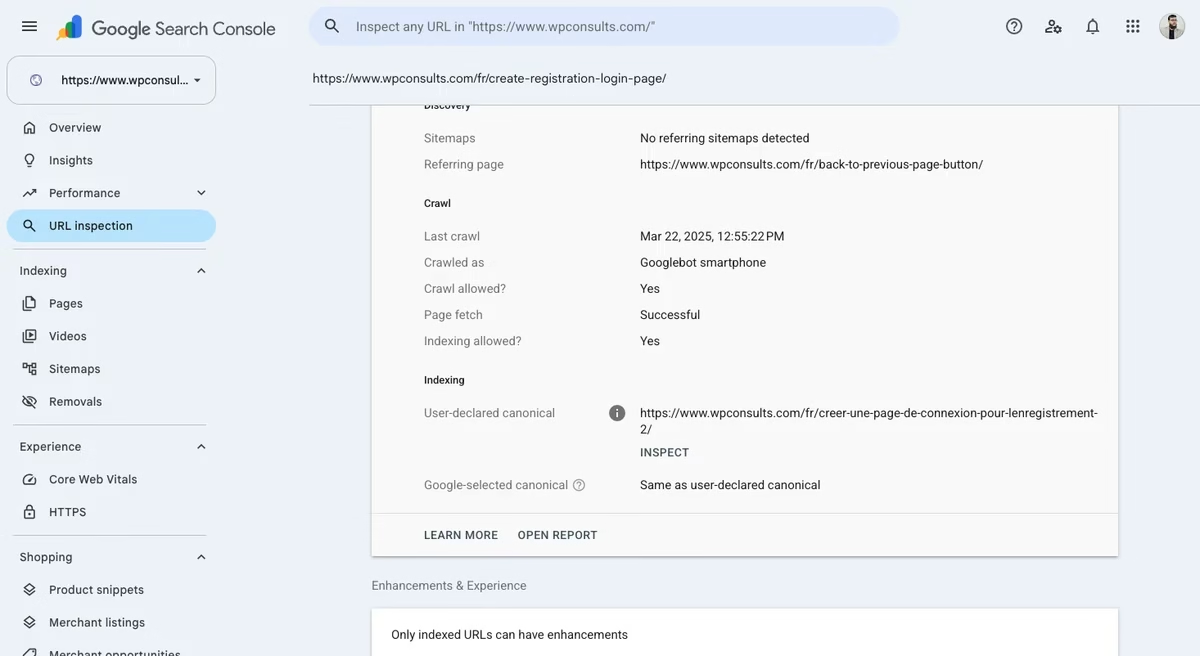
That is two rows on one site, so it is not a big enough sample to generalize from. It is enough to show that Google’s help page describes fewer causes than the report actually collects, which is worth knowing before you go hunting for an AMP page you never built.
User-declared canonical vs Google-selected canonical: what the two fields tell you
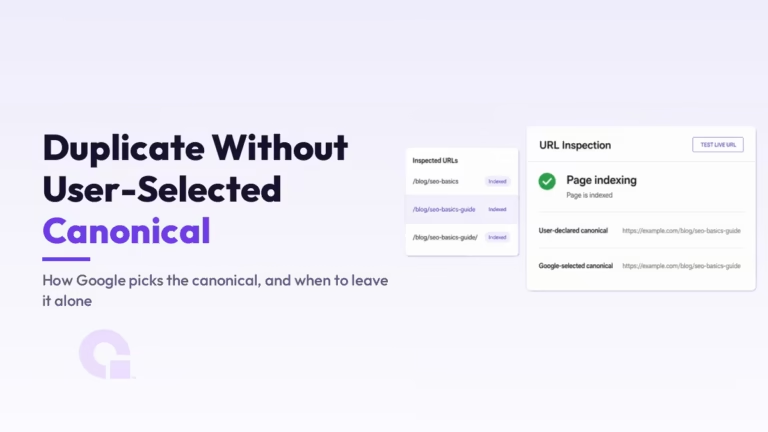
User-declared canonical is the URL your site asked Google to treat as the original. Google-selected canonical is the URL Google actually chose. When those two agree, Search Console writes “Same as user-declared canonical”, and that agreement is exactly what “alternate page with proper canonical tag” is reporting.
When they disagree, you are in a different situation and the field says so. On one of my own URLs the site declared a canonical pointing at a pretty permalink, and Google-selected canonical reads “Inspected URL”, which is Google saying it kept the URL I inspected and ignored my declaration.
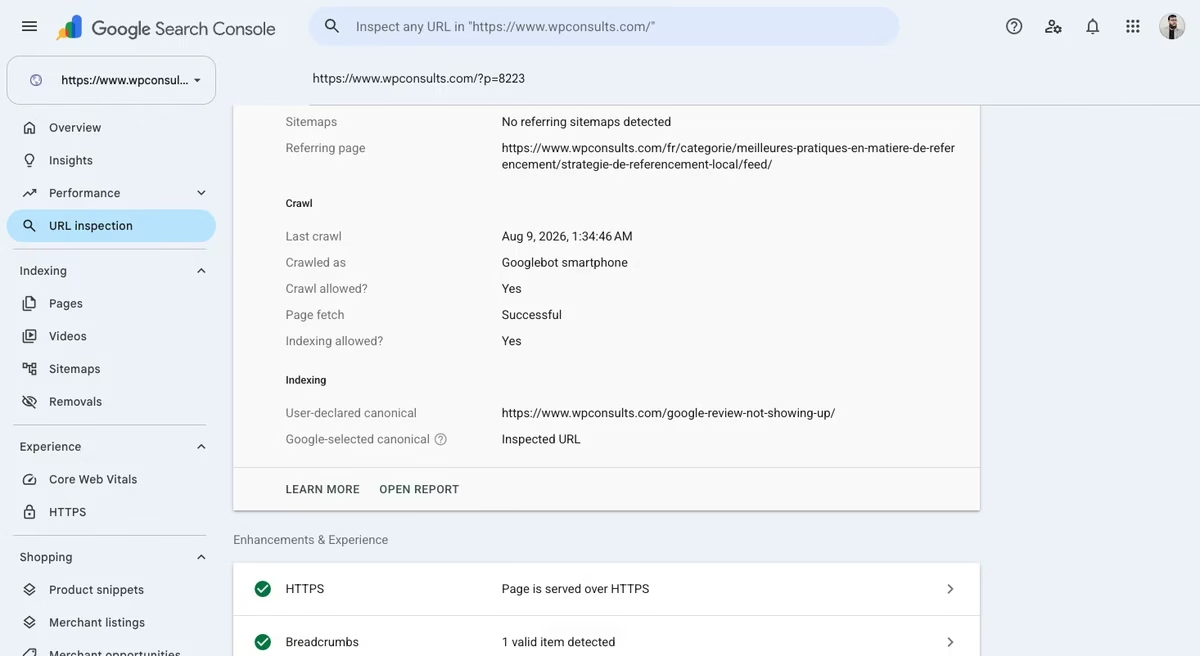
That is Google’s canonicalization documentation in practice, where it says you can indicate a preference “but Google may choose a different page as canonical than you do”, and that a canonical preference “is a hint, not a rule”.
Read those two fields together and the whole report gets easier. Agreement means your declaration was accepted, so if the wrong page is out of the index, that is your site’s doing and you can change the tag.
Disagreement is harder, because Google ignored the tag. Changing it again will not help on its own; you have to make the page different enough in its content that Google stops treating it as a copy of the other one.
How this status differs from the other Page indexing rows
The Page indexing report groups four similar-sounding canonical states, and only one of them means your own declaration was accepted. People read one of these statuses and act as if it were another, so this is the table I would have wanted the first time I opened that report.
| Status | Who chose the canonical | Is it a problem? |
|---|---|---|
| Alternate page with proper canonical tag | You did, and Google agreed | Only if you wanted this URL indexed |
| Duplicate without user-selected canonical | Google did, because you declared nothing | Usually not, but worth checking which page it picked |
| Duplicate, Google chose different canonical than user | Google did, and it overruled you | Yes, if the page it picked is the weaker one |
| Crawled, currently not indexed | Nobody. This is not a canonical decision at all | Often yes, and it is a content question rather than a tag question |
There is a fifth message people mix in here, and it is not a canonical decision either. If Search Console tells you the canonical is outside your property, that is a property setup issue and I covered the one-minute fix in Canonical URL Not in Property.
What about Shopify collections, variants and filter URLs?
On a Shopify or WooCommerce store, most of the URLs in the alternate page list are generated by the platform rather than written by you. Variant URLs, swatch links, sorted collection views and filtered collection views all get created for you, and the canonical usually points back at the clean collection or product URL, which is why they land in this status.
That is almost always what you want, so the rule for stores is the same as everywhere else: leave the generated variants alone and only look at a URL you deliberately wrote content for. If your list is long enough to be annoying, the source is worth understanding, and I went through where those extra URLs come from in Shopify duplicate content from collections.
The one store case I would actually act on is a variant with real demand behind it, where people search for that size or that color by name and you have written something for it. Point that page’s canonical at itself instead of at the parent collection, because it can earn those searches on its own.
So, is alternate page with proper canonical tag worth fixing?
Honestly, for most of the URLs sitting in that status, no. The advice to ignore it is right for parameter URLs, product variants and paired mobile pages, and I would not spend an evening on those even if the count looks alarming.
Almost every article on this status opens with “it is fine”. Google’s own report opens with “these pages aren’t indexed or served on Google”, and that line is what matters to the person who has a real page in the list.
So give it ten minutes: export the list, flag only the URLs you can name a search query for, and inspect those. If that leaves you with nothing, you have your answer and you can stop worrying about the count. If it leaves you with three pages you have been wondering about for months, you just found out your own site was the thing keeping them out.
Common questions about the alternate page canonical status
Does alternate page with proper canonical tag hurt my rankings?
Not by itself. The canonical target keeps the ranking signals and stays in the index, so the alternate being excluded is the intended outcome. It only costs you when the excluded URL was the page you wanted ranking.
How long does it take to clear after I change the canonical?
There is no fixed window, and anyone quoting one is guessing. Google has to recrawl the page and then re-decide, so re-inspect the URL every few days and watch the Google-selected canonical field rather than counting days.
Do my French or German versions of a page end up in this status?
Not for being translations. Google’s help page states that alternate language pages are not detected by Search Console, so a properly translated page does not land here simply because another language version exists.
Is a self-referencing canonical enough on its own?
A self-referencing canonical is the right first move, and it is a request rather than a guarantee. Google describes a canonical as a hint, so if the page is still near-identical to the one it was pointing at, expect Google to keep choosing the other one.
Work with WpConsults
Still not sure which of your URLs should be indexed?
Send me the export and the pages you care about, and I will tell you which rows are noise and which ones your own site is excluding by mistake.
Update Logs
13 Aug 2026
- First published, with Google’s current wording for the status, the two rows sitting in my own Search Console, and a table for deciding which URLs in the list are worth touching.
Want our posts to show up more often on Google?
One step & Google will surface this site in your Top Stories.