The reCAPTCHA badge sitting in the bottom-right corner of your site annoys a lot of owners, and the question I get most often is whether you are even allowed to get rid of it. The short answer is yes, Google lets you hide it, but only if you keep the required attribution text visible somewhere in the user flow.
In this guide I will show you the compliant way to hide the reCAPTCHA badge with one line of CSS, the exact text Google wants you to keep on the page, and the no-code plugin route if you would rather not touch any code at all.
Key Takeaways
- Google’s terms do allow you to hide the reCAPTCHA badge, as long as the reCAPTCHA branding stays visible somewhere in the user flow.
- The clean method is one line of CSS,
.grecaptcha-badge { visibility: hidden; }, plus a short attribution line near your forms. - Use
visibility: hidden, notdisplay: none, so reCAPTCHA v3 keeps running and still scores your traffic. - A plugin like Badgeshift does the same thing without code, and can reposition the badge if you would rather move it than hide it.
- Hiding the badge is cosmetic only; the reCAPTCHA script still loads, so it does almost nothing for page speed.
Can you legally hide the reCAPTCHA badge?
Most people assume that hiding the badge breaks Google’s rules and quietly switches off their spam protection. That is not what happens. Google’s own reCAPTCHA FAQ says you are allowed to hide the badge, as long as the reCAPTCHA branding stays visible in the user flow.
So the badge itself is optional, but the attribution is not. The part people skip is the second half of that rule: when you hide the badge, you have to add a visible line of text wherever the protection runs, like your contact form, login, or checkout. The standard snippet Google asks for is this:
This site is protected by reCAPTCHA and the Google
Privacy Policy and Terms of Service apply.
The two phrases Privacy Policy and Terms of Service should link to policies.google.com/privacy and policies.google.com/terms. Keep that line near your forms or in the footer and you are inside Google’s terms, badge or no badge.
The compliant way to hide it with CSS
If you are comfortable with a tiny bit of code, this is the cleanest route because it adds nothing extra to your site. Do the two steps in order, because the attribution has to be in place before you hide the badge, otherwise you are technically out of compliance for as long as the badge is gone.
Step 1: add the attribution text
Drop the snippet above into your footer, or right under the submit button of each protected form. A small, light-gray line of fine print is enough; it does not need to be loud, it just needs to be readable and present.
Step 2: hide the badge with one line of CSS
Go to Appearance > Customize > Additional CSS (or your theme’s stylesheet) and add:
.grecaptcha-badge { visibility: hidden; }Notice I used visibility: hidden and not display: none. This matters more than it looks. With reCAPTCHA v3, the badge element is tied to the script that quietly scores your visitors in the background. visibility: hidden keeps that element loaded and working while hiding it from view, so your protection still runs. display: none removes the element from the layout entirely, and on some setups that stops v3 from scoring traffic the way it should, which defeats the whole point of having reCAPTCHA at all.
Hide it with a plugin, no code needed
If you would rather not edit CSS, a small plugin does the same job from a settings page. Badgeshift is one I have used for this; you toggle the badge off and it handles the CSS for you, and it can also reposition the badge if you decide you only want to move it rather than hide it.
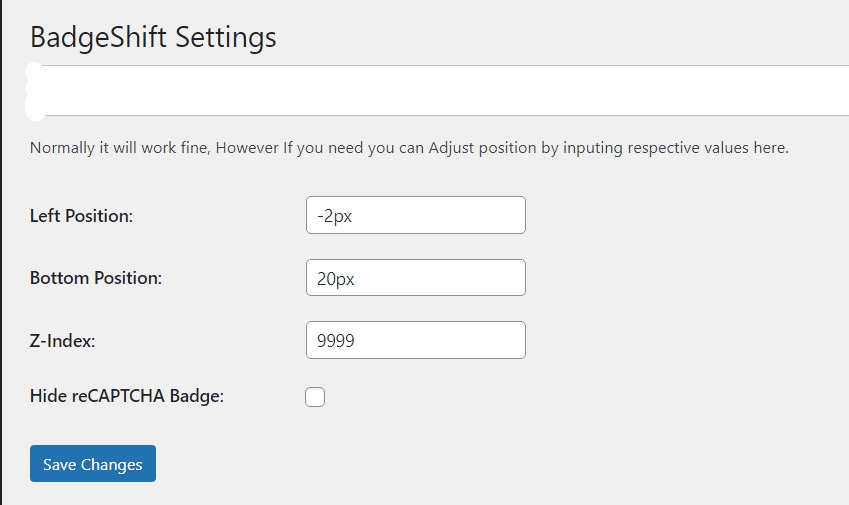
The one thing a plugin will not do for you is add the attribution text, so you still need that line on your forms or footer. The plugin only handles the visual side; the compliance side is on you.
Does hiding the badge speed up your site?
This is where I want to correct a common expectation. Hiding the badge is purely cosmetic; the reCAPTCHA JavaScript still loads and runs exactly as before, so you do not save any real weight by hiding it. If your actual goal is a faster site, the fix is to load reCAPTCHA only on the pages that need it (your forms and login) instead of site-wide, which is a separate job worth doing for your Core Web Vitals.
So treat hiding the badge as a design decision, not a performance one. They are two different problems, and conflating them is how people end up disappointed when the badge is gone but the page is just as heavy.
Common mistakes to avoid
- Using
display: noneinstead ofvisibility: hidden. It can stop reCAPTCHA v3 from scoring traffic on some setups, so you lose protection while thinking you only hid a badge. - Hiding the badge but skipping the attribution. This is the one that actually breaks Google’s terms; the badge is optional, the branding text is not.
- Hiding it site-wide when reCAPTCHA only loads on a few pages. The CSS is harmless either way, but it tells me the script is probably loading everywhere too, which is the real thing worth fixing.
So, should you hide the reCAPTCHA badge?
Honestly, for most sites it is fine to hide it, and I usually do. That bottom-right badge clashes with a lot of designs and adds nothing for the visitor, so removing it visually while keeping a clean attribution line is a reasonable trade. Just make sure you do it the compliant way, with the text in place and visibility: hidden so v3 keeps working.
The only time I would leave the badge alone is if a form is getting hammered by spam and the visible badge is genuinely deterring bots or reassuring real users; in that narrow case the small design cost is worth it. Otherwise, hide it, keep the attribution, and move on.
Update Logs
29 Jun 2026
- Rewritten to make the compliance rule clear: you can hide the badge if you keep Google’s attribution text, with the official snippet and links added, plus a note on why
visibility: hiddenbeatsdisplay: nonefor reCAPTCHA v3.
Want our posts to show up more often on Google?
One step & Google will surface this site in your Top Stories.