

WP-Cron ne fonctionne pas selon un horaire fixe. Il s'exécute à chaque chargement de page, ce qui explique pourquoi votre article programmé n'a pas été publié à l'heure prévue et pourquoi votre e-mail de renouvellement est arrivé avec trois heures de retard.
Tout le monde vous dira de le remplacer par un véritable cron de serveur. C'est souvent vrai, mais ce n'est pas toujours le cas ; c'est pourquoi cet article part de votre problème plutôt que de l'outil.
Principaux enseignements
- WP-Cron est déclenché par le chargement des pages, et non par l'horloge système ; ainsi, un site à faible trafic ne respecte pas les horaires prévus, tandis qu'un site à fort trafic effectue cette vérification des milliers de fois par heure.
- La solution habituelle consiste à
define( 'DISABLE_WP_CRON', true );enwp-config.phpainsi qu'un véritable cron de serveur qui appellewp-cron.phpà intervalles réguliers. - Définissez la constante et oubliez le cron du serveur : toutes les tâches planifiées sur votre site s'arrêteront alors automatiquement. La constante désactive le déclencheur, elle ne le remplace pas.
- Action Scheduler est une file d'attente, pas une horloge. Sa propre FAQ indique qu'il est lancé par défaut par WP-Cron et que les actions en retard sont normales ; il optimise donc le débit, et non la ponctualité.
- Les services Cron externes ne nécessitent aucun accès au serveur et permettent d'ajouter une fonctionnalité de surveillance, au prix d'un point de défaillance unique situé en dehors de votre site.
- Le WP-Cron par défaut convient parfaitement à la plupart des petits blogs. WordPress présente son comportement de mise en file d'attente et de nouvelle tentative comme une fonctionnalité, et c'en est effectivement une.
Pourquoi WP-Cron ne respecte pas son calendrier ?
WP-Cron ne se déclenche que lorsqu'un utilisateur charge une page. WordPress vérifie la liste des tâches à exécuter à chaque chargement de page et exécute celles qui sont en retard ; ainsi, si personne ne visite votre site entre 14 h et 17 h, la tâche que vous avez programmée pour 14 h sera exécutée à 17 h.
Ce n'est pas mon interprétation, c'est ce qu'indique la documentation de WordPress. Le chapitre consacré au cron dans le « Plugin Handbook » l'explique clairement : “ WP-Cron ne s'exécute pas en continu comme le cron système ; il n'est déclenché qu'au chargement de la page. ”, et cela correspond presque exactement à cet exemple de 14 h.
C'est donc le nom qui pose problème. Ça s'appelle « cron » et ça fonctionne comme une liste de tâches à faire que l'on consulte chaque fois que l'on passe devant.
Le problème se pose dans les deux sens, ce que la plupart des guides omettent de mentionner. Un site peu fréquenté ne respecte pas ses délais, tandis qu’un site très fréquenté effectue la même vérification pour chaque requête, ce qui Documentation de WP Engine précise que “ cela oblige le serveur à fournir un effort plus important que nécessaire et peut entraîner des ralentissements, des délais d'expiration et d'autres problèmes de performances ”.”
Partez de votre symptôme, pas de l'outil
Chaque symptôme nécessite une solution adaptée, et c'est souvent en choisissant l'outil avant tout que l'on finit par utiliser un service cron externe pour envoyer des requêtes à un site dont le véritable problème était une table « actions » surchargée. Repérez votre symptôme dans ce tableau, puis consultez la section correspondante.
| Ce que vous voyez | Qu'est-ce qui ne va pas, au juste ? | Comment y remédier ? |
|---|---|---|
| Un article programmé s'affiche “ Retard par rapport au calendrier prévu ” | Personne ne consultait une page au moment où la publication devait avoir lieu | Un véritable cron de serveur, de sorte que le déclenchement s'arrête en fonction du nombre de visiteurs |
| Les e-mails et les rappels de renouvellement de WooCommerce arrivent en retard | Même problème de déclenchement, mais sur une file d'attente plus importante | Cron du serveur, et vérification dans Action Scheduler des tâches bloquées |
Des milliers de lignes dans wp_actionscheduler_actions | Un problème de débit, et non un problème de synchronisation | Optimisation et nettoyage du planificateur d'actions, et non création d'un nouveau déclencheur |
| Votre site reçoit très peu de visiteurs | La gâchette ne se déclenche pas assez souvent pour qu'on puisse s'y fier | Cron du serveur ou service cron externe |
| Trafic intense et TTFB lent en cas de charge élevée | La vérification cron s'exécute à chaque requête | DISABLE_WP_CRON ainsi qu'une tâche cron sur le serveur à intervalle fixe |
| En réalité, rien n'est cassé | Rien | Laisse tomber. Vraiment. |
Remarquez combien peu de ces lignes indiquent “ remplacer WP-Cron ”. C'est un choix délibéré, et c'est sur ce point que je ne suis pas d'accord avec les conseils que vous trouverez en tête des résultats de recherche.
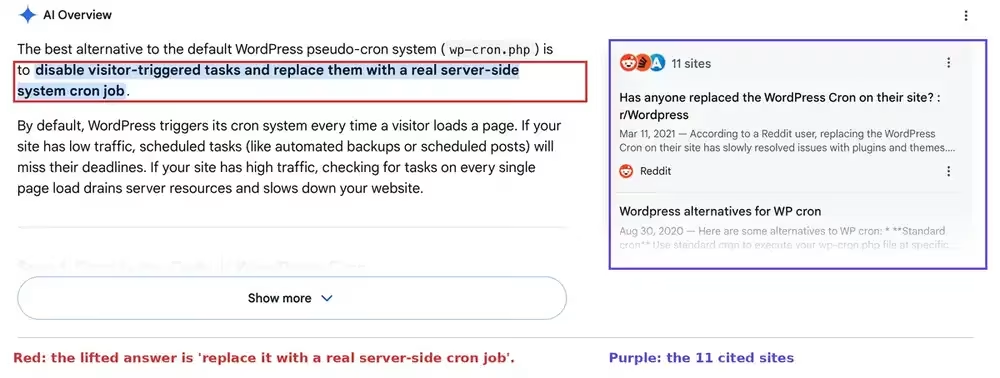
Comparaison entre le cron du serveur, Action Scheduler et les services externes
Ces trois éléments ne sont pas concurrents, et les considérer comme une liste restreinte constitue la première erreur. Un cron de serveur remplace le déclencheur, Action Scheduler gère une file d'attente de tâches, et un service externe remplace le déclencheur depuis l'extérieur de votre serveur.
| Cron du serveur réel | Planificateur d'actions | Service Cron externe | |
|---|---|---|---|
| Ce que cela fait réellement | Appels wp-cron.php sur l'horloge système | Files d'attente, lots, tentatives de reprise et journaux des tâches en arrière-plan | Appels wp-cron.php depuis un autre serveur |
| Est-ce que ça règle le problème de la ponctualité ? | Oui | Non. Il hérite par défaut du déclencheur de WP-Cron. | Oui |
| Cela améliore-t-il le débit ? | Non | Oui, c'est justement son rôle | Non |
| Faut-il un accès au serveur ? | Oui, crontab ou un panneau de configuration | Non, il est intégré à WooCommerce et à d'autres plateformes | Non |
| Risque principal | Vous définissez la constante et vous n'avez plus à vous soucier du cron | Le prendre pour une solution au problème de planification | Un point de défaillance unique sur lequel vous n'avez aucun contrôle |
| Idéal pour | Horaires de publication fixes, renouvellements, sites à faible fréquentation | Magasins contenant des milliers de tâches en file d'attente | Hébergement géré sans accès à cron |
Pour vérifier ce qui est réellement programmé sur votre site, WP Crontrol est le plugin de référence, et WP-CLI vous fournit la même liste avec Liste des événements WP Cron. Vérifiez bien avant de modifier quoi que ce soit.
Comment remplacer WP-Cron par un cron de serveur classique
Il y a deux étapes : désactiver le déclencheur de chargement de page, puis configurer l'horloge système pour qu'elle appelle ce même fichier à intervalles réguliers. Effectuez la deuxième étape, sinon votre site cessera discrètement d'exécuter toutes les tâches planifiées.
Étape 1. Ajoutez ceci à wp-config.php, au-dessus de la ligne indiquant “ C'est tout, arrêtez de modifier ” :
define( 'DISABLE_WP_CRON', true );Étape 2. Créez une véritable tâche cron sur le serveur, soit via le panneau de configuration de votre hébergeur, soit dans le fichier crontab. Une fréquence de cinq minutes constitue un réglage par défaut raisonnable :
*/5 * * * * wget -q -O - https://yoursite.com/wp-cron.php?doing_wp_cron >/dev/null 2>&1Et maintenant, le plus important : c'est le type de défaillance dont personne ne vous met en garde. DISABLE_WP_CRON Cela ne désactive pas la planification, mais désactive la déclencheur.
Vos événements sont toujours en attente dans la base de données, attendant leur tour. Aucun processus ne vient les exécuter. Par conséquent, les articles ne sont pas publiés, les e-mails ne sont pas envoyés, les sauvegardes ne se lancent pas, et WordPress ne signale aucune erreur, car de son point de vue, la file d'attente n'est tout simplement pas sollicitée.
Une dernière mise en garde si vous utilisez un hébergement géré. La documentation de WP Engine indique que ne prend techniquement pas en charge les véritables tâches cron côté serveur et propose à la place un service Cron alternatif qui appelle wp-cron.php pour vous, ce qui nécessite la même constante. Ainsi, “ il suffit d'utiliser crontab ” n'est même pas littéralement possible sur certains serveurs, et les guides qui le préconisent ne le mentionnent jamais.
Action Scheduler est une file d'attente, pas une horloge
Action Scheduler ne garantira pas la ponctualité de vos tâches, car il ne contrôle pas le déclencheur. Son FAQ interne précise qu’il “ est lancé par WP-Cron ” par défaut et qu’il est “ conçu pour fonctionner en parallèle avec WP-Cron sans en modifier le comportement ”, et indique que les actions en retard sont normales.
Relisez bien cela, car on le présente régulièrement comme la solution miracle aux retards dans les projets. Or, il hérite précisément du problème qu'il est censé résoudre.
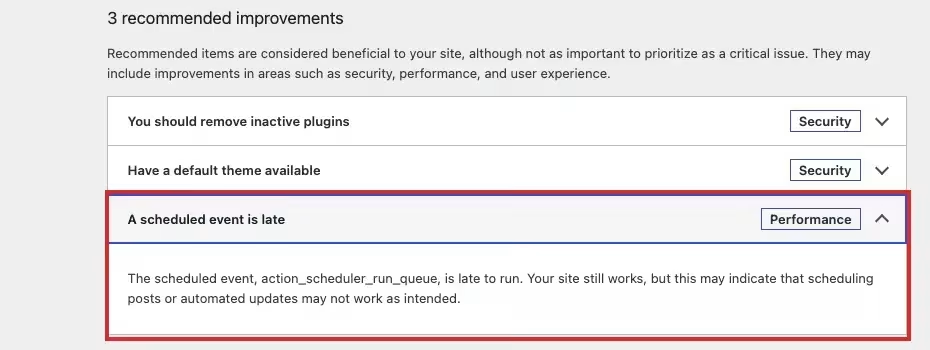
Je préfère vous le montrer directement sur notre site plutôt que d'en discuter. La section « État du site » de WordPress indique ici qu'une tâche planifiée est en retard, et la tâche en question est : action_scheduler_run_queue, qui correspond à l'événement WP-Cron chargé d'exécuter la file d'attente d'Action Scheduler.
Alors, à quoi sert Action Scheduler ? Au traitement de gros volumes. Il regroupe les tâches par lots, effectue des tentatives de réexécution, consigne les opérations dans un journal et met à votre disposition un écran d'administration, tout en stockant toutes les données dans sa propre actionscheduler_ des tableaux plutôt que de tout mettre en bloc dans wp_options.
Voici à quoi cela ressemble dans une boutique réelle. Notre site a enregistré 1 697 actions, dont 1 565 menées à bien et 123 a échoué, et je n'aurais pas su que ces erreurs existaient si je n'avais pas ouvert cet écran.
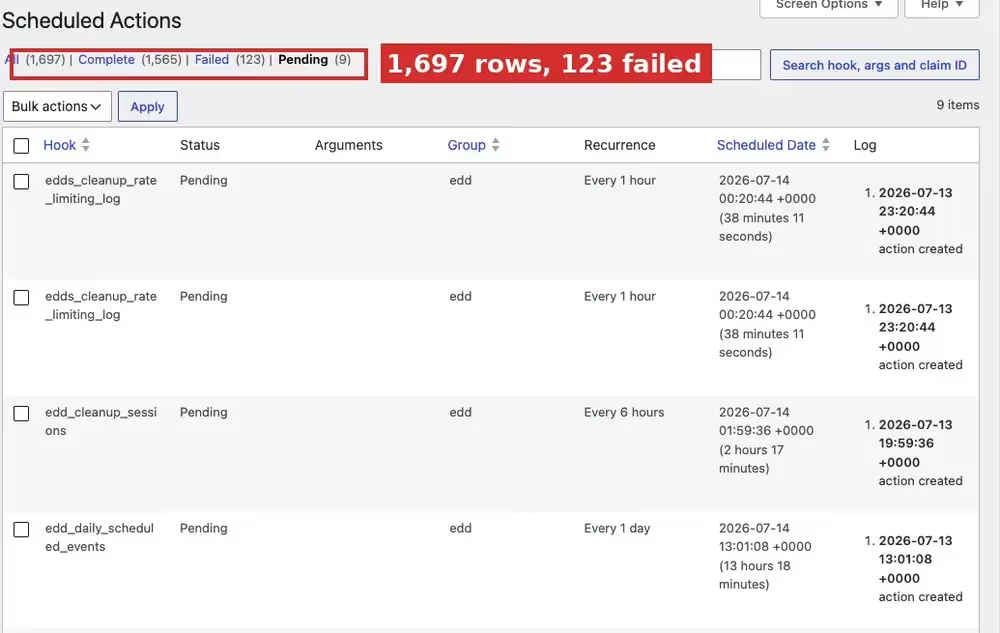
Voilà un résumé honnête de cet outil. Il est excellent pour gérer des milliers de tâches, mais ce n’est pas la solution qu’il faut choisir lorsque votre reproche est : “ Ça aurait dû être fait à 3 h 10 du matin. ”
Quels sont les avantages des services Cron externes, et quel est leur coût ?
Un service cron externe appelle votre wp-cron.php depuis un autre site Internet, selon un calendrier fixe. Vous n'avez absolument pas besoin d'accéder au serveur, et vous bénéficiez généralement d'une surveillance et d'alertes, ce qu'une ligne de crontab ne vous offrira jamais.
En contrepartie, le cœur de votre site se trouve désormais en dehors de celui-ci. Si le service tombe en panne, si votre compte expire ou si la connexion vers votre serveur est interrompue, le déclencheur disparaît et rien sur votre serveur ne s'en rend compte, car aucun élément de votre serveur ne surveillait cette connexion.
C'est mon raisonnement, et non une faille avérée dont quelqu'un aurait fait état ; je choisirais quand même cette solution sur un hébergement géré sans accès à cron. La surveillance a une certaine valeur, et il vaut mieux être alerté d'un déclencheur manquant que de le découvrir une semaine plus tard.
Qui n'a vraiment pas besoin de remplacer WP-Cron ?
Si votre site ne comporte aucune obligation liée à des horaires fixes, WP-Cron convient parfaitement et vous pouvez arrêter de lire. Un blog qui publie dès que vous cliquez sur « Publier », sans boutique en ligne, sans renouvellements et sans e-mails urgents, n'a rien à perdre si une tâche de nettoyage s'exécute à 17 h au lieu de 14 h.
WordPress le précise lui-même, et c'est justement la citation que les partisans du “ toujours le remplacer ” ne vous montrent jamais. Extrait du même chapitre du manuel :
Avec le planificateur système, si le délai s'écoule sans que la tâche ait été exécutée, celle-ci ne sera pas relancée. Avec WP-Cron, toutes les tâches planifiées sont placées dans une file d'attente et s'exécuteront dès que possible (c'est-à-dire au prochain chargement de la page). Ainsi, même si vous ne pouvez pas en être sûr à 100% quand Votre tâche s'exécutera, vous pouvez en être sûr à 100% finalement.
C'est un véritable compromis de conception, dit sans détours. Un système cron qui se déclenche alors que votre site rencontre une erreur saute tout simplement cette exécution et passe à la suivante, tandis que WP-Cron conserve la tâche dans la file d'attente et la réessaie dès que l'occasion se présente.
Aucun des deux modèles n'est meilleur en théorie ; ils présentent chacun leurs propres failles. Vous devez choisir entre “ ça fonctionnera, mais je ne sais pas exactement quand ” et “ ça fonctionnera à 3 h 10 du matin, ou ça ne fonctionnera pas du tout ”.”
Il est également intéressant de noter qui tire profit de ces conseils généraux. Ce sont principalement les hébergeurs et les fournisseurs de solutions de surveillance par cron qui les diffusent, et les principes qu’ils vous exposent sont corrects. C’est le mot “ toujours ” que je remettrais en question.
Ce que ce site héberge réellement, et pourquoi
Nous sommes résolument partisans de l'idée que “ le timing est essentiel ”, c'est pourquoi nous utilisons un déclencheur côté serveur. Ce blog publie à des horaires fixes, et deux articles ont été mis en ligne cette semaine exactement à l'heure prévue, l'un à 3 h 10 du matin et l'autre à 15 h 30, heure de Dacca, alors que mon ordinateur était éteint et que je dormais.
Cela ne fonctionne que parce que le déclencheur ne dépend pas du fait qu'un visiteur arrive justement à 3 h 10 du matin. Presque personne ne consulte un blog consacré au référencement à cette heure-là, ce qui correspond exactement au cas d'échec lié à un faible trafic présenté dans le tableau ci-dessus.
Notre animateur est Hostinger, et comme la plupart des hébergeurs, il propose un écran dédié aux tâches Cron dans le panneau d'administration ; la configuration se résume donc aux deux étapes ci-dessus, rien de plus compliqué que ça.
L'histoire de cette « guerre » qui nous a menés là où nous en sommes mérite d'être lue si vous vendez quoi que ce soit : j'ai décrit le cas précis où les e-mails et les renouvellements de WooCommerce arrivaient en retard et La mise en place d'une véritable tâche cron a permis de résoudre le problème. Cet article présente la version générale de cette correction.
Il y a une distinction qu'il convient de bien garder à l'esprit lorsque vous êtes sur ce site : un e-mail envoyé en retard est un planification problème, et un e-mail qui n'arrive jamais est généralement un livraison problème, dont la solution est tout à fait différente. Si vous ne savez pas de quel problème il s'agit, vérifiez si vos e-mails parviennent à quitter le bâtiment en Configurer correctement le protocole SMTP Tout d'abord.
Et si vous vous intéressez à ce sujet davantage pour des raisons de charge du serveur que de temps de chargement, sachez que le surcoût lié au chargement de la page est bien réel mais minime, et qu’il est rarement la cause réelle du ralentissement. J’ai déjà écrit un article sur ce qui fait véritablement la différence lorsque un site WordPress doit pouvoir gérer un trafic important, et à propos de INP et réactivité pour ce qui est de la partie front-end.
Alors, faut-il remplacer WP-Cron ?
Si une action doit se produire à un moment précis sur votre site, alors oui, faites-le dès aujourd’hui. Les publications programmées, les renouvellements d’abonnement, les e-mails transactionnels et les sauvegardes nocturnes méritent tous un déclencheur qui ne dépende pas du fait qu’un inconnu charge votre page d’accueil.
Si aucun élément de votre site n'est soumis à une échéance, ne touchez pas à rien. Vous ne feriez qu'ajouter un élément supplémentaire et une nouvelle source d'erreur, en échange d'une ponctualité dont vous ne vous souciez pas.
Et s'il y a une chose à retenir de tout cela : lorsque vous définissez cette constante, assurez-vous que la tâche cron du serveur s'exécute bien avant de fermer le terminal. Un site avec DISABLE_WP_CRON Et aucune tâche cron ne semble fonctionner parfaitement jusqu'au jour où l'on se rend compte que rien n'a été publié depuis une semaine.
Les tâches planifiées continuent-elles à s'exécuter en retard ?
Si, après cela, l'heure n'apparaît toujours pas sur vos publications, vos e-mails ou vos renouvellements, nous contacter ou m'envoyer un courriel et je t'aiderai à déterminer lequel de ces trois problèmes est réellement le tien.
Vous souhaitez que nos publications apparaissent plus souvent sur Google ?
En un clic, Google affichera ce site dans votre rubrique « À la une ».

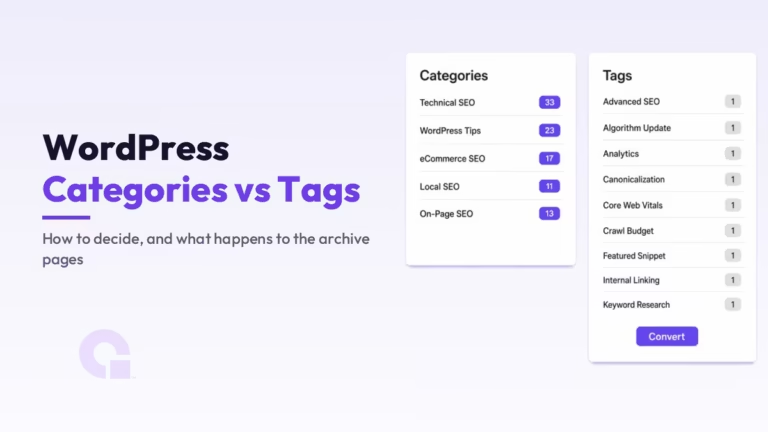 Catégories et balises WordPress : comment choisir, et quel est le rôle de vos pages d'archives dans les résultats de recherche ?
 Comment corriger une page alternative à l'aide d'une balise canonique correcte, et quelles URL sont correctes
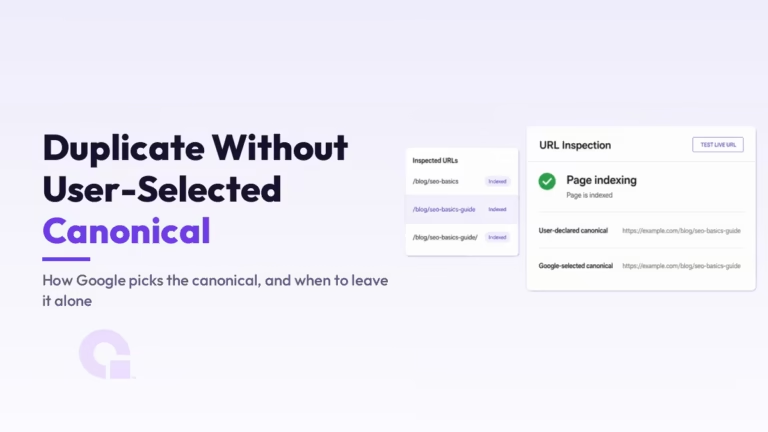 Duplicata sans URL canonique choisie par l'utilisateur : comment Google sélectionne l'URL canonique, et quand ne pas intervenir
