

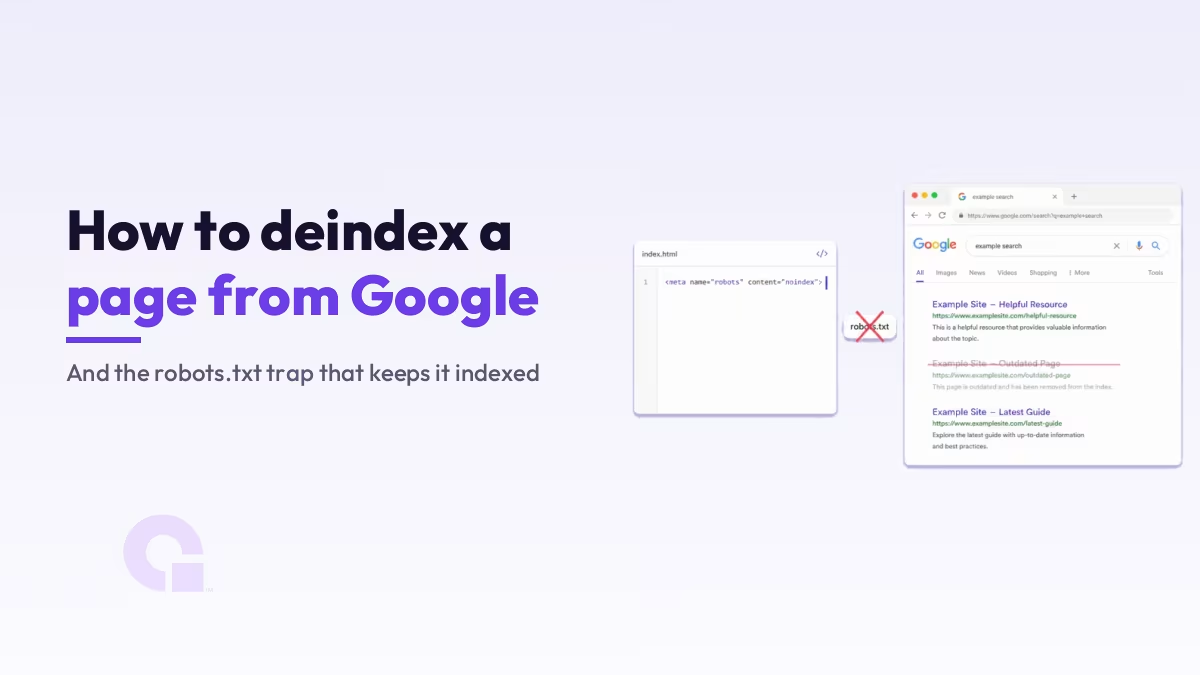
Pour désindexer une page sur Google, il suffit d'ajouter un noindex règle et vous permettez ainsi à la page de rester accessible à l'exploration, car une page bloquée dans le fichier robots.txt n'est jamais lue ; par conséquent, Googlebot ne voit jamais cette règle et l'URL peut tout de même figurer dans l'index.
Vous trouverez ci-dessous les méthodes, le scénario auquel chacune d'entre elles correspond réellement, le piège qui fait discrètement échouer la plupart des tentatives, ainsi que la boucle de vérification que personne ne prend la peine de vous montrer.
Principaux enseignements
- La méthode consiste à
noindex, sous forme de balise meta ou d'en-tête HTTP. Le fichier robots.txt n'est pas un outil de désindexation, et Google l'indique clairement par écrit. - Le piège : a
noindexbalise « tag » et un fichier robots.txtInterdirese neutralisent mutuellement. Googlebot ne peut pas explorer la page ; il ne voit donc jamais la balise, et l'URL peut tout de même apparaître dans les résultats sans description. - Utilisation
Balise X-Robotspour les fichiers PDF, les images et tout ce qui n'est pas au format HTML. - L'outil « Suppression » n'est qu'une solution provisoire. Google indique que les demandes restent valables environ six mois ; veillez donc à toujours mettre en place une méthode permanente en complément.
- En toute honnêteté, en ce qui concerne les délais : Google indique que plusieurs mois peuvent s'écouler avant que Googlebot ne revisite une page. Demandez une nouvelle exploration via l'outil « Inspection d'URL » pour les URL qui vous importent.
- Demandez-vous d'abord s'il ne vaudrait pas mieux regrouper la page à l'aide d'une redirection ou d'une balise canonique. La désindexation efface tout ce que l'URL avait acquis.
Que signifie réellement la désindexation d'une page par Google ?
La désindexation consiste à supprimer une page de l'index de Google afin qu'elle n'apparaisse plus dans les résultats de recherche ; cela diffère du blocage de l'exploration. L'exploration correspond à la récupération de la page par Googlebot ; l'indexation correspond au stockage de cette page par Google et à sa mise en disponibilité pour l'affichage. Une page peut être explorée sans être indexée, et elle peut être bloquée à l'exploration tout en restant indexée.
Ce dernier point prend presque tout le monde au dépourvu, et c'est justement la raison d'être de cet article.
Avant de désindexer : ne vaudrait-il pas mieux regrouper cette page ?
Si la page comporte des liens, des impressions ou un historique, il est généralement préférable de la regrouper dans une page plus performante à l'aide d'une redirection 301 ou d'une balise canonique, car une redirection permet de conserver l'autorité acquise par l'URL, tandis que la désindexation la fait tout simplement disparaître.
Aucune page parmi les résultats de recherche sur ce sujet ne vous invite à effectuer cette démarche en premier lieu, alors que c'est justement celle qui importe le plus. La désindexation est une opération de maintenance définitive ; passez-la donc rapidement en revue avant de vous précipiter sur une balise :
- Il s'agit d'une page qui est pratiquement identique à une autre, de meilleure qualité. Fusionnez-la et redirigez l'ancienne URL via une redirection 301, ou définissez une balise canonique pointant vers la version que vous souhaitez conserver. Vous conservez ainsi les liens ; consultez notre guide pour les articles et les pages en double dans WordPress.
- C'est un sujet un peu superficiel, mais il n'en reste pas moins important. Il vaut mieux la développer plutôt que de la supprimer. Une page désindexée ne rapporte plus rien, et ce pour toujours.
- Soit c'est vraiment du spam, soit c'est un message privé. Si la désindexation est la bonne solution, la suite de cet article s'adresse à vous.
- De toute façon, il n'était pas prévu qu'il soit référencé. Certaines pages doivent tout simplement rester hors de l'index, et les recommandations de Google en matière d'indexation le prévoient sans problème. Nous avons abordé cet aspect sous un angle positif dans exploré, non indexé pour le moment.
Les méthodes permettant de désindexer une page sur Google
Il existe cinq méthodes, et la première couvre la grande majorité des cas. Celle de Google Documentation sur l'indexation par blocs est d'une clarté inhabituelle quant à la distinction entre les deux.
1. La balise méta « noindex », pour les pages HTML classiques
Insérez ceci dans la page : En-tête>. Selon le document de Google, lorsque Googlebot explore la page et extrait la balise, “ Google supprimera complètement cette page des résultats de recherche Google, que d'autres sites y renvoient ou non ”.”
<meta name="robots" content="noindex">Utilisation googlebot au lieu de robots si vous souhaitez bloquer uniquement Google et laisser les autres moteurs de recherche tranquilles. La plupart du temps, ce n'est pas le cas.
2. L'en-tête « X-Robots-Tag », pour les fichiers PDF et autres fichiers non HTML
Un fichier PDF ne contient pas En-tête>, il n'y a donc aucun endroit où placer une balise meta. Renvoyez plutôt la règle sous forme d'en-tête de réponse HTTP, comme le recommande explicitement la documentation de Google “ pour les ressources non HTML, telles que les fichiers PDF, les fichiers vidéo et les fichiers image ”.”
Balise X-Robots : noindexVous pouvez définir ce paramètre au niveau du serveur, dans votre fichier de configuration Apache, dans votre fichier de configuration Nginx ou via le panneau de configuration des en-têtes de votre hébergeur. Ces deux méthodes ont le même effet, et Google recommande de choisir celle qui correspond le mieux au type de contenu.
3. Supprimer le contenu, en renvoyant un code 404 ou 410
Si le contenu ne doit pas exister du tout, le supprimer est la solution la plus radicale, et Google… document de suppression de page la qualifie de “ moyen le plus sûr d'empêcher que vos informations n'apparaissent dans d'autres moteurs de recherche qui pourraient ne pas respecter les noindex ” balise ».”
Cela empêche également les utilisateurs d'accéder directement à la page, ce qui est un noindex Ce n'est pas le cas.
4. Protéger la page par un mot de passe
Le fait de soumettre l'accès à la page à une authentification permet de garantir l'accès aux personnes autorisées tout en bloquant l'accès à tous les robots d'indexation. C'est la solution idéale pour les sites de préproduction, les portails clients et tout contenu véritablement privé, car elle ne repose pas sur le fait qu'un robot d'indexation choisisse de respecter une règle.
5. L'outil de suppression de la Search Console, réservé aux cas urgents uniquement
L'outil “ Removals ” permet de masquer une URL des résultats de recherche Google en l'espace d'environ un jour, ce qui est d'ailleurs sa raison d'être, mais cette mesure est temporaire. La documentation de Google est très claire quant à cette limite : « Les demandes effectuées via l'outil « Removals » restent valables pendant environ 6 mois. »
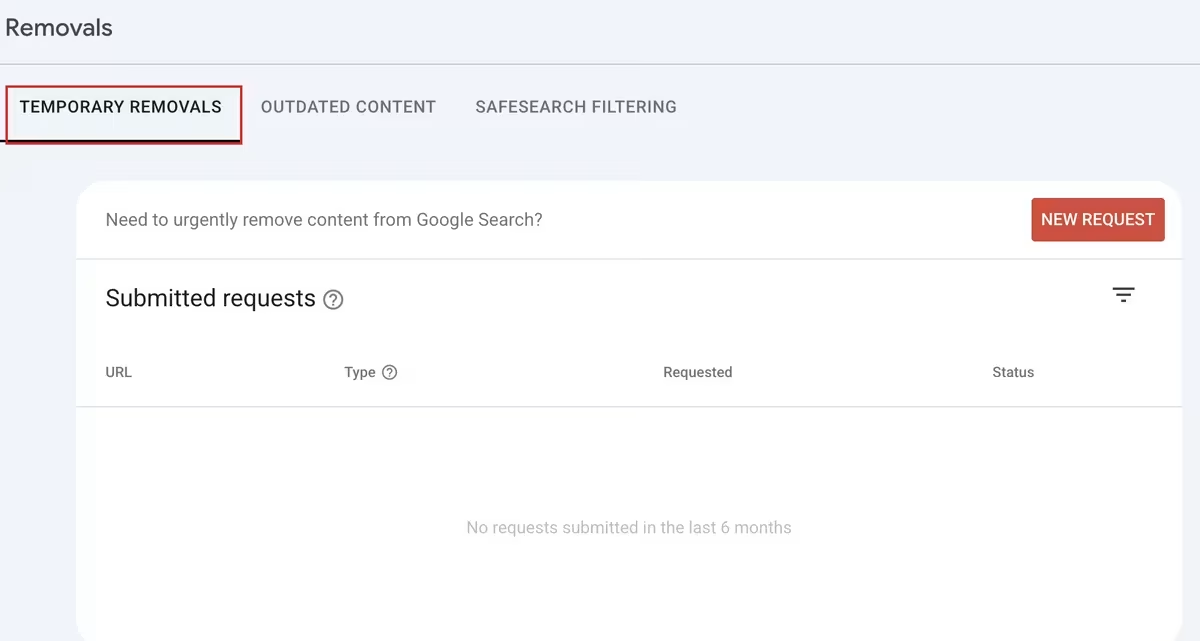
Considérez donc cette solution comme un frein d'urgence, jamais comme une solution définitive. Utilisez-la lorsqu'un élément sensible apparaît dans les résultats à ce moment précis, puis mettez immédiatement en place une solution permanente ; sinon, l'URL réapparaîtra dans six mois. Notre ancien guide sur Supprimer des URL des résultats de recherche Google traite de cet outil de manière plus approfondie.
Un détail tiré du document de Google que presque personne ne mentionne : il faut protéger toutes les variantes de l'URL, car différentes URL peuvent renvoyer vers la même page. Voici les exemples fournis par Google : exemple.com/chiots, exemple.com/CHIOTSet example.com/petchooser?pet=chiots. Enlever l'un d'entre eux et laisser les autres est une façon courante de croire que l'on a terminé alors que ce n'est pas le cas.
Le piège du fichier robots.txt qui empêche une page d'être désindexée
Ajouter noindex Le fait d'ajouter une balise à une page et de bloquer cette page dans le fichier robots.txt ne double pas votre protection, mais l'annule, car Googlebot doit explorer la page pour détecter la balise, et c'est justement le fichier robots.txt qui l'empêche de le faire. La balise n'est donc jamais lue et l'URL peut rester dans l'index.
Google met cette information dans un encadré intitulé “ Important ” dans sa propre documentation : “ Pour le noindex Pour que cette règle soit effective, la page ou la ressource ne doit pas être bloquée par un fichier robots.txt… le robot d'indexation ne verra jamais la noindex règle, et la page peut tout de même apparaître dans les résultats de recherche, par exemple si d'autres pages renvoient vers elle. ”
Et le Présentation du fichier robots.txt commence par préciser que ce fichier n'a jamais été conçu à cette fin : “ Ce n'est pas un moyen d'empêcher une page web d'apparaître dans Google. Pour empêcher une page web d'apparaître dans Google, bloquez son indexation à l'aide de noindex ou protéger la page par un mot de passe. ”
Voici ce qui se passe concrètement lorsque vous bloquez une page dans le fichier robots.txt alors que des liens pointent vers celle-ci. Google peut indexer l'URL sans jamais lire la page ; le résultat s'affiche donc avec l'URL, éventuellement le texte d'ancrage utilisé pour créer le lien, mais sans aucune description. Ce résultat peu esthétique, dépourvu de description, en est le symptôme classique.
Pourquoi la combinaison « noindex » et « Disallow » ne fonctionne pas
- Vous ajoutez une balise « noindex » à la page
- Vous devez également ajouter une règle « Disallow » dans le fichier robots.txt
- Googlebot respecte la directive « Disallow » et ne récupère jamais la page
- Il ne prend donc jamais en compte la balise « noindex »
- L'URL reste indexable et peut s'afficher sans description.
La solution est simple une fois qu'on y a pensé : laissez Googlebot explorer la page, conservez le noindex sur cette page, puis attendez que le robot d'indexation la réindexe. Ajoutez le bloc robots.txt plus tard, si vous le souhaitez toujours, une fois que la page aura effectivement disparu des résultats de recherche.
Quelle méthode de désindexation convient le mieux à votre situation ?
| Votre situation | Utilisez ceci | Pourquoi ? |
|---|---|---|
| La page existe et doit rester en ligne, mais elle ne doit pas apparaître dans les résultats de recherche. | noindex balise meta | Permet de conserver l'accessibilité de la page pour les utilisateurs, tout en la retirant des résultats de recherche. |
| Il s'agit d'un fichier PDF, d'une image ou d'un autre fichier non HTML | Balise X-Robots : noindex | Il n'y a pas d'en-tête HTML dans lequel insérer une balise meta. |
| Le contenu a disparu définitivement | 404 ou 410 | Suppression quasi totale, et cela fonctionne pour les moteurs de recherche qui ignorent la balise « noindex ». |
| Il s'agit d'un site privé, interne ou de test. | Protection par mot de passe | Cela ne dépend pas du fait qu’un robot d’indexation décide ou non de respecter une règle. |
| Il y a actuellement une information sensible dans les résultats. | L'outil de désinstallation, ainsi que l'un des éléments ci-dessus | Il le cache en moins d'une journée, mais seulement pendant environ six mois. |
| Cette page est une version allégée d'une autre page. | Redirection 301 ou URL canonique | Ne le désindexez pas. Regroupez-le et conservez ce qu'il a généré. |
Comment désindexer une page dans WordPress
Dans WordPress, vous ne modifiez pas les fichiers du thème : il suffit d'activer un commutateur par page dans le plugin de référencement que vous utilisez, et celui-ci génère le noindex balise meta dans la section pour vous.
- Rang Math: Ouvrez l'article ou la page, repérez le panneau latéral du plugin, accédez à l'onglet « Avancé », puis définissez la balise meta « Robots » sur « No Index ». Il s'agit d'une simple case à cocher, et c'est généralement la méthode la plus rapide dans la plupart des cas.
- Yoast SEO : Ouvrez l'article, repérez l'encadré Yoast, allez dans l'onglet “ Avancé ”, puis réglez l'option « Autoriser les moteurs de recherche à afficher cette page dans les résultats de recherche ? » sur « Non ». Même résultat, formulation différente.
- Des sections entières à la fois : Ces deux plugins vous permettent de définir « noindex » pour des types d'archives entiers (archives par balise, archives par auteur, pages paginées), qui sont généralement à l'origine du véritable gonflement de l'index.
Une fois que vous avez activé l'option, consultez le code source de la page et vérifiez que la balise s'y trouve bien. Les plugins peuvent entrer en conflit, les couches de mise en cache peuvent servir du code HTML obsolète, et une option que vous avez activée dans l'éditeur n'est pas la même chose qu'une balise reçue par Googlebot.
Combien de temps faut-il à Google pour désindexer une page ?
Tout dépend de la fréquence à laquelle Google explore cette URL, et cela peut prendre des mois. Ce n’est pas une réponse évasive de ma part, c’est la réponse officielle de Google : “ En fonction de l’importance de la page sur Internet, il peut s’écouler plusieurs mois avant que Googlebot ne revienne sur une page. ”
Vous verrez l'expression “ quelques jours ” revenir régulièrement dans ce sujet. Sur une page très fréquentée et bien référencée, c'est souvent vrai. Mais ce n'est pas le cas pour l'archive de balises oubliée que vous essayez de nettoyer, et cette page est justement le genre de page que Googlebot n'est pas pressé de revisiter.
Alors, faites la seule chose qui permet réellement de faire avancer les choses : ajoutez le balisage, puis demandez une nouvelle exploration via l'outil d'inspection des URL pour les URL qui vous intéressent. Pour quelques pages importantes, cela vaut la peine de faire ces clics. Pour 500 archives de balises, ajoutez la règle et armez-vous de patience.
Comment vérifier si la page a bien été désindexée
Deux écrans de la Search Console permettent de boucler la boucle : ils vous indiquent si Googlebot a détecté votre règle et s'il en a tenu compte.
La fonction « Inspection d'URL » vous indique ce que Googlebot a reçu. Vérifiez l'URL et ouvrez la vue HTML explorée, qui affiche la page exactement telle que Googlebot l'a récupérée. Si votre noindex Si cela ne figure pas dans ce code HTML, cela n'existe pas aux yeux de Google, peu importe ce qu'affiche votre navigateur. C'est précisément cette vérification que Google recommande à cette fin.
Le rapport d'indexation des pages indique que cela a fonctionné. Dans la section “ Pourquoi certaines pages ne sont-elles pas indexées ? ”, il existe une catégorie intitulée “ Exclues par la balise ‘noindex’ ”, et vos URL désindexées y sont classées une fois que Google les a traitées. Voici ce rapport concernant notre propre site.
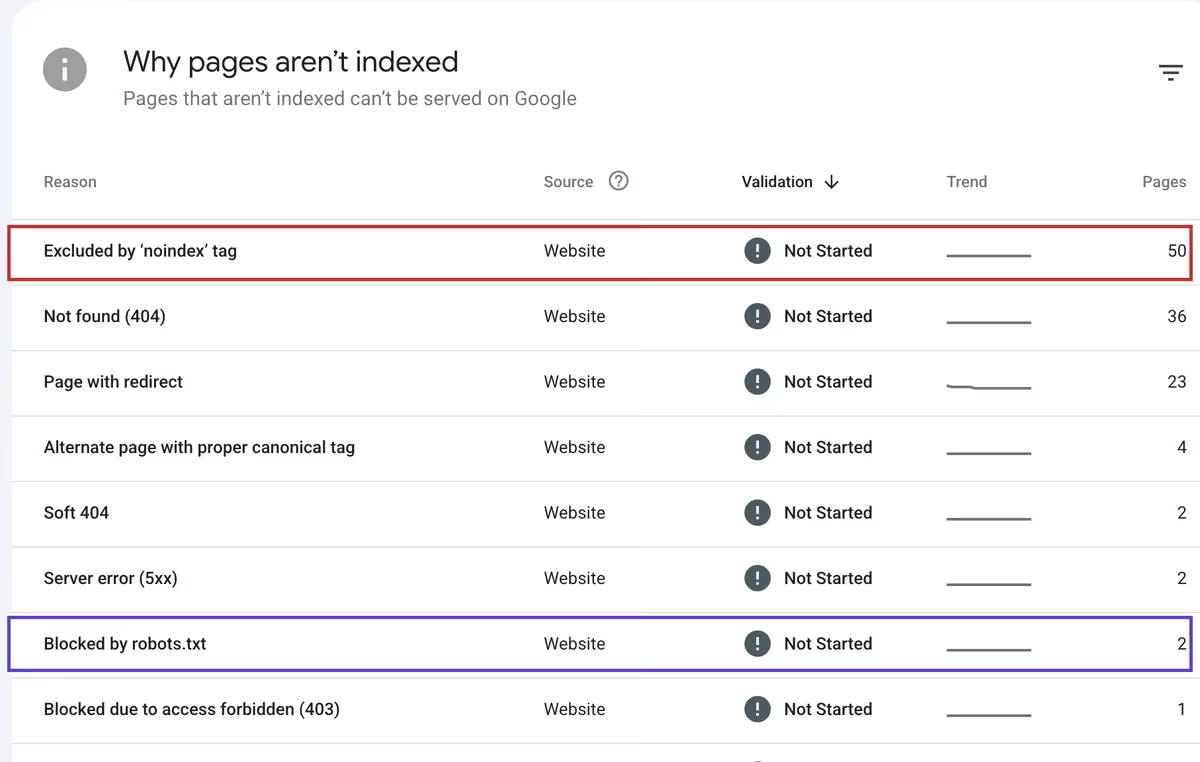
Remarquez les deux lignes de cette capture d'écran. La mention “ Exclue par la balise ‘noindex’ ” signifie que le système a fonctionné exactement comme prévu. La mention “ Bloquée par le fichier robots.txt ” signifie que Google n'a pas pu lire ces pages ; il ne peut donc appliquer aucune règle d'indexation à leur égard, et c'est dans ce compartiment que le problème apparaît sur un site réel.
Si le nombre total indexé varie et que vous ne comprenez pas pourquoi, nous vous expliquons comment interpréter correctement ce chiffre dans Le nombre de pages indexées dans Search Console a diminué.
404 ou 410 : cette différence a-t-elle de l'importance ?
En ce qui concerne la suppression définitive, les recommandations de Google considèrent les codes 404 et 410 comme interchangeables, et son guide de suppression vous invite simplement à supprimer le contenu sans faire de distinction entre les deux.
De nombreux professionnels préfèrent le code 410, estimant que le message “ Gone ” est plus explicite que “ Not Found ” et devrait permettre de supprimer l'URL plus rapidement. C'est un raisonnement logique, mais cela ne correspond pas à ce qu'indique la documentation.
Honnêtement, nous n'avons pas fait de tests à ce sujet, je ne vais donc pas vous dire quelle est la meilleure solution. Si votre serveur gère facilement le code 410, utilisez-le, vous n'y perdez rien. Sinon, un code 404 convient très bien et vous feriez mieux de consacrer vos efforts à quelque chose qui en vaut la peine.
Alors, quelle est la bonne méthode pour désindexer une page sur Google ?
Franchement, c'est à peu près le cas sur toutes les pages : il faut ajouter noindex, laissez la page accessible à l'exploration, demandez une nouvelle exploration si la page est importante, et consultez le rapport d'indexation des pages dans quelques semaines. L'outil de suppression est réservé aux véritables situations d'urgence ; si vous l'utilisez sans mettre en place de solution permanente, vous ne ferez que gagner six mois et vous vous exposez à une mauvaise surprise à l'avenir.
L'erreur que je constate le plus souvent est celle dont personne ne vous met en garde, et ce n'est pas de choisir la mauvaise balise. C'est de se tourner vers le fichier robots.txt parce qu'on a l'impression qu'il s'agit d'un blocage plus puissant et plus décisif, alors que c'est justement ce qui garantit que Google ne tiendra jamais compte de vos instructions.
Et avant toute chose, demandez-vous si cette page ne mériterait pas plutôt une redirection. La désindexation est facile à mettre en œuvre, mais impossible à annuler ; il est donc généralement plus judicieux de regrouper une page qui a encore de la valeur.
La page apparaît-elle toujours après que vous l'avez désindexée ?
Neuf fois sur dix, c'est soit le piège du fichier robots.txt, soit une exploration qui n'a pas encore eu lieu. Envoyez-moi l'URL et je vous dirai de quoi il s'agit. Vous pouvez nous contacter ou m'envoyer un courriel, et il vaut la peine de bien s'y prendre pour nettoyer votre index.
Journal des mises à jour
13 juillet 2026
- Publié pour la première fois, cet article s'oppose à la documentation actuelle de Google concernant le blocage de l'indexation, le fichier robots.txt et la suppression de pages. Il s'appuie sur des captures d'écran réelles de Search Console issues de notre propre site et propose une analyse honnête de la question opposant les codes d'erreur 404 et 410.
Vous souhaitez que nos publications apparaissent plus souvent sur Google ?
En un clic, Google affichera ce site dans votre rubrique « À la une ».

 Catégories et balises WordPress : comment choisir, et quel est le rôle de vos pages d'archives dans les résultats de recherche ?
 Comment corriger une page alternative à l'aide d'une balise canonique correcte, et quelles URL sont correctes
 Duplicata sans URL canonique choisie par l'utilisateur : comment Google sélectionne l'URL canonique, et quand ne pas intervenir
