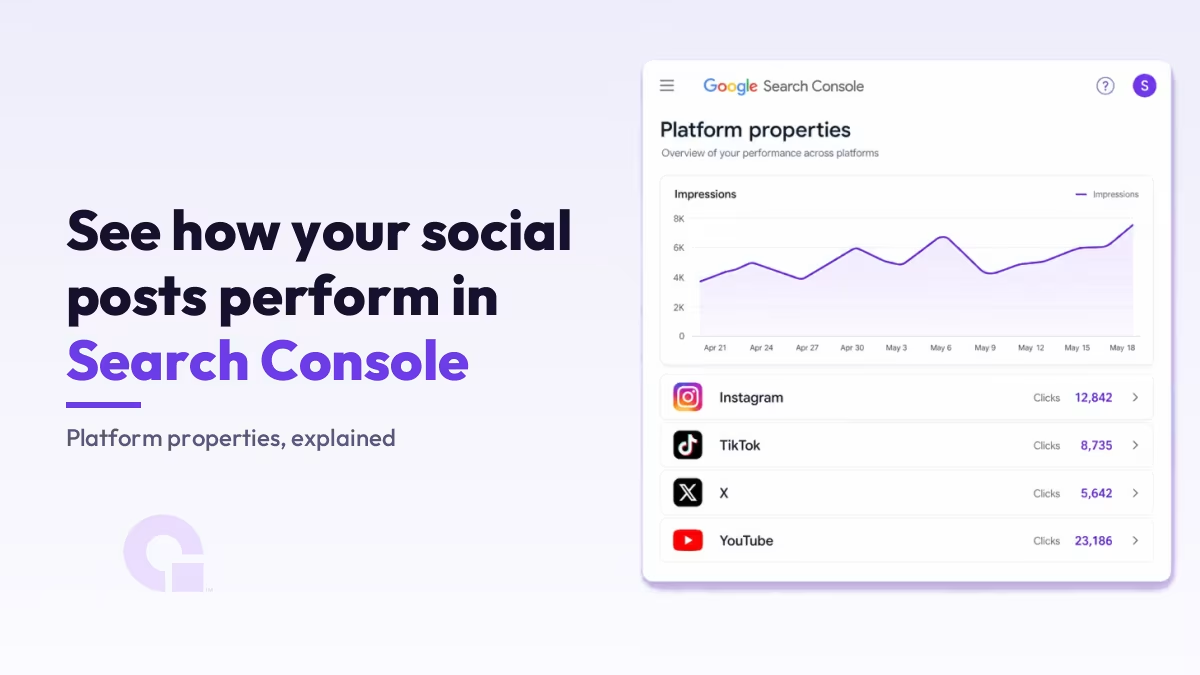
Google Search Console can now track your Instagram, TikTok, X, and YouTube posts. It is a new property type called platform properties, and you verify it by connecting the account, so you do not even need a website to use it.
Setup takes about two minutes and every guide out there covers it. The part worth your time is what you do with the data afterward, plus one unofficial report Google has not documented, and that is where I will spend most of this piece.
Key Takeaways
- Platform properties are a new Search Console property type, launched in July 2026, for your Instagram, TikTok, X, and YouTube content.
- You verify by authorizing the account, so a creator or brand with no website can now use Search Console.
- You get three reports, Performance, Insights, and Achievements, showing clicks, impressions, CTR, and average position across Google Search, Discover, and News.
- It measures Google surfaces only. It does not count the views, likes, or watch time your post gets on the platform itself.
- The real payoff is the query data: it shows which searches send people to your posts, which is a free page-gap list for your own site.
- The feature is rolling out gradually, so it may not have reached your account yet.
What platform properties are in Search Console
A platform property is a Search Console property type that reports on how your posts on Instagram, TikTok, X, and YouTube perform on Google. Google announced it on July 7, 2026, and framed it as a way for creators and publishers to see which searches lead people to their social and video content.
Those four platforms are the whole list at launch. There is no Facebook, no Pinterest, no LinkedIn yet.
One thing to get right, because the plain “Search Console” framing undersells it: the reports cover Google Search, Discover, and Google News, not Search alone. Google’s help documentation is explicit that the Discover and News reports only appear if your content actually gets traffic from those surfaces, so a new property may only show Search at first.
Who platform properties are for (no website required)
The genuinely new thing here is that you verify a platform property by authorizing the account, not by proving you control a domain. There is no DNS record to paste and no HTML file to upload.
That small mechanical change opens Search Console to a group that was locked out before. A creator who lives entirely on TikTok and YouTube, or a brand whose whole presence is an Instagram account and no real website, can now see Google search data about their own content. If you have ever set up a normal website property in Search Console, this is the same tool with a different front door.
You may also have seen Search profiles mentioned alongside this. That is a separate, personal creator view inside Search; platform properties are the reporting and analysis side you set up and verify, and that is what this guide is about.
How to add a platform property, step by step
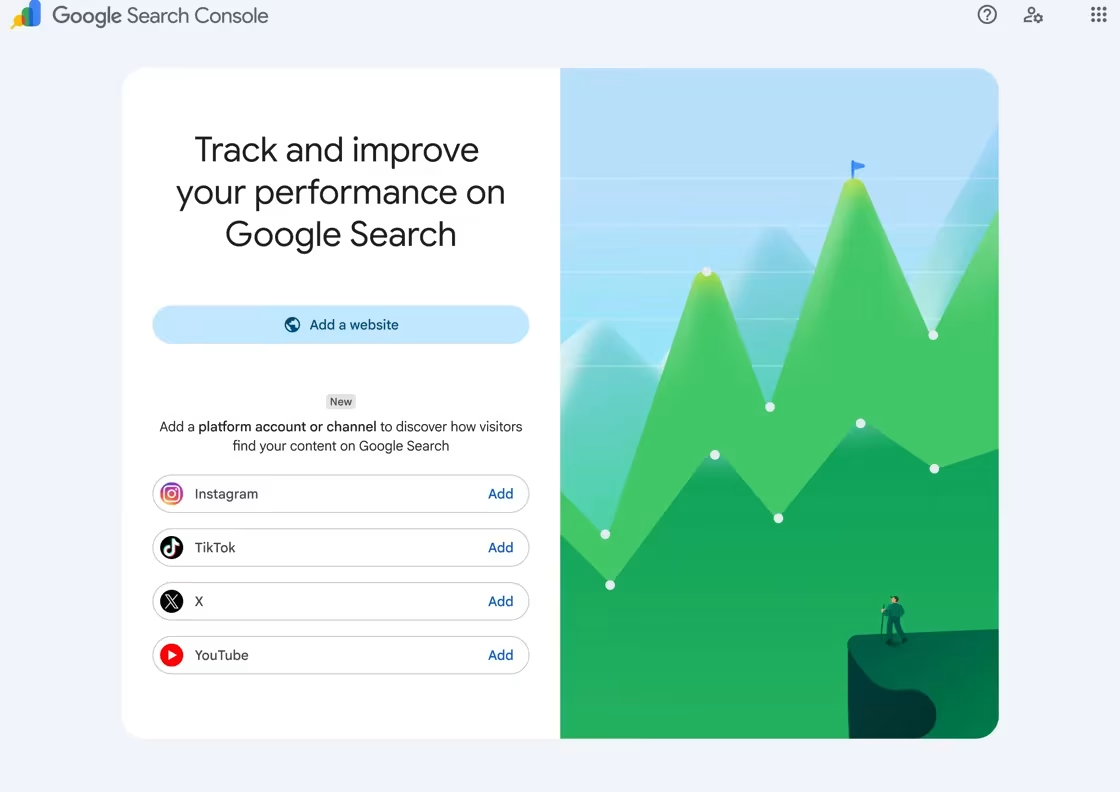
Adding one is quick: open the property selector, pick the platform, sign in to authorize it, and wait a few days for data. Here is the full flow.
Adding a platform property, start to finish
- Open Search Console and click Add property
- Choose your platform: Instagram, TikTok, X, or YouTube
- Sign in and authorize the account when Google prompts you
- Confirm ownership, then click Go to property
- Wait a few days for the reports to fill with data
Two honest expectations before you go looking for numbers. Ownership is checked periodically, so if the external login expires the property pauses until you re-verify, though Google keeps your history so you do not start from zero. And a brand new property shows empty charts for a few days while Google collects and processes the data, which is normal, not a fault.
The three reports you get from a platform property
Once data lands, a platform property gives you three reports. The Performance report is the one you will live in; the other two are lighter summaries built on top of it.
| Report | What it shows | What it is best for |
|---|---|---|
| Performance | Total clicks, impressions, average CTR, and average position, filterable by individual post and by query | Finding which posts and which searches actually drive traffic |
| Insights | A high-level view of recent trends, your top posts, and how people discover your account on Google | A quick weekly read without digging |
| Achievements | Milestones, such as passing a new clicks threshold in the last 28 days | Tracking progress over time |
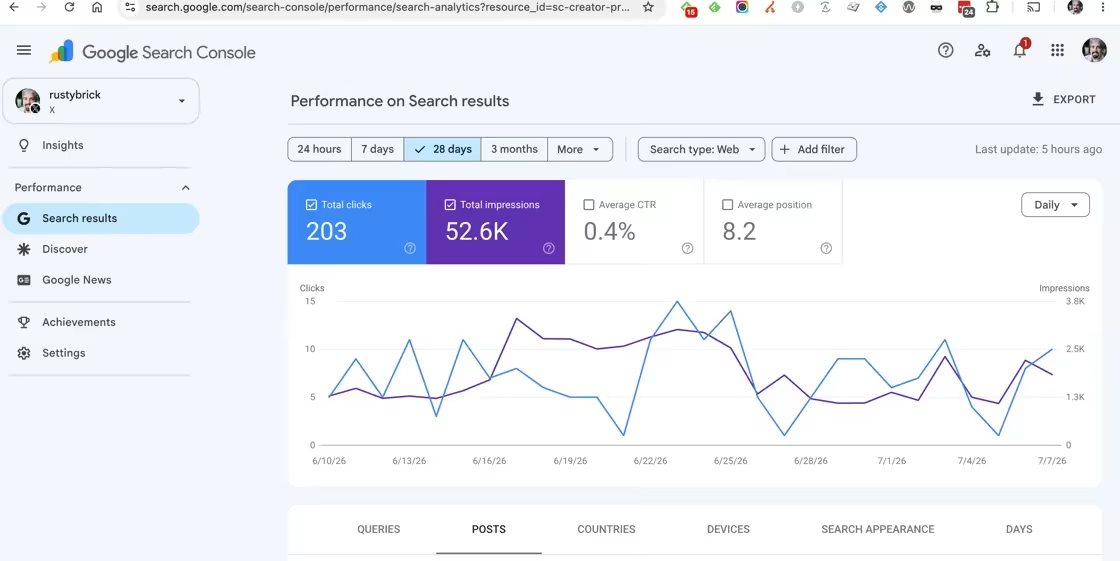
The Performance report is where the useful work happens, because it carries the query data. The default window is 28 days, and you can filter and sort to see which posts and which search terms bring the most traffic, then export it if you want to slice it elsewhere.
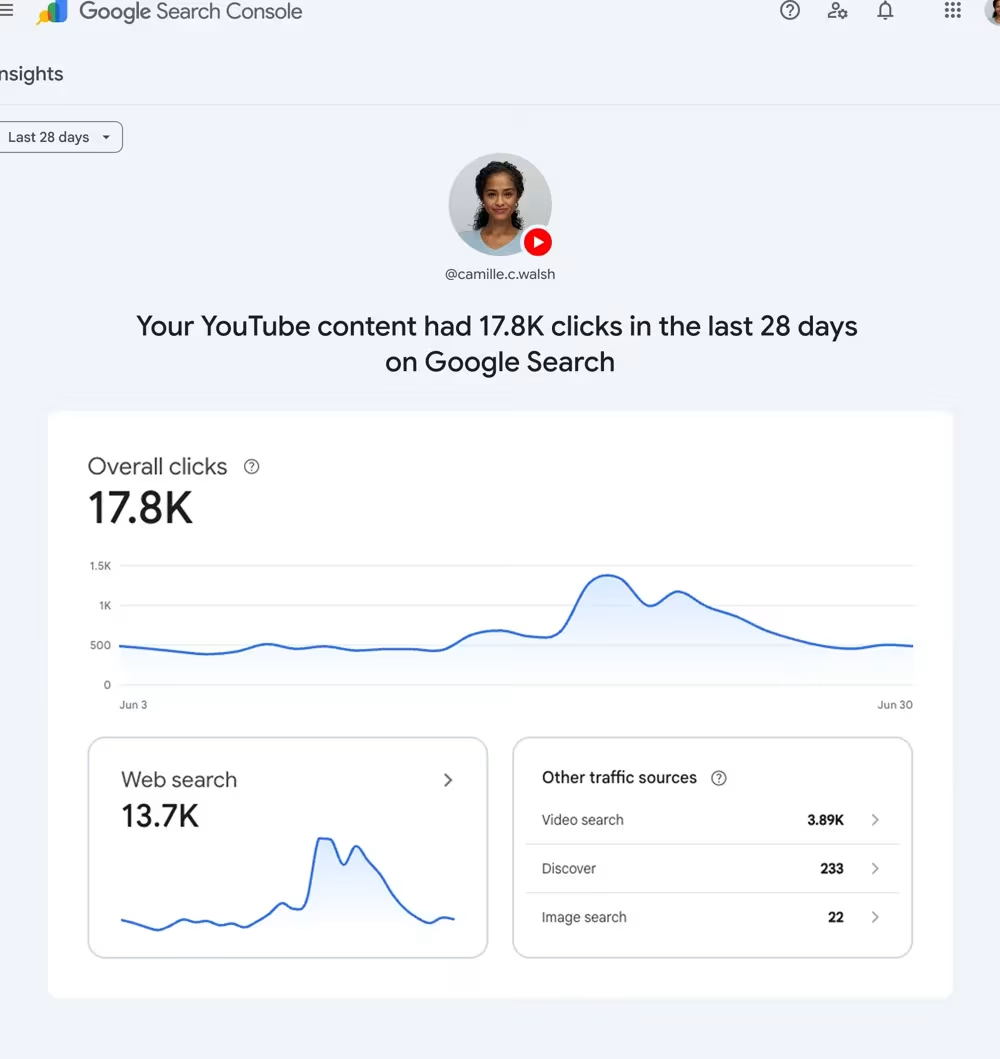
One quirk worth knowing on the Insights page: the top summary card counts all your clicks across Google, including web, image, video, and news, while the detailed lists underneath focus on web search only. So the big number and the breakdown below it can disagree, and that is by design rather than a bug.
What platform properties do not measure
This is the limit that keeps you from misreading the numbers: platform properties only show how your content performs on Google. They do not track what happens on the platform itself, so they will never show how many times your video was watched on TikTok or how many likes a post pulled on Instagram.
A couple of edge cases are handled sensibly. When an Instagram story shows up in Google results it counts as an impression, and a click on it counts as a click. And when a video is played inside Google’s own viewer, that still counts as a click, even though the user never left the results page.
Platform property versus a website property
If you already run a site in Search Console, the mental model is simple: a platform property reports on your social and video posts, a website property reports on your own pages, and the only real difference is how you prove ownership.
| Question | Platform property | Website property |
|---|---|---|
| What it tracks | Your posts on Instagram, TikTok, X, or YouTube | Pages on a website you own |
| How you verify it | Sign in and authorize the account | A DNS record, HTML file, or tag |
| Do you need a website | No | Yes |
| Surfaces covered | Google Search, Discover, and News | Google Search, Discover, and News |
Turn the query report into a build-a-page decision
Here is the part almost no write-up gets to, and it is the reason this feature matters for anyone who also owns a site. The queries landing on your social posts are a free list of search demand you can already see you are getting, and each one is a small decision: build a page on your own site for it, or let the social post keep the slot.
The reason this matters is ownership. A ranking Instagram post is Google sending traffic to a page you rent from Meta; the same query, answered on your own site, is traffic you own and can convert. So I read the query report as a shortlist of pages worth building, not just a vanity chart.
| What you see in the query report | What it usually means | The move |
|---|---|---|
| A commercial or product query sending clicks to your post | Real buying intent you do not yet own on your own site | Build or improve a page on your own site for that query |
| An informational query your post answers well | The post is doing the job; a thin page would just compete with it | Leave it, and let the social post keep the slot |
| A branded query (your name plus a topic) | People are searching for you specifically | Make sure your own site ranks for it too, so you are not renting the relationship |
| Lots of impressions but almost no clicks | You show up, but the title or angle is not landing | Rework the post, or answer the query properly on a page you control |
For an online store, this is genuinely valuable. A product query that keeps landing on your TikTok is demand your category or product page should be capturing, and it pairs naturally with getting the product feed and page details right so the page can actually rank. For a local business, the same read tells you which service or “near me” phrases to build a real page around.
One caution, because it is easy to overdo. Do not spin up a thin page for every query you see, or you will end up with a pile of near-duplicate pages that Google quietly files under crawled, currently not indexed. Build a page only when you genuinely have more to say than the post already does. And when you are reading the numbers, remember the usual trap that impressions can spike without clicks, so check the query is really converting attention before you invest in it.
The unofficial /ai AI performance report for platform properties
There is an unofficial way to open a generative AI performance report for a platform property, and Google has not documented it. You add /ai into the report URL, after “search-analytics” or “discover”, and the AI performance view loads for that property.
Credit where it is due: this was found by Kenichi Suzuki and spotted by Barry Schwartz Barry SchwartzFounder, Search Engine RoundtableFounder of Search Engine Roundtable and a long-running search industry news reporter, also News Editor at Search Engine Land.XLinkedInSearch Engine Roundtable, as reported on Search Engine Roundtable. The URL looks like this, with the bold part being the bit you insert:
https://search.google.com/search-console/performance/search-analytics/ai?resource_id=sc-creator-profile
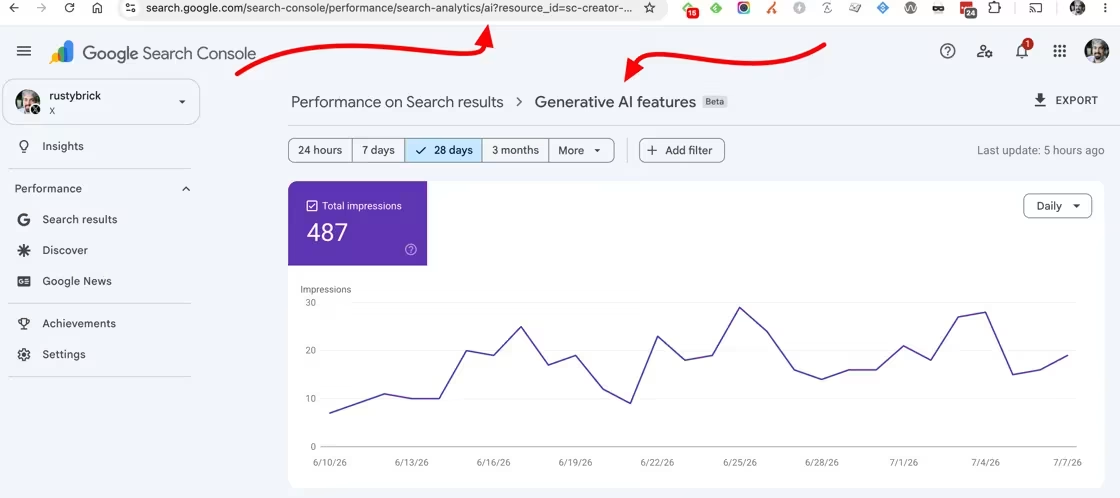
Two honest caveats. First, this is a trick, not a Google feature, and Schwartz says plainly that it works “at least for now”; it may stop working whenever Google decides, and it does not work on normal website properties. Second, I have not been able to confirm it first-hand, because the platform-property rollout has not reached my own account yet, so treat this as reported rather than tested and try it on your own property.
It is worth knowing because it is the platform-side cousin of the native report Google did ship for websites. If you want the documented version for your own site, that is the Search generative AI performance report for website properties; the /ai trick just surfaces the same kind of view for a platform property that the normal menu does not expose yet.
Why you might not see platform properties yet
If you go to add a property and the platform option is not there, you are not doing anything wrong. Google is rolling this out gradually over the coming weeks, so it simply has not reached every account.
For the record, it had not reached my own Search Console when I wrote this, which is exactly the uneven rollout Google describes. When it does land, expect a few days of empty charts while data accumulates, and give the Discover and News reports time to appear only if your content earns traffic there.
So, are platform properties worth setting up?
Honestly, yes, and it costs you almost nothing. If any real slice of your audience finds you through Google, connecting your accounts gives you query data you simply could not see before, and for a creator with no website it is the first proper view of how Google treats their content.
What I would not do is treat it as a scoreboard. The number that matters is not your total impressions, it is which searches are sending people to posts you do not own, because that list is the most honest content plan you will get for your own site. Set it up, read the query report with a builder’s eye, and the tool earns its two minutes many times over.
Want help turning that query data into pages that rank?
If you are not sure which of those queries deserve a page on your own site, contact us or email me and I will help you read the report and prioritize. The setup is easy; deciding what to build from it is the part that actually pays.
Want our posts to show up more often on Google?
One step & Google will surface this site in your Top Stories.