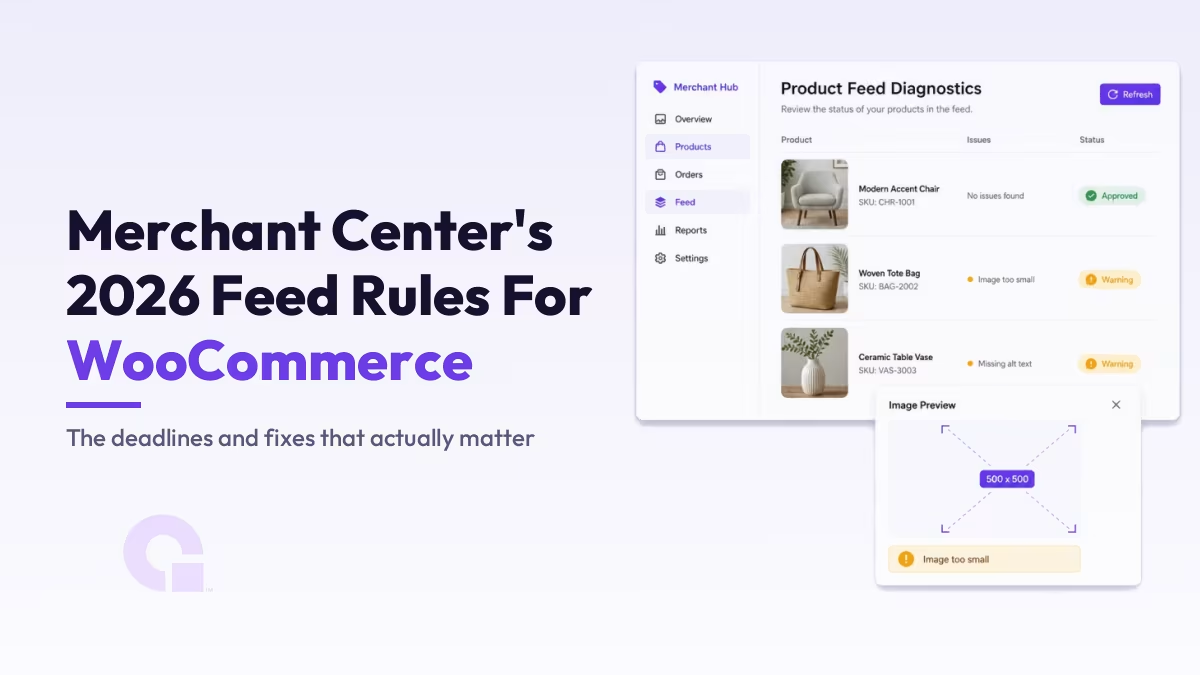
Google changed the Merchant Center product data specification in April 2026, and this round is not cosmetic: product images get a hard minimum size, product videos become a real feed attribute, and shipping data moves down to the product level. On top of that, the API your feed plugin talks to is being replaced this August.
If you run a WooCommerce store, most of this is fixable in an afternoon once you know what actually changed and which date matters for each item. That is what this guide covers, with every deadline verified against Google’s own announcements.
Key Takeaways
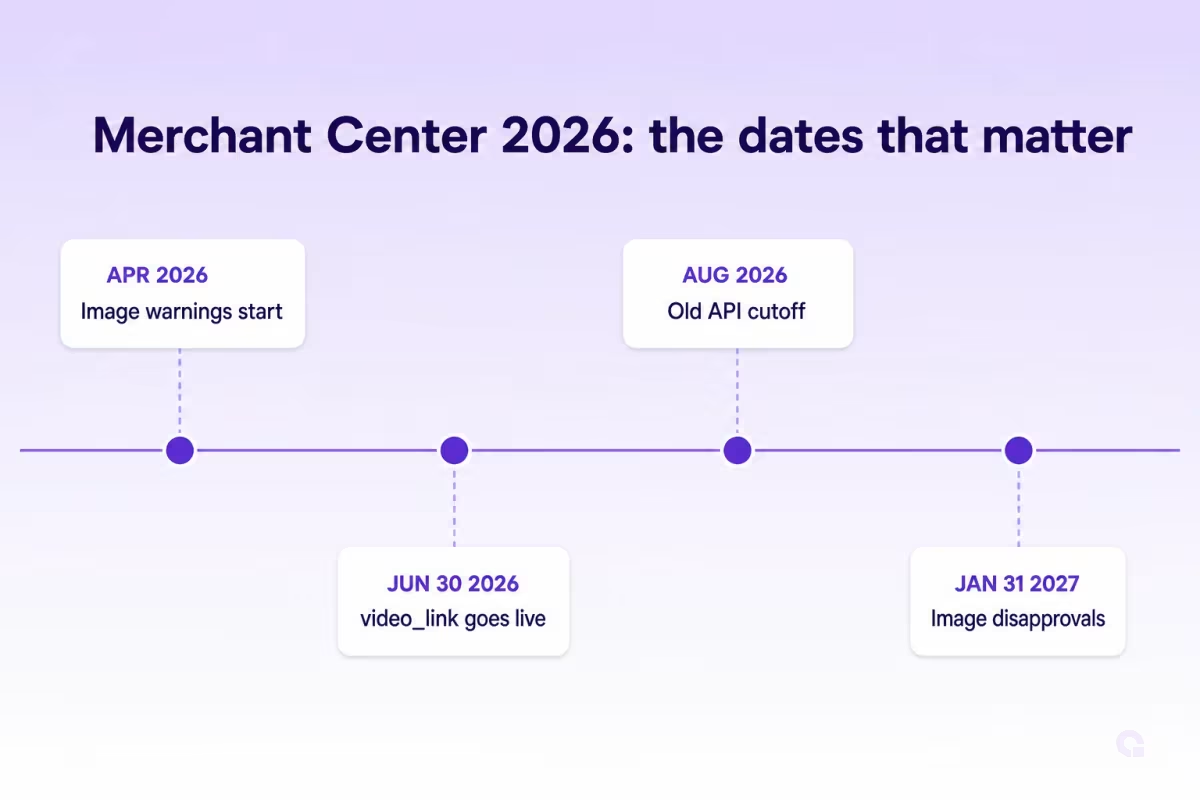
- Product images below 500×500 pixels have triggered warnings since April 14, 2026; enforcement (disapprovals) starts January 31, 2027
- The new video_link attribute went live for serving and policy validation on June 30, 2026; video errors block the video, not the product
- Shipping data moved to the product level: handling cutoff time, minimum order value, and loyalty shipping labels per product
- Google is retiring the legacy Content API in August 2026; keeping the Google for WooCommerce extension updated is what carries you through
- A video or image warning sits in the same “Needs attention” queue as a disapproval, so check it even when sales look normal
- Promotional text in a feed title (price, sale wording, your company name) is a documented disapproval trigger, even though the same words are fine in a page title
- Google auto-assigns every product a category, and it only accepts a google_product_category override in specific listed cases
- Since July 7, 2026, merchant listing structured data supports a category property and sale-duration dates, so the page can now express what the feed does
What changed in the 2026 Merchant Center product data specification
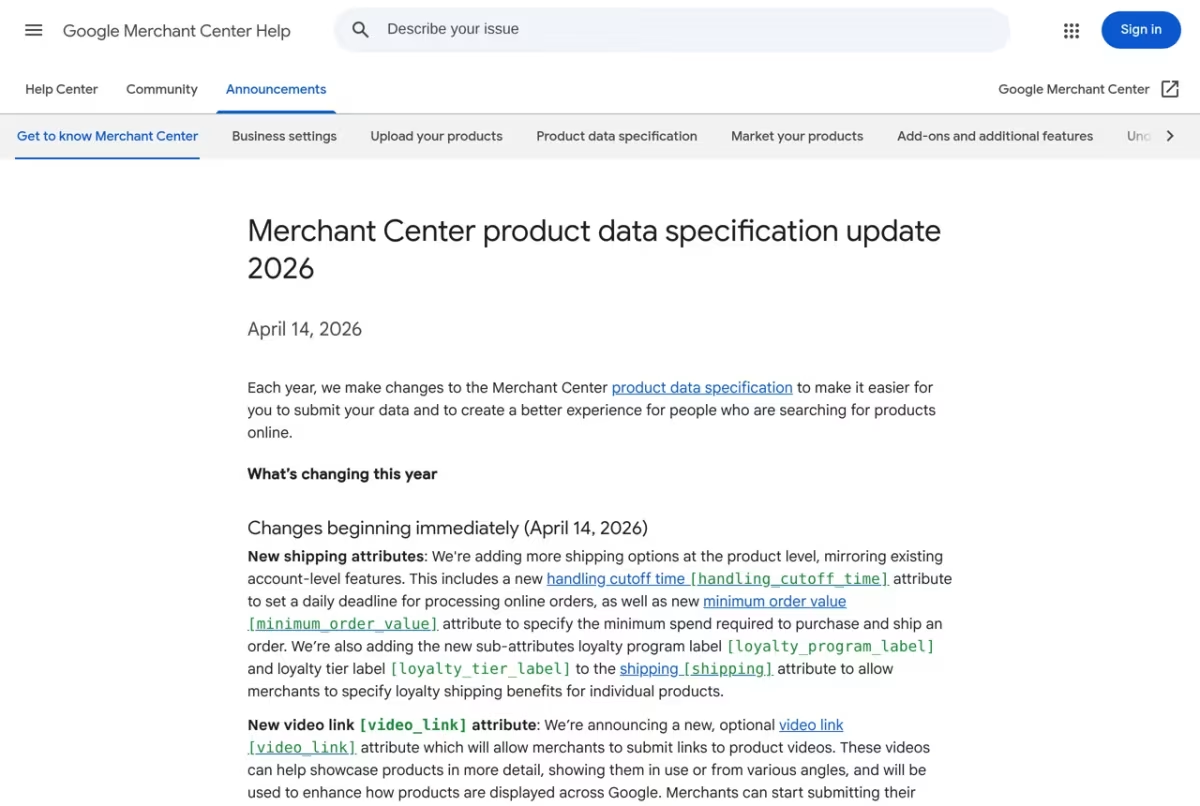
Google revises the product data spec every year, but most years the changes are new optional attributes nobody is forced to touch. The 2026 update, announced April 14, is different because one change carries a disapproval deadline and another rewires how your product data reaches Google at all.
Here is Google’s own announcement, which is worth reading in full since it is short and every date in this article comes from it.
| Change | Warning starts | Enforcement | Who needs to act |
|---|---|---|---|
| 500×500 px minimum for image_link and additional_image_link | April 14, 2026 | January 31, 2027 | Any store with old or small product photos |
| video_link attribute (product videos in the feed) | Technical errors from April 14, 2026 | Serving + policy validation from June 30, 2026 | Optional; stores with product videos |
| Product-level shipping: handling_cutoff_time, minimum_order_value, loyalty labels | Live April 14, 2026 | Optional, no deadline | Stores whose shipping reality varies per product |
| Content API for Shopping retired, replaced by Merchant API | Ongoing | August 2026 | Everyone syncing via a plugin or custom code |
The 500×500 image minimum: the one with a disapproval deadline
The minimum resolution for every product image, including additional images, rises to 500×500 pixels across all categories and marketing methods. Warnings have been running in Merchant Center since April 14, 2026, and enforcement begins January 31, 2027, at which point undersized images can take the listing down with them.
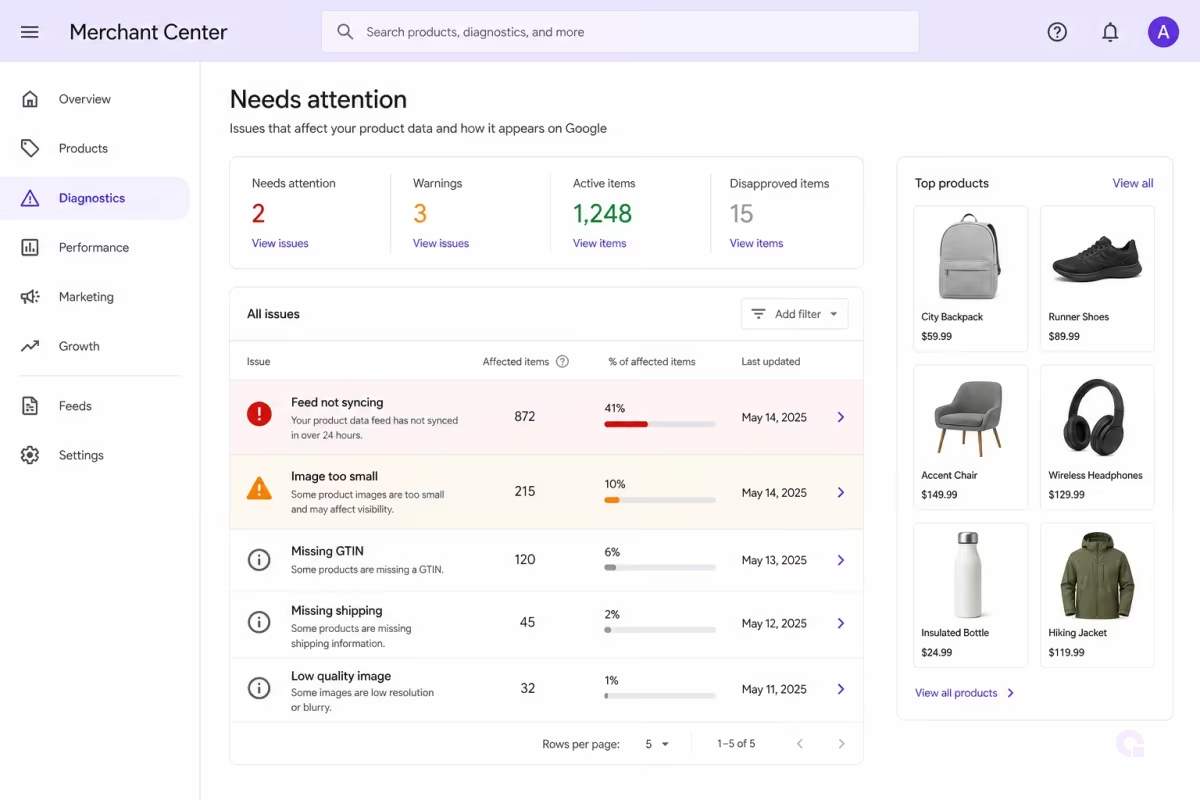
Google says it will auto-optimize some smaller images to keep products serving, and those get flagged in the Needs attention section too. I would not lean on that safety net; an upscaled thumbnail sells the product about as well as you would expect, and Google choosing your product imagery for you is not a position a store wants to be in.
To find what is affected: Merchant Center, then Products, then Needs attention, click View history and look for “Image too small for upcoming enforcement”. In WooCommerce, the usual offenders are old products whose only photo was uploaded years ago, variation images pulled from small swatches, and feeds configured to send a thumbnail size instead of the full image. Check what your feed plugin actually sends; the fix is often changing one image-size setting, not reshooting your catalog.
The video_link attribute: live since June 30, 2026
Product videos are now a first-class feed attribute. You could submit video_link from April 14, but June 30 is when submitted videos became eligible to serve and when Google started policy and quality validation on them.
The failure mode is gentle, which is why it is easy to ignore: a video that fails validation stops the video from showing, not the product. Still, if you have product videos sitting on YouTube or your CDN already, wiring them into the feed is cheap enhancement work, and video-carrying listings get more surface area in Google’s shopping experiences. Check the Needs attention section for video warnings after you add them.
Product-level shipping data: optional, but it fixes a real WooCommerce problem
The 2026 spec adds handling_cutoff_time (the daily order-processing deadline), minimum_order_value, and loyalty shipping labels as per-product attributes, mirroring what was previously account-level only.
This matters because account-level shipping settings lie for a lot of stores. A store shipping most items same-day but its bulky products in 3 days had to pick one story; now the bulky items can carry their own cutoff and the delivery estimates shoppers see stay honest. Nothing forces you to adopt these, but if your delivery estimates in Shopping have always been slightly wrong for a subset of products, this is the mechanism that fixes it.
Feed titles are not page titles, and promotional text gets products disapproved
Do not put price, sale wording, shipping or delivery text, or your company name in a feed title. Google’s title documentation lists this under Minimum requirements, and the consequence is stated plainly: “If you don’t follow these requirements, we’ll disapprove your product and let you know in your Merchant Center account.”
The exact rule, verbatim from Google’s title attribute documentation: “Don’t include promotional text. Don’t add information such as price, sale price, sale dates, shipping, delivery date, other time-related information, or your company’s name.”
I am spelling this out because the advice to stuff “cheap”, “sale” and “free shipping” into titles keeps circulating, and it is usually well-meant. It works on a page title, where you are writing for a search snippet and nobody disapproves anything.
The feed title is a different field with a different rulebook. Google’s doc says titles “don’t always need to be identical to the content on your landing pages” as long as they refer to the same product, so treating the two as one field is the mistake underneath the bad advice.
There is a second split inside the feed itself, and almost nobody mentions it. The title is really two attributes: [title] and [structured_title], and generative-AI-written titles belong in [structured_title] with digital_source_type set to trained_algorithmic_media.
If you send both, Google’s tie-break is explicit: “If you provide both the structured title [structured_title] and title [title] attributes, we’ll only use the title [title] attribute.” So an AI-generated title dropped into the plain [title] field is not just a spec violation, it is also the one Google will actually use.
One last piece of honesty about titles: a compliant title is an input, not a promise. Google’s own doc says it may promote key product attributes using content from your landing page, images, and other signals, so what a shopper sees is not always exactly what you sent.
How Google categorizes your products, and when google_product_category actually overrides it
Google assigns the category for you, automatically, on every product. The google_product_category attribute is the documented override, but Google only accepts that override in specific listed cases, so for most products the auto-assignment simply stands.
Straight from Google’s category documentation: “All products are automatically assigned a product category from Google’s continuously evolving product taxonomy.”
The cases where an override is accepted are narrow: enforcing category-specific attribute requirements (Apparel and Accessories, Mobile Phones, Software and similar), targeting Google Ads campaigns, and regulated categories. Outside those, sending the attribute does not reassign your product.
So if your products are landing in the wrong category, the lever is not the override. Google names it in the same breath: high-quality, on-topic titles and descriptions, plus accurate pricing, brand, and GTIN information are what drive correct categorization.
That is a more useful instruction than it looks. It means a miscategorized product is usually a data-quality symptom, and the fix is upstream in your product data, not in one more attribute bolted onto the feed.
The July 2026 schema additions: category and sale duration on the page
Google added two properties to merchant listing structured data on July 7, 2026: a category property, and sale-duration dates. Together they let your product page express in schema what your feed already expresses in attributes.
The category property accepts plain text or a CategoryCode object. Plain text is your own custom product type, the page-level twin of the product_type feed attribute. For a Google Product Category, you use CategoryCode, set inCodeSet to a Google Product Taxonomy URL, and set codeValue to the GPC ID (Google’s example is "2271") or the full path such as "Apparel & Accessories > Clothing > Dresses".
Google’s merchant listing documentation describes it as similar to the google_product_category attribute in product feeds, which is exactly why it matters here: the same taxonomy now has a home in your markup.
For sale periods, use validFrom for the start and either validThrough or priceValidUntil for the end, in ISO 8601 format. Google recommends providing both ends of the window, and including the time and timezone for accuracy.
These sit on the Offer node when the price there is the active sale price, or on a PriceSpecification node when the sale price is defined that way.
Here is the connection worth taking away, because it is the reason all three of these sections belong in one guide. Your feed carries the attributes, your page carries the schema, and your titles obey a third rulebook, and Google is steadily making the three describe the same product in the same vocabulary.
Get them agreeing with each other and you are doing the work that pays off across Shopping, Search, and the AI shopping surfaces at once. I go deeper into the markup side in my guide to product schema for AI shopping agents.
The Merchant API migration: the August 2026 deadline behind the scenes
The Content API for Shopping, which is how most feed plugins have talked to Merchant Center for a decade, is being retired in favor of the Merchant API; Google already shut down the API’s beta version in February 2026 and the legacy API’s sunset lands in August 2026. If you sync WooCommerce with the official Google for WooCommerce extension, the migration ships inside plugin updates, and WooCommerce’s guidance is to be on the current version by early August.
So the action item is unglamorous: keep the extension updated, and if your store pins plugin versions or someone built a custom Content API integration, treat this as a real deadline, because a feed that stops syncing does not disapprove products, it silently stops updating prices and stock. That failure mode is worse than a disapproval; you find out from angry customers, not from a dashboard warning.
The order to fix things in a WooCommerce store
Merchant Center 2026 compliance, in the order that de-risks fastest
- Update the Google for WooCommerce extension (or audit your custom API integration)
- Strip promotional text from feed titles, since that one disapproves products
- Pull the “Image too small” warning list from Needs attention
- Fix undersized images: feed image-size setting first, then real replacements
- Add product-level shipping data where your estimates have been wrong
- Wire existing product videos into video_link and watch for warnings
The ordering logic is simple: fix the things that can break your feed before the things that improve it. The API migration, the title rules, and the image minimum are the ones with teeth; shipping attributes and video are upside once the floor is safe.
One connection worth making: this compliance work is also the foundation for where feeds are heading. The same clean, complete product data that satisfies these 2026 rules is what agentic shopping surfaces read, which I covered in my breakdown of the Universal Commerce Protocol and product feeds.
So, how urgent are the 2026 Merchant Center changes really?
If this were my store, I would treat the extension update as this week’s job and the image audit as this month’s, then relax. The January 31, 2027 image enforcement sounds far away, but image fixes on a big catalog are slow, manual work, and warnings have already been accumulating since April; a 2,000-SKU store does not clear that list in a weekend.
The title rules deserve a faster look than that, though, because they are the only item here that can disapprove a product today rather than next January. If someone on your team has been “optimizing” feed titles the way they optimize page titles, that is a ten-minute check worth doing this afternoon.
The rest is opportunity rather than obligation. Product-level shipping and video_link reward stores that keep their feed honest and rich, and most competitors will do neither until something breaks. Yes, that is a boring edge; boring edges are the ones still working a year later.
Want Your Product Feed Checked Against the 2026 Rules?
Don’t hesitate to contact us or email me for a feed and Merchant Center review. Remember, a compliant, complete feed is the groundwork for everything your store does in Google Shopping and beyond.
Update Logs
14 Jul 2026
- Added the feed title rules, after seeing promotional wording recommended for product titles: Google’s documentation puts that under Minimum requirements and disapproves the product, and the title is really two attributes.
- Added how Google auto-assigns product categories, and the narrow cases where google_product_category is actually accepted as an override.
- Added the category and sale-duration properties Google introduced in merchant listing structured data on July 7, 2026, which is what lets the page express the same taxonomy the feed uses.
Want our posts to show up more often on Google?
One step & Google will surface this site in your Top Stories.