
Googlebot Only Reads the First 2MB of Your Page – Here’s What That Means for Your SEO

If your most important SEO elements are buried too deep in your HTML, Google might never even see them. Here’s exactly what’s going on and how to fix it – explained so simply that even your little cousin could follow along.
On March 31, 2026, Google’s own Search Central team dropped a blog post that pulled back the curtain on how Googlebot actually works behind the scenes. And honestly? It revealed some stuff that most SEO guides completely ignore.
The post is called “Inside Googlebot: demystifying crawling, fetching, and the bytes we process“ and if you care about your website showing up on Google, you need to understand what it says.
Here I’m going to break it down:
How Googlebot Crawls Your Page?
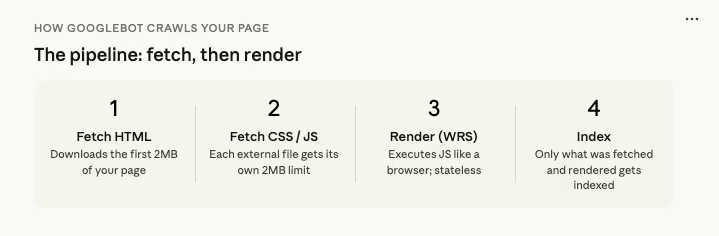
So when you see “Googlebot” in your server logs, that’s just Google Search knocking on your door. There are many other crawlers using the same infrastructure behind the scenes.
Why does this matter for you? Because each of these crawlers has its own settings including how much of your page it will actually read. And that brings us to the big revelation.
How Much of Your Page Google Reads? The 2MB Limit
Here’s the part that should make every website owner sit up and pay attention:
Googlebot currently fetches up to 2MB for any individual URL (not counting PDFs).
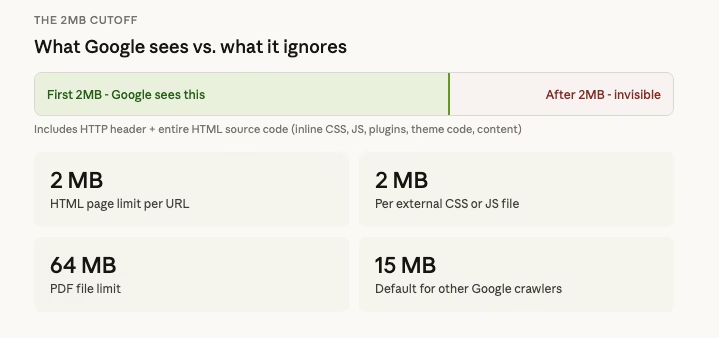
That means when Googlebot visits one of your web pages, it downloads the first 2MB of data including the HTTP header and then it stops. Everything after that 2MB cutoff? Google doesn’t see it. It’s not fetched, not processed, not indexed.
Now, 2MB sounds like a lot, right? For a simple blog post, it probably is. But here’s the thing that 2MB includes your entire HTML source code. That means all the code your theme generates, all the inline CSS and JavaScript your plugins inject, all the tracking scripts, all the schema markup, all the navigation menus, footers, sidebars… everything.
On a bloated WordPress site with ten plugins all injecting code into the <head> section? You’d be shocked how fast that 2MB fills up.
For PDF files, the limit is much higher; 64MB. And for other Google crawlers that don’t specifically set a limit, the default is 15MB. But for Google Search specifically, it’s 2MB. That’s the one that matters for your rankings.
So What Happens to the Stuff After 2MB?
Let me be blunt: it doesn’t exist to Google.
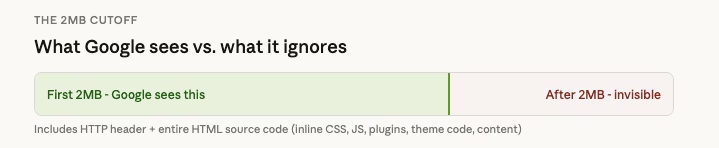
If your page’s important content, meta tags, canonical tags, structured data, or internal links are positioned below the 2MB mark in your HTML source code, Google will never see them. It’s like writing the most brilliant essay, but the teacher only reads the first two pages and throws the rest away.
This is why the order and structure of your code matters so much.
The Web Rendering Service (WRS) Is Stateless; And That’s a Big Deal
Once Googlebot fetches those first 2MB of your page, it hands everything off to something called the Web Rendering Service (WRS).
The WRS is like a stripped-down web browser. It processes your JavaScript, executes your client-side code, and tries to understand what your page actually looks like and says. It pulls in CSS and JavaScript files, processes XHR requests (those are the behind-the-scenes data calls your page makes), and figures out your page’s content and structure.
But here’s the catch; and this is crucial:
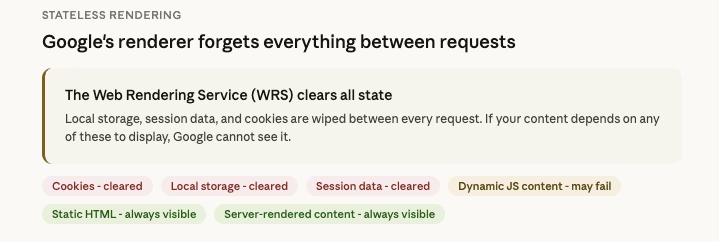
The WRS is completely stateless. That means it clears local storage and session data between every single request.
Imagine you visit a website, and every time you click a link, your browser forgets who you are. No saved logins. No cookies. No “remember me” settings. Nothing.
So if your website depends on cookies, session state, or local storage to display content, Google’s renderer can’t see that content. It’s invisible.
This is a huge deal for websites that use:
- Dynamic content that loads based on user sessions — Google won’t see it.
- Personalized content based on cookies — Google won’t see it.
- JavaScript frameworks that rely on local storage — the content might not render for Google at all.
If you’re running a WordPress site, this is another reason why your caching setup matters. You want to make sure the cached version of your pages that Google sees includes all the content you want indexed.
External CSS and JS Files Get Their Own 2MB Limit
Here’s another detail that flew under the radar for most people: external CSS and JavaScript files are fetched separately, and each one has its own 2MB limit.

So your HTML gets 2MB. Your main CSS file gets 2MB. Your JavaScript bundle gets 2MB. Each file is independently capped.
This is actually good news in one way – it means moving heavy CSS and JavaScript out of your HTML and into external files gives your HTML more breathing room. But it also means that if any single CSS or JS file exceeds 2MB, it’ll get cut off too, and your page might not render correctly for Google.
This is especially relevant if your site loads massive JavaScript bundles (looking at you, single-page applications built with React or Angular). If that JS file gets truncated, the code that builds your page content might never execute, and Google sees a blank page.
Why This Makes the Order of Your Code So Important
Think of your HTML document like a letter. Googlebot reads it from top to bottom, and it’s only going to read the first 2MB. So what you put at the top matters enormously.
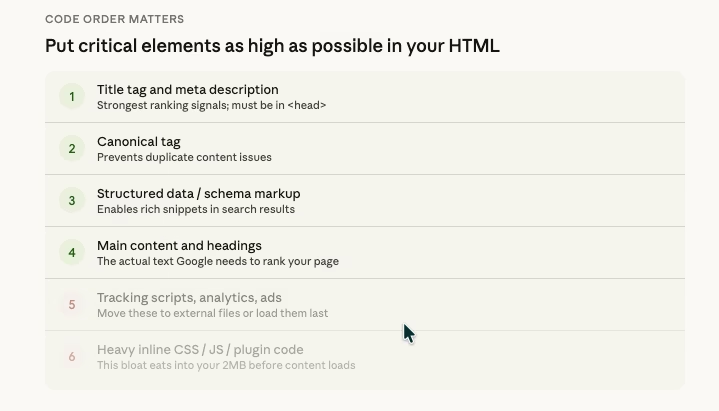
Here’s what should be as HIGH as possible in your document:
- Title tag — This is one of the strongest ranking signals. If it’s buried deep in your code, Google might miss it.
- Meta description — This is what often shows up as the snippet in search results.
- Canonical tag — This tells Google which version of a page is the “real” one. If Google can’t see it, you could have duplicate content issues.
- Structured data (Schema markup) — This helps Google understand what your page is about and can get you rich snippets in search results.
- Hreflang tags — If you have a multilingual site, these tell Google which language version to show to which users.
- Your main content — The actual text and headings that you want Google to rank.
And here’s what should NOT be clogging up the top of your HTML:
- Massive inline CSS blocks
- Huge JavaScript snippets
- Tracking code for ten different analytics tools
- Unnecessary plugin-generated code
Why Some CMS Platforms Are Better Than Others (Out of the Box)
This is something that rarely gets talked about in SEO circles, but it’s incredibly important: the CMS (Content Management System) you use directly affects how your HTML is structured.
WordPress, for example, is fantastic but its flexibility is also its weakness. Every plugin you install can inject code into your page’s <head> or <body>. A poorly coded theme might dump massive CSS blocks inline instead of loading them as external files. Before you know it, your actual page content doesn’t start until deep into the HTML.
On the other hand, a well-optimized WordPress setup with a lightweight theme (like GeneratePress, Kadence, or Blocksy), minimal plugins, and properly configured caching can produce incredibly lean HTML that gets your important content to Googlebot fast.
This is also why WordPress hosting and performance matter so much. A good hosting provider combined with proper optimization means cleaner, faster-loading code.
A Simple Checklist: How to Make Sure Google Sees Your Most Important Stuff
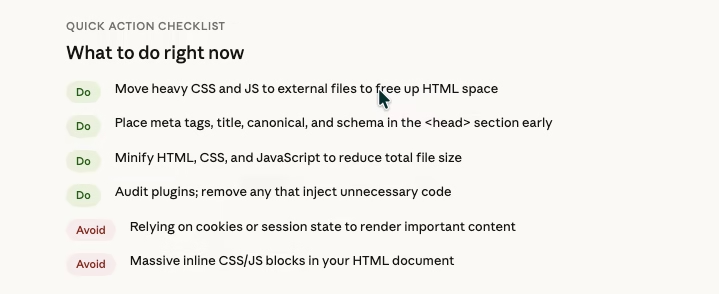
Here’s a practical, easy-to-follow action plan:
Check your page size. Right-click on any page of your website, click “View Page Source,” and look at how big the HTML file is. If it’s approaching 2MB, you have work to do.
Move CSS and JavaScript to external files. Don’t let your theme or plugins dump huge blocks of code directly into your HTML. External files get their own 2MB allowance.
Put critical tags at the top. Your title, meta description, canonical, and structured data should be in the <head> section, as high up as possible.
Minify your code. Use a tool or plugin to compress your HTML, CSS, and JavaScript. This reduces file size without changing functionality.
Audit your plugins. Every plugin on your WordPress site potentially adds code to your pages. Deactivate anything you don’t truly need, and check if the remaining ones are injecting unnecessary code.
Don’t rely on cookies or sessions for important content. Remember, Google’s WRS clears everything between requests. If your content needs a login or a cookie to appear, Google can’t see it.
Submit and maintain a clean sitemap. Make sure Google can find and crawl your important pages efficiently.
Monitor your server logs. Google’s blog post specifically recommends this. If your server is slow to respond, Googlebot will back off and crawl your site less frequently.
This is What an ON Page SEO should Also Care.
Here’s the uncomfortable truth: most on-page SEO advice stays at the surface level. They’ll tell you to add keywords to your title tag, write a compelling meta description, use H2 and H3 headings, and add alt text to images. And yes, all of that matters.
But none of that matters if Google never sees it.
If your title tag is positioned after 2MB of plugin-generated junk code, it’s invisible. If your structured data sits at the bottom of a bloated HTML file, Google doesn’t know it exists. If your canonical tag is buried beneath inline CSS from three different page builders, you might as well not have one.
The real edge in SEO isn’t just about what you write; it’s about understanding the infrastructure your content passes through before Google even evaluates it. It’s about understanding how crawl budgets work and making sure every byte counts.
The Bottom Line
Google just gave us a rare peek behind the curtain, and the message is clear:
Your HTML structure matters. The order of your code matters. The size of your files matters though 2MB is way more to reach the limit normally.
Every single byte that Googlebot fetches is a byte that could contain your most important ranking signals or a byte wasted on unnecessary code that pushes your actual content beyond the cutoff.
In a world where everyone is fighting for the same keywords and the same rankings, this kind of technical knowledge is what separates the websites that dominate from the ones that wonder why they’re stuck on page 5.
Get in touch with WpConsults today and let’s make sure your website is built to rank.
Change Logs:
1. Posted on March 31 2026;
Discover more from WpConsults
Subscribe to get the latest posts sent to your email.


