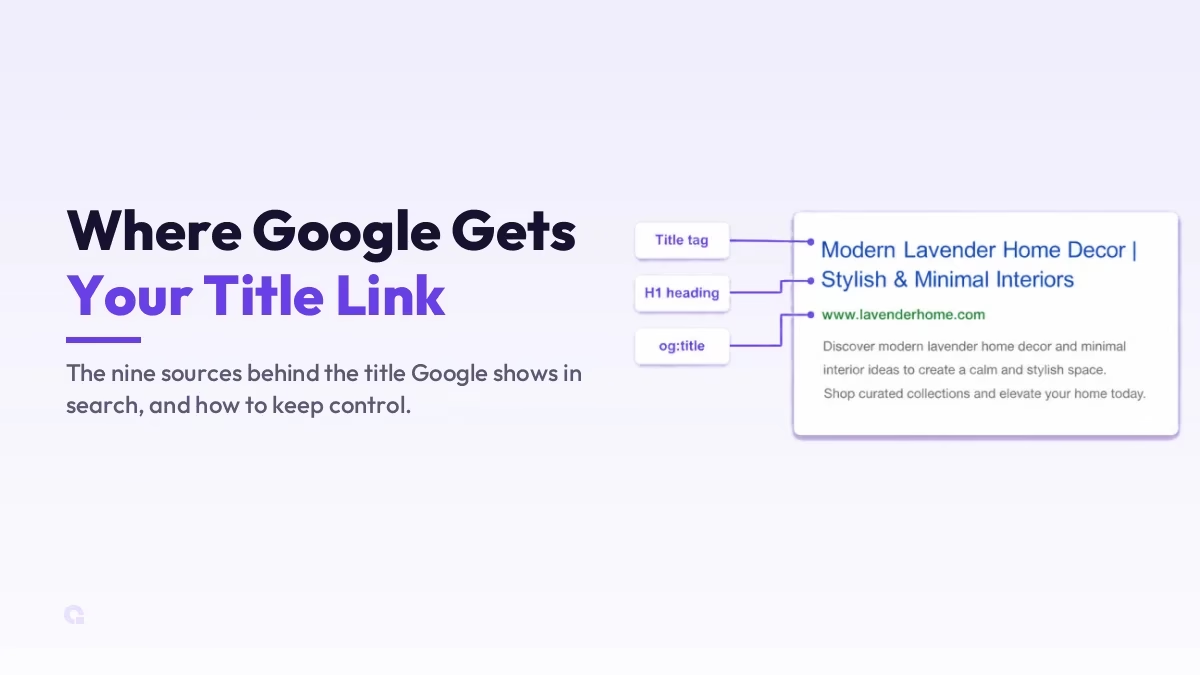
The Google title link is the clickable blue headline of your result in search, and most people assume it comes straight from their <title> tag. It does not, at least not always. Google builds that title from nine different sources, and it will swap your tag for something else the moment it decides your tag is weak, stale, or unclear.
So this is not really a list to memorise; it is about understanding what Google pulls from, why it sometimes overrides you, and how to keep your own title the one that wins. Get that right and you control the first thing a searcher reads about your page.
Key Takeaways
- Google uses nine sources to build the title link, not just your
<title>tag. - The
<title>element is still the primary source and the one you have the most direct control over. - Google rewrites your title when it is half-empty, obsolete, inaccurate, boilerplate, or has no clear main heading.
- One clear, distinctive
<h1>that matches your title tag is the simplest way to keep control. - Anchor text and links pointing to your page can become your title when Google cannot read your page well.
What actually feeds your Google title link
Google has been clear that the title link is generated automatically, using both the content on your page and references to it from around the web. According to Google’s own title link documentation, there are nine sources it can draw from. Here they are, with what each one means for you in practice.
| Source | What it means for you |
|---|---|
Content in <title> elements | The primary source, and the one you set directly. Keep it descriptive and unique per page. |
| Main visual title on the page | The big headline a reader sees first. Google checks it matches your title tag. |
Heading elements, especially <h1> | Your <h1> is a strong signal of the page’s real topic. Use one clear H1. |
Content in og:title meta tags | Your Open Graph title, mostly for social. Keep it consistent with the title tag. |
| Other large, prominently styled text | Anything visually shouting \”I am the title\” can get pulled in. Style your real title to stand out. |
| Other text contained in the page | If your title is weak, Google may grab a relevant phrase from the body instead. |
| Anchor text on the page | Descriptive internal links help Google read the page’s subject correctly. |
| Text within links that point to the page | How other sites link to you (off-page anchor text) can become your title. |
WebSite structured data | Helps Google settle your site name, which often sits beside the title in results. |
Notice the pattern: the first half is content you place on the page, and the last few are signals other people send about your page. That second group matters because if Google cannot crawl your page properly, it falls back on off-page anchor text to write your title for you. That is also why descriptive internal links and off-site SEO signals quietly shape how your result reads.
Why Google rewrites your title even when your tag looks fine
Here is the part most \”9 sources\” posts skip, and it is the part that actually loses you clicks. Google does not just read your title tag and print it. When it spots a problem, it generates a replacement from one of the other sources, and you do not get a vote. These are the specific issues that trigger a rewrite, straight from Google’s documentation.
- Half-empty titles. A tag like
| Site Namewith no real title; Google fills the gap from your headings or prominent text. - Obsolete titles. Your visible page says \”2026 admissions\” but the title tag still says \”2024\”; Google trusts the fresher visible date.
- Inaccurate titles. The tag does not match what the page is actually about, so Google rewrites it to fit the content.
- Micro-boilerplate. The same generic title repeated across many pages (think a TV show with no season number); Google adds the detail it can detect.
- No clear main title. Several headings share the same size and weight, so Google guesses, usually grabbing the first one.
- Language or script mismatch. The title is in a different language or alphabet from the body; Google picks text that matches the page.
Every one of these is avoidable, and that is the good news. A rewrite is almost always Google telling you your title and your page disagree with each other. Fix the disagreement and the rewrite usually stops.
How to keep your title tag the one that wins
You cannot force Google to use your exact title, but you can remove almost every reason it would override you. A few practical moves, each tied to why it matters.
Give every page a unique, descriptive <title> so Google never has to guess, and make sure it genuinely matches the page content so it does not read the tag as inaccurate. Keep one clear <h1> that lines up with that title, styled to stand out, because when your visible title and your tag agree, Google has no reason to look elsewhere. Avoid duplicate or boilerplate title tags across pages, since repeated titles are one of the most common rewrite triggers.
In WordPress you do not edit the raw <title> by hand; an SEO plugin like Rank Math or Yoast generates it from a template, which is exactly where you set a clean, per-page title and keep your og:title consistent with it. For your site name beside the title, add WebSite structured data so Google settles on the brand name you want. And keep your internal and inbound anchor text descriptive, because the way pages link to you (your Open Graph and link signals included) feeds the same title-building system.
Remember that Google has to recrawl and reprocess the page before any title change shows, which can take days or weeks. So after you fix a title, give it time before you judge whether the fix worked.
So which source should you actually focus on?
Honestly, the title tag is still where your effort should go. It is the primary source, the one you control directly, and the one Google reaches for first; the other eight mostly exist as fallbacks for when your tag fails. So I would not lose sleep over og:title or structured data on a normal blog post, beyond keeping them consistent.
That said, do not treat the other sources as noise either. Your <h1> and your anchor text are the safety net Google uses when something goes wrong, so a clear heading and descriptive links are cheap insurance. Get the title tag right, keep the page agreeing with it, and the Google title link you wrote is almost always the one that shows.
Update Logs
28 Jun 2026
- Refreshed against Google’s current title link documentation, added the specific reasons Google rewrites your title, and a clearer verdict on where to focus.
Want our posts to show up more often on Google?
One step & Google will surface this site in your Top Stories.