

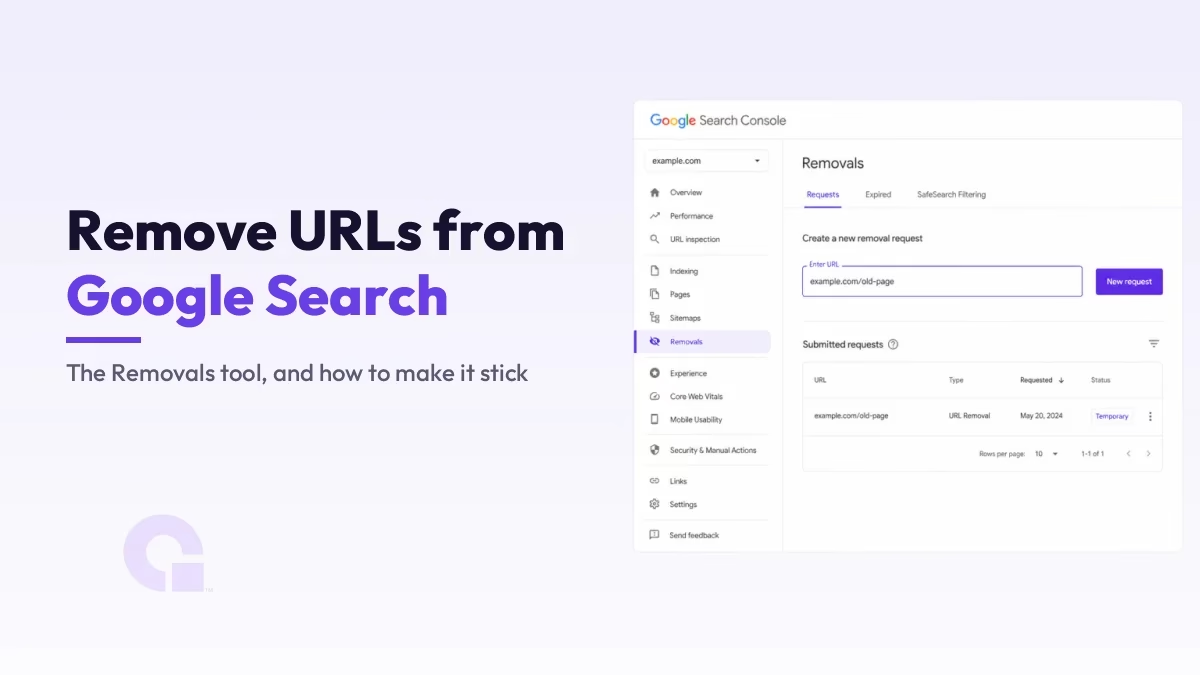
Vous pouvez supprimer une URL des résultats de recherche Google en quelques minutes à l'aide de l'outil « Suppression » de la Search Console, mais voici le hic que la plupart des guides omettent de mentionner : cette suppression est temporaire ; elle masque la page pendant environ six mois, et non de manière définitive. Pour que la suppression soit définitive, vous devez également modifier la page elle-même.
Je vais vous présenter ci-dessous, étape par étape, le fonctionnement de l'outil « Supprimer », puis vous montrer comment transformer un masquage temporaire en masquage permanent, et ce qu'il faut faire lorsque la page appartient à quelqu'un d'autre.
Principaux enseignements
- L'outil « Suppression » de la Search Console masque une URL à Google pendant environ six mois ; il s'agit d'une mise en attente temporaire, et non d'une suppression définitive.
- Pour supprimer définitivement une page, associez cet outil à un
noindexajouter une balise, ou supprimer la page pour qu'elle renvoie un code 404 ou 410. - Le fait de supprimer une URL des résultats de recherche ne supprime pas le contenu du Web ; la page existe toujours à cette adresse.
- Cet outil ne fonctionne que pour les propriétés que vous avez validées dans Search Console.
- Pour une page dont vous n'êtes pas le propriétaire, utilisez plutôt l'outil « Contenu obsolète » ou adressez une demande relative à la vie privée ou à des questions juridiques.
- Vérifiez le résultat à l'aide d'un
site :Recherchez l'URL exacte.
Ce qu'il faut savoir avant de commencer
Search Console fournit des informations sur les URL indexées ; l'outil de suppression permet donc de contrôler si une URL apparaît dans Google, et non si la page existe. La suppression d'une URL la masque dans les résultats, mais la page reste en ligne à son adresse et reste accessible à toute personne disposant du lien.
Tout aussi important : la demande de suppression principale est temporaire. Google masque l’URL pendant environ six mois, et une fois ce délai écoulé, la page peut réapparaître dans les résultats de recherche si elle est toujours en ligne et indexable. C’est pourquoi il vaut mieux considérer cet outil comme une suspension d’urgence qui vous fait gagner du temps pour mettre en place une solution définitive, que j’aborderai après la présentation étape par étape.
Comment supprimer des URL de la recherche Google dans Search Console
Commencez par vous connecter à Google Search Console avec le compte propriétaire du site. Vous devez disposer d'une propriété vérifiée pour utiliser cet outil ; si vous en possédez plusieurs, sélectionnez précisément celle qui contient l'URL que vous souhaitez supprimer.
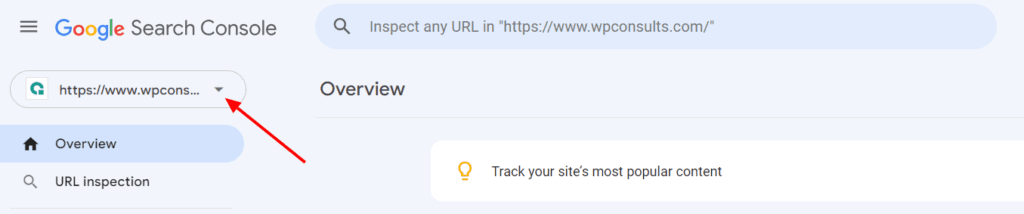
Dans la barre latérale de gauche, ouvrez la Déménagements section. C'est ici que sont regroupées toutes les demandes de suppression ; vous pouvez donc également consulter les demandes antérieures et leur statut actuel.
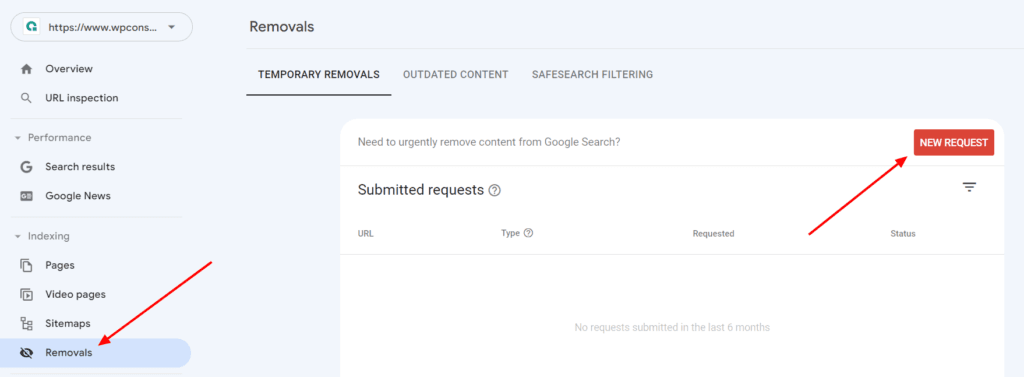
Cliquez sur Nouvelle demande en haut à droite, et une boîte de dialogue s'ouvre dans laquelle vous devez saisir l'URL. Si vous rencontrez également le problème courant “ L'URL n'est pas sur la propriété ”, consultez mon guide sur Correction de l'erreur « URL non définie dans la propriété » Ça clarifie les choses.
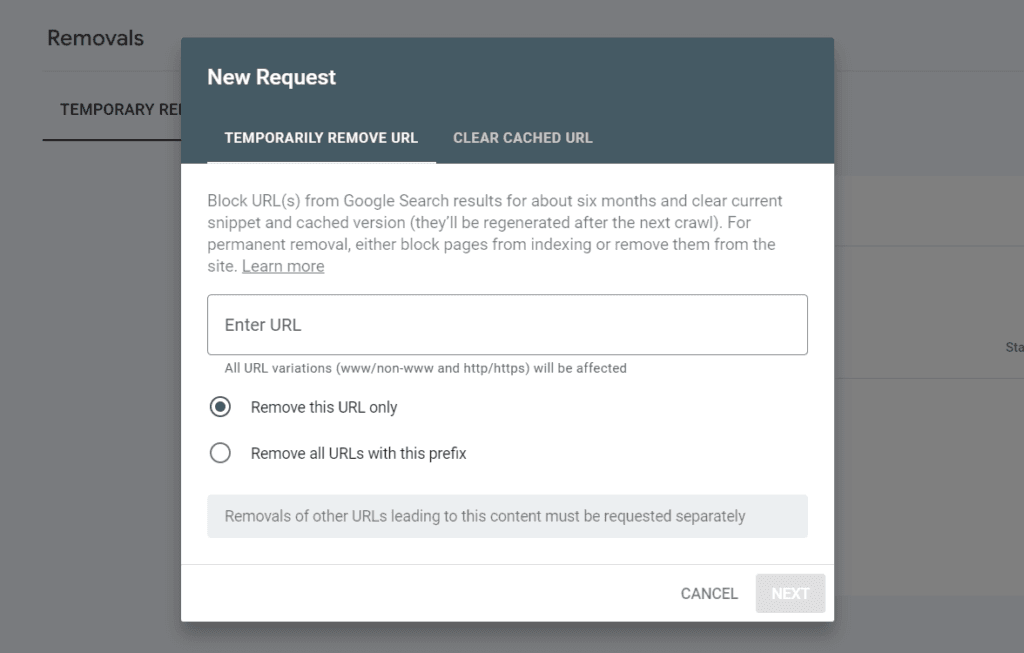
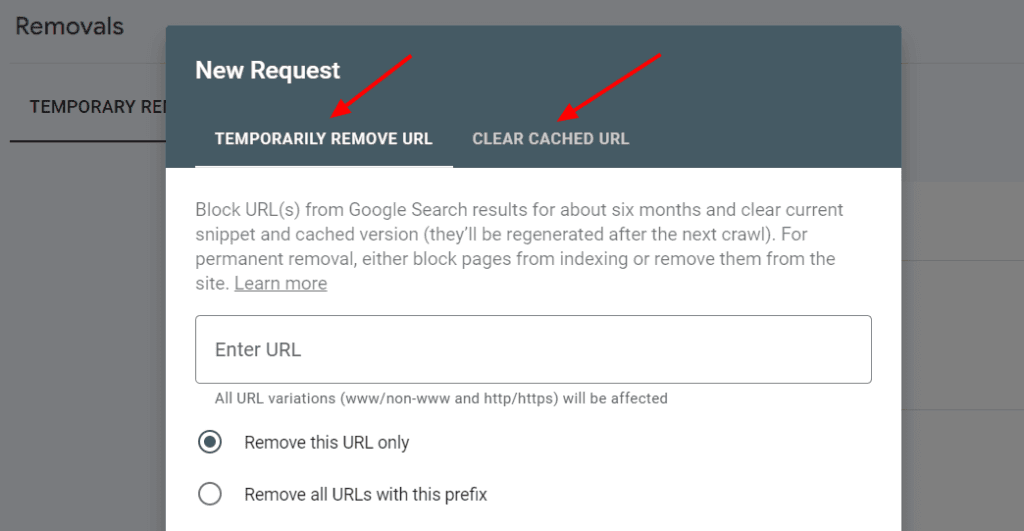
Saisissez l'URL complète, en commençant par https://, et copiez-la à l'identique, y compris les paramètres, car Google considère chaque variante comme une page distincte. Choisissez ensuite ce que vous recherchez. Supprimer temporairement l'URL masque la page dans les résultats et efface sa copie mise en cache pendant environ six mois. Vider le cache de l'URL Cela ne fait qu'actualiser l'extrait et le cache une fois que vous avez déjà modifié la page, et cela n'a aucune incidence sur le référencement ni sur l'indexation.
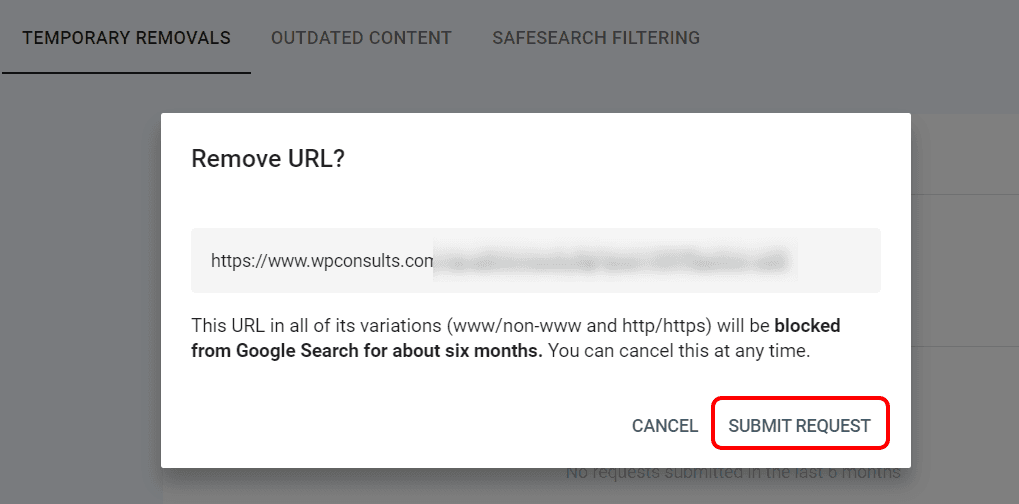
Vérifiez l'écran de confirmation afin de savoir exactement ce qui va se passer, puis cliquez sur Soumettre une demande. Votre demande est ajoutée à la liste des demandes en attente, et Google la traite généralement en un jour ou deux environ.
De retour dans la liste des déménagements, vous verrez que le statut passe à Supprimé quand ça marche. Les autres statuts parlent d'eux-mêmes : Expiré signifie que les six mois sont écoulés, Annulé cela signifie que quelqu'un l'a retiré, et Échec Cela signifie généralement que l'URL était erronée ou qu'elle relève d'une autre propriété.
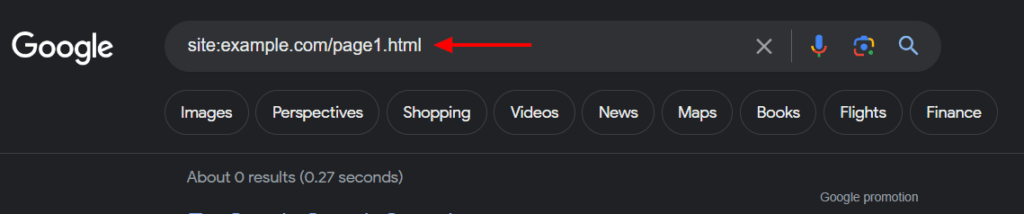
Pour vous en assurer, lancez une commande site : rechercher l'adresse exacte, par exemple site:exemple.com/ancienne-page, et vérifiez qu'aucun résultat n'apparaît.
Rendre la suppression définitive
Cet outil ne suffit pas à lui seul à empêcher une page d'apparaître dans Google ; vous devez donc, pendant cette période de six mois, envoyer un signal durable à Google. Il existe deux méthodes fiables pour y parvenir, et votre choix dépendra de votre volonté de voir cette page rester en ligne ou non.
Si la page doit rester en ligne mais ne pas apparaître dans les résultats de recherche, ajoutez un noindex la balise meta « robots » (ou l'en-tête X-Robots-Tag) et assurez-vous que la page n'est pas bloquée dans le fichier robots.txt, car Google doit explorer la page pour détecter l'attribut « noindex ». Google explique cela dans son guide consacré à Empêcher l'indexation avec « noindex ». Si la page ne doit pas exister du tout, supprimez-la afin qu’elle renvoie un code 404 ou, mieux encore, un code 410. Le code 410 indique que la page a “ disparu définitivement ”, ce que Google prend en compte plus rapidement ; j’explique cette différence dans mon analyse de 410 et autres codes d'état.
Ne bloquez pas l'URL dans le fichier robots.txt en espérant qu'elle disparaisse des résultats de recherche. Le fait d'empêcher l'exploration peut en réalité faire apparaître l'URL telle quelle dans les résultats, sans extrait, et cela empêche Google de détecter votre balise « noindex » ; cela joue donc en votre défaveur dans ce cas précis.
Supprimer une page dont vous n'êtes pas le propriétaire
L'outil de suppression ne fonctionne que sur les sites que vous avez validés ; vous ne pouvez donc pas l'utiliser sur une page appartenant à un autre site. Si une page que vous ne contrôlez pas a déjà été modifiée ou supprimée, mais que Google affiche toujours l'ancienne version, utilisez l'outil public Supprimer le contenu obsolète outil permettant de demander à Google de l'actualiser.
S'il s'agit d'informations personnelles, comme un numéro de téléphone divulgué ou un numéro d'identification exposé, ces demandes doivent être traitées via la procédure de suppression des informations personnelles de Google, qui sont évaluées au regard de la protection de la vie privée. Et si la page existe toujours et héberge ce contenu, la véritable solution consiste à contacter le propriétaire du site ou, lorsque cela se justifie, à engager une action en justice, car Google peut masquer un résultat mais ne peut pas supprimer la page d'un tiers.
Alors, comment faire pour supprimer définitivement une page ?
À mon avis, il faut considérer l'outil « Removals » comme une première étape, et en aucun cas comme une solution complète. Utilisez-le pour masquer instantanément un contenu sensible dès sa publication, puis ajoutez immédiatement un noindex ou renvoyer un code 410 sur la page elle-même, de sorte qu'une fois les six mois écoulés, il ne reste plus rien à réafficher.
Si vous n'utilisez que l'outil, la page revient discrètement plus tard ; si vous ne modifiez que la page, celle-ci peut rester dans les résultats pendant des semaines, le temps que Google la réindexe. Les deux méthodes combinées sont rapides et donnent des résultats durables, ce qui est justement ce que vous recherchez.
La page apparaît-elle toujours dans Google ?
Si vous avez supprimé l'URL et ajouté une balise « noindex » ou un code d'état 410, mais qu'elle apparaît toujours dans les résultats de recherche, nous contacter ou m'envoyer un courriel et je t'aiderai à en trouver la raison. L'objectif étant d'avoir une page qui ne figure pas dans les résultats de recherche, il vaut donc la peine de vérifier qu'elle reste bien exclue.
Journal des mises à jour
1er juillet 2026
- Nous avons recentré le contenu sur le point essentiel, à savoir que l'outil « Suppression » n'est qu'une solution temporaire, et avons ajouté la solution définitive (noindex ou 404/410), une section consacrée à la suppression des pages dont vous n'êtes pas propriétaire, ainsi qu'une note expliquant pourquoi le blocage via le fichier robots.txt peut se retourner contre vous.
Vous souhaitez que nos publications apparaissent plus souvent sur Google ?
En un clic, Google affichera ce site dans votre rubrique « À la une ».



Merci Abdullah, cela m'aide à résoudre mon problème.
Merci, Benedict, de m'en avoir fait part ; cela me motive à publier davantage de contenu utile.