

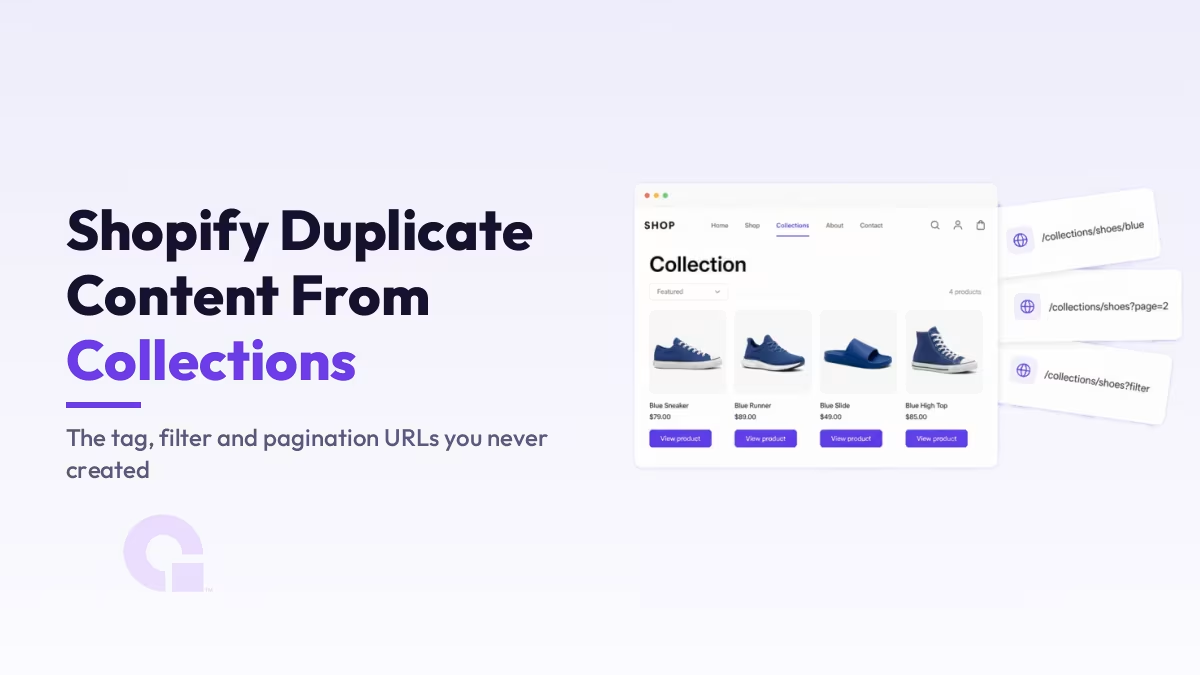
Die meisten doppelten Inhalte bei Shopify stammen nicht von Ihnen. Ihr Shop generiert sie selbstständig anhand von Tags, Shop-Filtern und Paginierung, und jede dieser URLs ist eine echte Seite, die Google crawlen und indexieren kann.
Die gängigen Lösungen gehen in einem wichtigen Punkt völlig daneben, und ich werde Ihnen den Live-Beweis dafür zeigen. Nicht jedes Duplikat sollte gelöscht werden – eines davon sollte sogar hervorgehoben werden.
Wichtigste Erkenntnisse
- Shopify erstellt automatisch doppelte Kollektions-URLs aus Produkt-Tags, Shop-Filtern und der Paginierung – zusätzlich zu den bekannten
/Kollektionen/x/Produkte/yProduktdopplungen. - Die Standard-„robots.txt“-Datei von Shopify blockiert
sort_by, Tag Kombinationen (das+Muster) sowie zwei gemeinsam verwendete Filter. Es blockiert weder eine einzelne Tag-URL noch einen einzelnen Filter noch?page=2. - Eine URL mit einem einzigen Tag wie
/kollektionen/alle/Fanartikelgibt den HTTP-Status 200 zurück, zeigt eine vollständige Produkttabelle an und enthält einen selbstreferenzierenden kanonischen Link, sodass es sich um eine eigenständige, indexierbare Seite handelt. - Auch paginierte Seiten sind auf sich selbst als kanonische Seiten festgelegt, und in Googles eigener Dokumentation heißt es, dass Seite 2 nicht auf Seite 1 als kanonische Seite festgelegt werden soll.
- Einige Tag-URLs weisen eine echte Suchnachfrage auf und sollten daher in entsprechende Sammlungen aufgenommen werden, anstatt pauschal mit „noindex“ gekennzeichnet zu werden.
- Die „robots.txt“-Datei ist bei jedem Shop anders, da sie bearbeitet werden kann. Überprüfen Sie daher Ihre eigene unter
yourstore.com/robots.txtBevor Sie einer Liste vertrauen – auch meiner.
Woher die doppelten Kollektions-URLs bei Shopify eigentlich stammen
Shopify erstellt automatisch doppelte Kollektions-URLs aus drei Quellen: Jedes Produkt-Tag in einer Kollektion erhält eine eigene URL, jeder Filter in der Shop-Oberfläche fügt eine weitere hinzu, und jede dieser Seiten wird paginiert. Das Ergebnis ist eine Kollektion, die sich unbemerkt in Dutzende nahezu identischer Seiten aufteilt, die dieselbe Überschrift und denselben Einleitungstext teilen.
Nehmen wir eine “Schuhe”-Sammlung mit 12 Tags und einem Farbfilter. Allein die URLs der Tags liefern Ihnen /Kollektionen/Schuhe/blau, /Kollektionen/Schuhe/Laufschuhe, und noch zehn weitere, von denen du keine einzige selbst entworfen hast.
Füge den Filter hinzu, und du erhältst /collections/shoes?filter.v.option.color=blue. Anschließend wird jede dieser Listen in ?page=2, ?Seite=3, und so weiter.
Niemand in Ihrem Team hat diese Seiten erstellt, daher behält auch niemand in Ihrem Team sie im Auge. Genau aus diesem Grund schleicht sich der Crawl-Overhead auch bei ansonsten gut geführten Shops ein.
Wie aus einer Sammlung Dutzende von URLs werden
- Sie erstellen eine Kollektion: /collections/shoes
- Jedes Produkt-Tag fügt eine URL hinzu: /collections/shoes/blue
- Jeder Storefront-Filter fügt eine URL hinzu: ?filter.v.option.color=blue
- Jede dieser Seiten ist paginiert: ?page=2, ?page=3
- Jede davon ist eine crawlbare Seite mit derselben Überschrift und derselben Einleitung
Hier gibt es eine kleine Ironie, die die Suche schwieriger macht, als sie eigentlich sein sollte. Wenn man nach diesem Begriff sucht, beantwortet Googles KI-Übersicht eine ganz andere Frage und erklärt einem, wie man Eine Sammlung duplizieren im Shopify-Adminbereich, was jedoch nicht das Problem ist, das Sie haben.
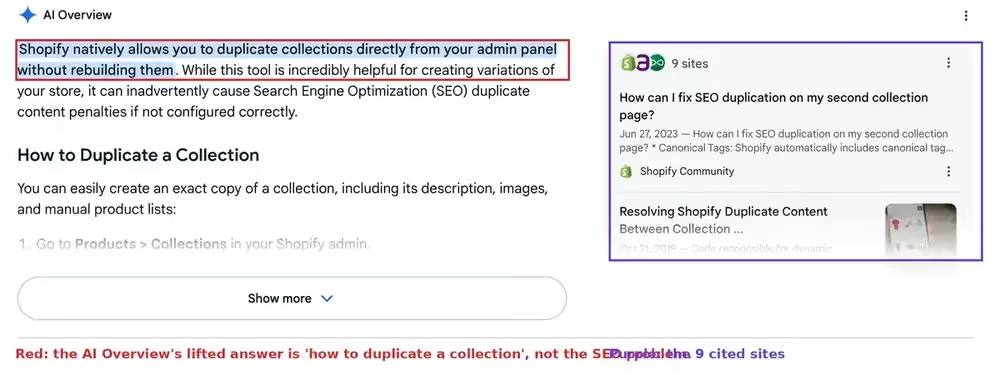
Was die Standard-„robots.txt“-Datei von Shopify blockiert und was weiterhin gecrawlt werden kann
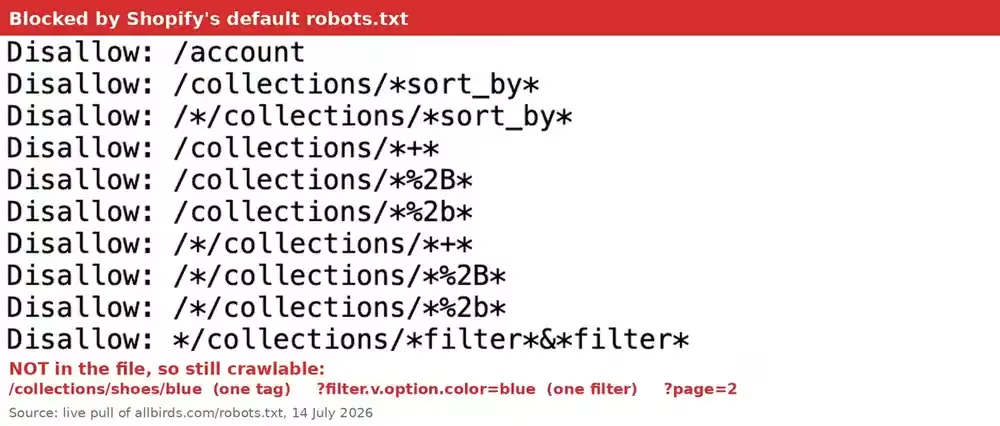
Die Standard-Datei „robots.txt“ von Shopify blockiert die Kombinationen, nicht die Einzel. Es verbietet sort_by, Tag-Kombinationen (die + und dessen Kodierung %2B Formulare) sowie zwei gemeinsam verwendete Filter. Eine einzelne Tag-URL, ein einzelner Filterparameter und die Paginierung werden von keiner Standardregel erfasst, sodass sie weiterhin gecrawlt werden können.
Ich habe mir die Unterlagen eines echten Geschäfts herausgesucht, um das zu überprüfen, anstatt mich auf die Blogbeiträge zu diesem Thema zu verlassen. Hier sind die wichtigsten Regeln, direkt aus diesen Unterlagen.
| URL-Muster | Beispiel | Durch die Standard-„robots.txt“-Datei blockiert? |
|---|---|---|
| Sortierparameter | /collections/shoes?sort_by=price-ascending | Ja, Disallow: /collections/*sort_by* |
| Zwei Tags kombiniert | /kollektionen/schuhe/blau+sale | Ja, Disallow: /collections/*+* und dessen %2B Formulare |
| Zwei Filter zusammen | ?filter.v.option.color=blue&filter.v.price=50 | Ja, Disallow: */collections/*filter*&*filter* |
| Ein Tag | /Kollektionen/Schuhe/blau | Nein. Kann gecrawlt werden. |
| Ein Filter | ?filter.v.option.color=blue | Nein. Kann gecrawlt werden. |
| Paginierung | /collections/shoes?page=2 | Nein. Das steht überhaupt nicht in der Datei. |
Lies dir diese Muster genau durch, denn das ganze Problem steckt in den Platzhaltern. /collections/*+* stimmt nur mit einer URL überein, die ein +, und eine einzelne Tag-URL enthält keine + darin.
Die Filterregel ist noch strenger: */Kollektionen/*Filter*&*Filter* benötigt das Wort Filter zweimal vorkommen, mit einem & zwischen ihnen. Ein Filterparam geht direkt hindurch.
Es gibt einen Vorbehalt, den ihr ernster nehmen solltet als die Tabelle. Die „robots.txt“-Datei kann bei jedem Shop unterschiedlich sein, weil robots.txt.liquid ist bearbeitbar. Ich habe in derselben Sitzung einen zweiten großen Shopify-Shop importiert, dessen Datei angepasst war: Sie enthielt eine zusätzliche Regel, und diese war fehlt die Mehrfachfilterregel, die es im ersten Geschäft gab.
Also geh und öffne yourstore.com/robots.txt Lies dir jetzt gleich deine eigene Liste durch. Das dauert zehn Sekunden und ist besser, als sich auf die Standardliste irgendeines Blogs zu verlassen – einschließlich meiner eigenen.
Warum eine URL mit einem einzelnen Tag eine eigenständige, indexierbare Seite ist
Eine einzelne Tag-URL ist eine vollständige, eigenständige und indexierbare Seite. Sie gibt den HTTP-Status 200 zurück, zeigt eine vollständige Produkttabelle an und enthält keine noindex, und ihre kanonischen Punkte verweisen auf sich selbst und nicht zurück auf die übergeordnete Sammlung.
Ich habe das direkt in einem echten Shop überprüft, anstatt es aus dem Gedächtnis wiederzugeben. Wird geladen deathwishcoffee.com/collections/all/merch zeigt eine normale Übersichtsseite an, und der Canonical-Tag im Head-Bereich lautet:
<link rel="canonical" href="https://www.deathwishcoffee.com/collections/all/merch">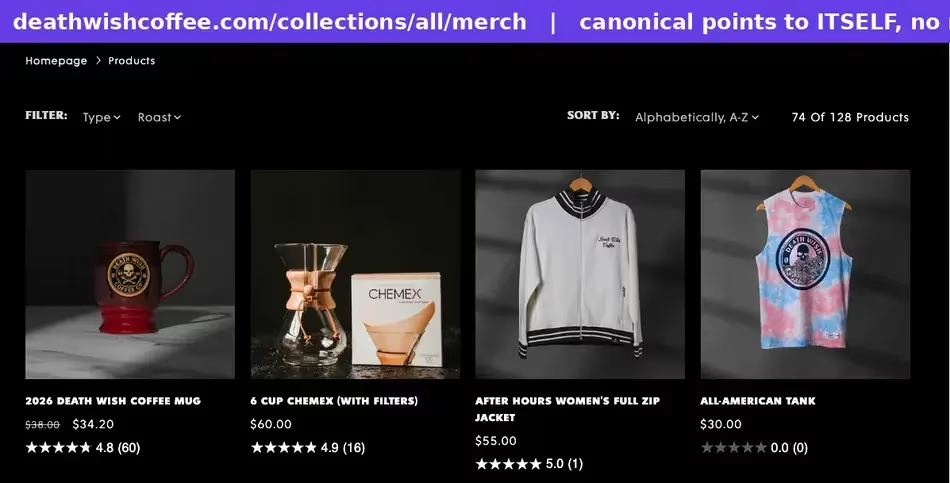
Das ist die Seite, die auf sich selbst verweist. Google erhält also nicht die Information “Das ist eine Variante der übergeordneten Sammlung”, sondern “Das ist die Seite, indexiere sie.”
Der Titel ändert sich bei den meisten Themen zwar ein wenig (es wird der Zusatz “tagged” angehängt), aber der Haupttext, die Überschrift und der Einleitungstext sind identisch mit denen der übergeordneten Seite. Aus Sicht von Google handelt es sich dabei um eine dünne, fast identische Seite, und Sie haben eine solche Seite für jedes Tag in jeder Sammlung.
Hier ist ein nützlicher Hinweis zur Fehlerbehebung, der sich aus der Funktionsweise von Shopify ergibt. Wenn ein Tag in der URL bei keinem Produkt verwendet wird, leitet Shopify zur URL der Kollektion weiter, wobei das Tag entfernt wird. In der Dokumentation zu den Shopify-Themes wird dies klar und deutlich beschrieben: wenn ein Tag in der URL bei keinem der Produkte des Shops verwendet wird, leitet der Shop zur URL der Kollektion weiter, ohne diese anzugeben.
Wenn Sie also eine Prüfung durchführen, ist eine Tag-URL, die Weiterleitungen gehören nicht zu Ihrem Ballast, und eines, das ergibt ist. Mit diesem einen Test lässt sich die Liste schnell sortieren.
Sollte man Seite 2 kanonisch auf Seite 1 verweisen?
Nein, und genau hier weiche ich von einem Großteil der Ratschläge zu diesem Thema ab. In der Dokumentation von Google heißt es ganz klar: “Verwenden Sie nicht die erste Seite einer paginierten Sequenz als kanonische Seite. Weisen Sie stattdessen jeder Seite eine eigene kanonische URL zu.” Das Standardverhalten von Shopify tut genau das bereits.
Ich habe die Standardeinstellung im selben Live-Shop überprüft. Wird geladen /collections/all?page=2 ergibt einen kanonischen Link, der auf ?page=2, nicht bei der Basis-Sammlung. Shopify macht es hier bereits richtig, und die beliebte “Korrektur” macht das wieder zunichte.
In mehreren Shopify-SEO-Anleitungen wird empfohlen, jede paginierte Seite mit einem Canonical-Tag auf Seite 1 zu verweisen, und es ist leicht nachvollziehbar, warum dies attraktiv erscheint. Es sieht übersichtlich aus und sorgt dafür, dass die wie Duplikate wirkenden URLs aus Ihren Berichten verschwinden.
Der Nachteil dabei ist, dass dadurch Ihre tiefer liegenden Produkte verdeckt werden. Wenn die Seiten 2 und 3 alle auf Seite 1 als die “echte” Seite verweisen, teilen Sie Google damit mit, dass die Produkte, die nur auf diesen Seiten sichtbar sind, zu einer URL gehören, auf der sie nicht erscheinen, und Sie haben es dadurch schwieriger gemacht, sie zu finden – statt es einfacher zu machen.
Um der Gegenseite gerecht zu werden: In den Richtlinien von Google wird ebenfalls empfohlen, von jeder Seite der Sequenz aus einen Link zurück zu Seite 1 zu setzen, da Seite 1 in der Regel die Seite ist, auf der die Besucher landen sollen. Dabei handelt es sich jedoch um einen Tipp zur Verlinkung und nicht um eine verbindliche Anweisung, und beides ist nicht austauschbar.
Es gibt eine doppelte Paginierung, die es wirklich wert ist, bereinigt zu werden: ?Seite=1. Diese URL ist ein echtes Duplikat der Basis-Sammlungs-URL. Falls Ihr Theme also irgendwo darauf verweist, korrigieren Sie die Links so, dass sie auf die bereinigte URL verweisen. Lesen Sie Googles Leitfaden zur Paginierung im E-Commerce falls Sie die vollständige Begründung lesen möchten.
Wenn du schon mal dabei bist, noch eine Sache, die du wissen solltest: Das alte rel="next" und rel="prev" Markup wird nicht mehr verwendet. Laut der Dokumentation von Google werden diese Tags nicht mehr verwendet. Wenn in einer Anleitung also immer noch empfohlen wird, sie hinzuzufügen, ist diese Anleitung veraltet.
Die URLs der Kollektionspfad-Produkte, über die bereits alle schreiben
Dies ist der einzige Punkt, den die vorhandenen Anleitungen gut behandeln, daher werde ich mich kurz fassen und ihnen die gebührende Anerkennung zollen. Wenn ein Theme über die Kollektion auf Produkte verweist, stellt Shopify dasselbe Produkt unter /kollektionen/schuhe/produkte/blue-runner sowie bei /produkte/blue-runner.
Die Korrektur befindet sich im „product-grid“-Snippet Ihres Themes. Verwenden Sie {{ product.url }} anstelle von {{ product.url | within: collection }}, sodass alle Ihre internen Links auf die bereinigte Produkt-URL verweisen.
Eine Warnung, die Amsive trifft den Nagel auf den Kopf Und das sollte man noch einmal betonen: Fügen Sie kein noindex zu diesen Produkt-URLs im Collection-Pfad. Sie sind bereits auf die bereinigte Produkt-URL kanonisiert, und ein „noindex“-Attribut bei einem kanonisierten Duplikat ist ein widersprüchliches Signal, das dazu führen kann, dass die Seite, die Sie eigentlich indexiert haben wollten, unterdrückt wird. Lassen Sie diese URLs aus Ihrer Sitemap heraus und lassen Sie die kanonische URL ihre Arbeit tun.
Welche Tag-Seiten sollen beworben, blockiert oder mit „noindex“ versehen werden?
Ordne jede Tag-URL einer der folgenden drei Kategorien zu: fördern es zu einer richtigen Sammlung machen, wenn es eine Suchnachfrage dafür gibt, noindex wenn es sich um ein echtes, fast identisches Duplikat handelt, nach dem niemand sucht, und Lass es einfach sein falls die Seite bereits gesperrt ist oder eine Weiterleitung erfolgt. Der pauschale Ratschlag “Alle Tag-Seiten mit ”noindex‘ versehen“ lässt den ersten Bereich außer Acht – und genau in diesem Bereich steckt das große Geld.
Überlegen Sie einmal, was eine Tag-URL normalerweise darstellt. /Kollektionen/Schuhe/wasserdicht ist eine Seite über wasserdichte Schuhe, und “wasserdichte Schuhe” ist ein Suchbegriff, nach dem die Leute tatsächlich suchen. Das ist kein überflüssiger Ballast, sondern eine Sammlung, die du noch nicht aufgebaut hast.
Der Unterschied zwischen den beiden liegt in der Nachfrage, und die Nachfrage lässt sich überprüfen. Wenn Sie sich nicht sicher sind, wie Sie die richtige Größe bestimmen sollen, finden Sie in meinem Leitfaden zu Überprüfung einer E-Commerce-Nische führt dieselbe Anforderungsprüfung auf Produktebene durch.
| Was du gefunden hast | Was ist zu tun? | Warum |
|---|---|---|
| Das Tag entspricht einer Suchphrase (“wasserdichte Schuhe”) | Mach Werbung dafür. Erstellen Sie eine echte Sammlung mit eigenem Text, eigenem Titel und internen Verknüpfungen | Es gibt eine Nachfrage, und eine gut gestaltete Sammelseite wird besser abschneiden als eine automatisch generierte Tag-Liste. |
| Das Tag ist eine interne Bezeichnung (“ss24-batch2”, “clearance-old”) | Mit „noindex“ kennzeichnen über eine Theme-Bedingung in der Tag-Vorlage | Niemand führt dort eine Suche durch, und es handelt sich um eine reduzierte Kopie der übergeordneten Sammlung. |
| Die Tag-URL leitet weiter, wenn man sie aufruft | Lass es sein. Es gibt nichts zu reparieren | Shopify entfernt bereits ungenutzte Tags aus der URL |
| Die URL enthält eine Sortierung, kombinierte Tags oder gestapelte Filter | Lass es sein. Bereits abgelehnt | Die Standard-Datei „robots.txt“ deckt diese Muster ab |
| Sie möchten ein Muster blockieren, das in der Datei „robots.txt“ nicht berücksichtigt wird | bearbeiten robots.txt.liquid, sorgfältig | Shopify unterstützt diese Funktion, bietet jedoch keinen Support dafür: Beachten Sie den folgenden Hinweis. |
Sollten Sie sich entscheiden, Ihre „robots“-Datei zu bearbeiten, lesen Sie bitte zunächst die Warnung von Shopify. In der Hilfe-Dokumentation wird dies ganz klar zum Ausdruck gebracht: “Dies ist eine nicht unterstützte Anpassung. Der Shopify-Support kann bei Änderungen an der Datei ”robots.txt.liquid“ nicht helfen … Eine falsche Nutzung dieser Funktion kann zum Verlust des gesamten Datenverkehrs führen.“
Wenn Sie die Vorlage bearbeiten, fügen Sie Anweisungen mit Liquid hinzu oder entfernen Sie sie, anstatt eine reine Textdatei über die Vorlage einzufügen. Shopify empfiehlt die Liquid-Methode gerade deshalb, weil dadurch die Möglichkeit erhalten bleibt, die Datei für Sie auf dem neuesten Stand zu halten, und warnt davor, dass ein fest codierter Ersatz bedeutet, dass Regeln können veralten.
Und denken Sie daran, was „robots.txt“ eigentlich bewirkt. Es verhindert das Crawlen, nicht die Indizierung; daher ist es das falsche Mittel für eine Seite, die bereits indiziert ist und die Sie nun entfernen möchten. Für diesen Zweck benötigen Sie einen „noindex“-Befehl, und ich habe die Funktionsweise in So lassen Sie eine Seite aus dem Index entfernen.
So überprüfen Sie Ihren eigenen Shop in der Search Console
Öffnen Sie den Bericht „Seiten“ in der Search Console und lesen Sie die Gründe, nicht die Gesamtzahlen. Die beiden Zeilen, die darauf hinweisen, dass dieses Problem in Ihrem Shop auftritt, sind “Duplikat ohne vom Benutzer ausgewählten kanonischen Link” und “Indexiert, obwohl durch robots.txt blockiert”, und jedes davon hat eine andere Bedeutung.
Klicken Sie auf die einzelnen Gründe und sehen Sie sich die URLs selbst an. Wenn Sie sehen, dass /Kollektionen/ Pfade, an deren Ende ein Tag steht, oder ein Filter. Parameter: Sie haben die Seiten gefunden, um die es in diesem Artikel geht.
Die Zeile “Indiziert, obwohl durch robots.txt blockiert” sorgt für Verwunderung, daher sollte man es klar und deutlich sagen: Es handelt sich nicht um einen Fehler. In der Dokumentation von Shopify selbst wird dies als normales Verhalten und in der Regel kein Grund zur Sorge, da Suchmaschinen eine Seite, die sie an anderer Stelle entdeckt haben, indexieren können, ohne sie jemals zu crawlen.
Möglicherweise finden Sie auch eine Reihe von URLs in der Kategorie “Gecrawlt, derzeit nicht indexiert” – damit teilt Google Ihnen mit, dass es die Seite geprüft und entschieden hat, dass sie keinen Platz im Index verdient. Dieser Status hat seine eigenen Ursachen und Lösungen, auf die ich in gecrawlt, derzeit nicht indexiert.
Eine Anmerkung zum Umfang: In diesem Artikel geht es um die URLs, die Ihr Online-Shop generiert – dabei handelt es sich um ein Problem beim Crawling und bei der Indizierung. Wenn Ihre Produktdaten auch in Google Shopping übertragen werden, handelt es sich dabei um einen separaten Bereich mit eigenen Regeln, auf die ich im Leitfaden zu den Anforderungen des Merchant Centers.
Inwieweit spielt es also wirklich eine Rolle, dass Shopify Inhalte aus Kollektionen dupliziert?
Ehrlich gesagt, für einen Shop mit 20 Produkten und drei Tags ist das nicht besonders viel. Google ist gut darin, selbstständig eine kanonische URL auszuwählen, und Sie haben Besseres zu tun, als eine Handvoll Tag-URLs zu bereinigen, auf die ohnehin niemand jemals gelangen würde.
Es spielt erst dann eine Rolle, wenn die Multiplikation ins Spiel kommt. Ein Shop, der schnell neue Kollektionen hinzufügt – jede mit einem Dutzend Tags und aktivierten Filtern –, erzeugt Hunderte von crawlbaren Beinahe-Duplikaten, ohne dass dies von einer einzigen Person bewusst entschieden wurde.
Wäre dies mein Shop, würde ich nicht gleich mit einer „noindex“-Durchforstung beginnen. Ich würde die URLs der Kollektionen exportieren, die Google tatsächlich gecrawlt hat, sie in die drei Kategorien der obigen Tabelle einordnen und davon ausgehen, dass ich mindestens eine Tag-URL mit echter Nachfrage finde, die es verdient, zu einer richtigen Kollektion zu werden.
Das rückt die ganze Aufgabe in ein neues Licht. Das Aufräumen lohnt sich zwar, aber der eigentliche Gewinn ist die Sammelseite, von der Sie gar nicht wussten, dass Sie sie brauchen – und die bekommen Sie durch noch so viel kanonische Aufräumarbeit nicht.
Sie sind sich nicht sicher, welche URLs aus Ihrer Sammlung Sie behalten sollen?
Schick mir die Liste, dann schaue ich mal nach. Du kannst kontaktieren Sie uns oder E-Mail direkt, und ich sage Ihnen gerne, welche davon nur Ballast sind und welche Sammlung es wert ist, aufgebaut zu werden.
Möchtest du, dass unsere Beiträge öfter bei Google erscheinen?
Ein Schritt – und Google zeigt diese Seite in Ihren „Top Stories“ an.

 ChatGPT-Einkaufsstudie: Was entscheidet tatsächlich darüber, ob Ihre Produkte genannt werden?
 Long-Tail-Keywords und KI-Übersichten: Was unsere Studie zu E-Commerce-Verweisen ergeben hat
 SEO für E-Commerce-Kategorieseiten: Was Seiten, die in den Suchergebnissen ganz oben stehen, tatsächlich mit ihrem Text machen
