---
url: 'https://www.wpconsults.com/downloads/honest-lastmod-pro/'
language: 'en'
title: 'Honest Lastmod Pro'
author:
name: 'Abdullah Nouman'
url: 'https://www.wpconsults.com/author/nouman/'
date: '2026-07-24T17:31:34-05:00'
modified: '2026-07-24T17:39:03-05:00'
type: 'download'
image: 'https://www.wpconsults.com/wp-content/uploads/2026/07/Honest-Lastmod-scaled-1.avif'
published: true
---
# Honest Lastmod Pro
WordPress pluginLaunch offer: $20 for 1 site, ends Oct 3
## Google reads your dates. *One fake one and it stops trusting them all.*
WordPress bumps a post’s modified date every time you save it, even for a design tweak that changed no words. Your SEO plugin copies that date into your sitemap as lastmod, and Google reads lastmod as a promise the page really changed. Honest Lastmod keeps that promise true, so your freshness signal stays believable.
Get Pro, $20 for 1 siteor start with the free version
One time payment, lifetime license. $50 for one site after launch.
Works with Yoast, Rank Math, SEOPressNo effect on page speedNothing changes on activationOne-time repair included $ curl https://yoursite.com/sitemap.xml/best-guide/ 2026-07-20 # you only fixed a typo# the same page, with Honest Lastmod on2025-11-02 # the last real content change What it does
## Keep your dates honest, see what Google is served, and fix the ones already inflated.
A wrong date is worse than no date. If Google keeps seeing updates that never really happened, it can stop trusting the dates across your whole site and fall back to its own crawl schedule. Honest Lastmod fixes that at the source, so whatever builds your sitemap serves the honest value.
### Per-post control
This save: keep the current date design tweak, typo, re-save
On every post and page you choose what a save does to the date: move it for a real change, or keep it for a design tweak or a re-save. Trivial saves stop inflating your dates.
### See what Google is served
/best-guide/ Honest /services/ Inflated /about/ Not tracked yet
The Sitemap dates tab reads your database live and shows, for every page, the date your sitemap serves and the last real content change, with a plain verdict.
### One-time repair
Preview (dry run) /services/ 2026-07-20 to 2025-11-02
It rebuilds honest dates from your revision history: the last time the words really changed, or the publish date when no revisions remain. Preview first; nothing is written until you commit. Also on WP-CLI.
### Auto mode Pro
save → words changed? yes: move date save → words changed? no: hold date
Pro decides every save for you. It compares a fingerprint of the visible words, so a real edit moves the date and a pure design change never does. Set it once and forget it.
### Automation API Pro
POST /wpc-lastmod/v1/mode { “id”:123, “mode”:”hold” }
Mark an update real or trivial from your own scripts: a REST endpoint, an inline meta value, PHP helpers, and a filter for one server-side rule instead of tagging each post.
### Works with your SEO plugin
Yoast Rank Math SEOPress and WordPress core
It corrects the modified date itself, so whatever generates your sitemap serves the honest value with no extra setup. Nothing to configure per plugin.
How it works
## Install it once. Clean up the past. Stay honest from then on.
1See what Google is served today
Activate the plugin (no dates change on activation) and open the Sitemap dates tab. It reads your database live and flags every page as Honest, Inflated, or Not tracked yet, so you know the size of the problem before you touch anything.
2Repair the dates already inflated
On the Repair tab, run the dry-run preview. It lists every date it would change, old to new, rebuilt from your revision history. Check the list, then commit. Run this before any tool that clears post revisions, because revisions are the evidence it reads.
3Stay honest on every future save
On the free plugin you pick “keep the current date” on saves that did not really change your content. On Pro, Auto mode makes that call for you on every save, and the automation API lets your own scripts decide.
See it
## Real screens from the plugin
The per-post control in the editor, and the settings screen with the live Sitemap dates viewer and the one-time repair.
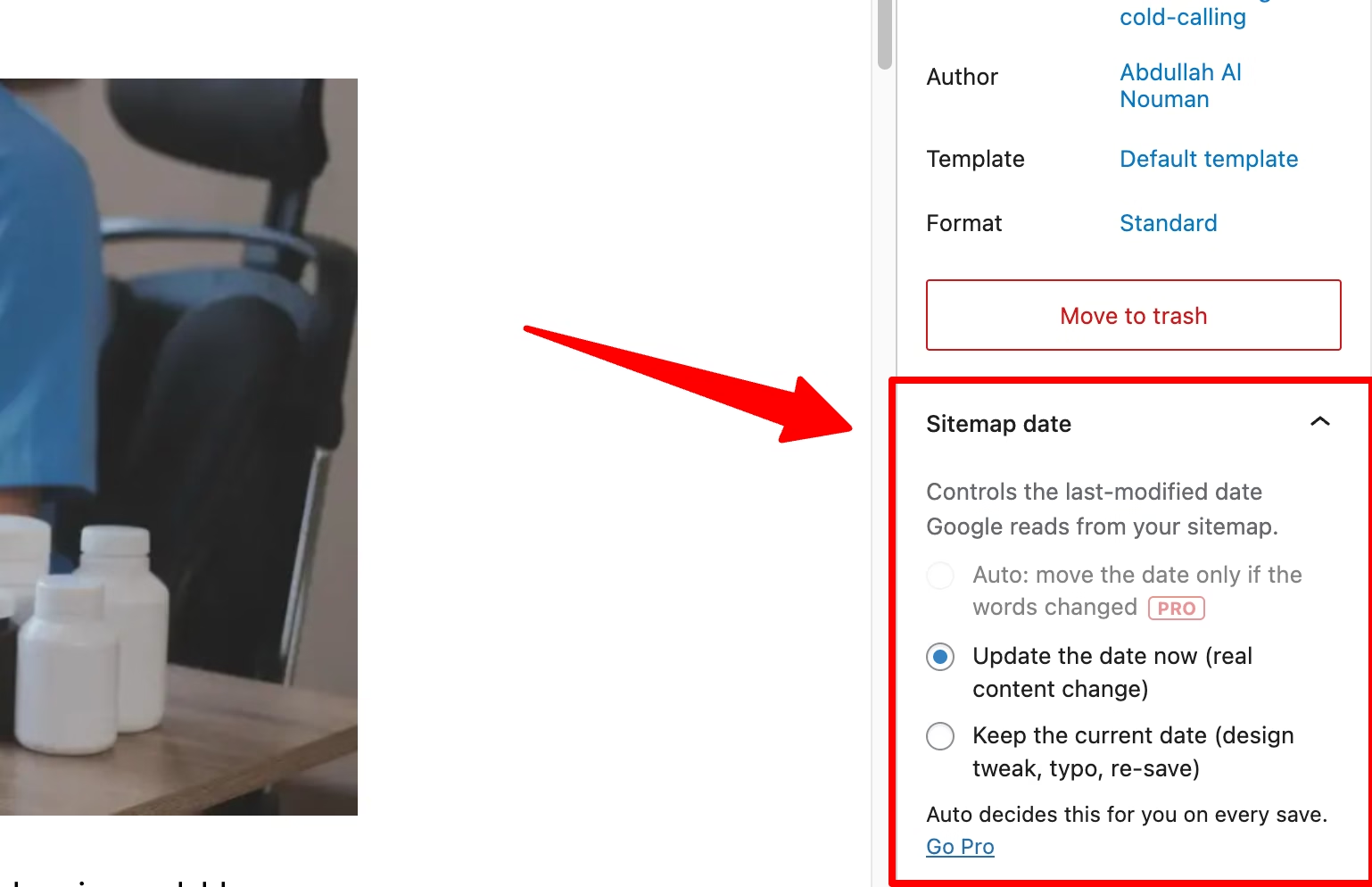The Sitemap date panel in the editor: move the date, keep it, or let Auto decide. 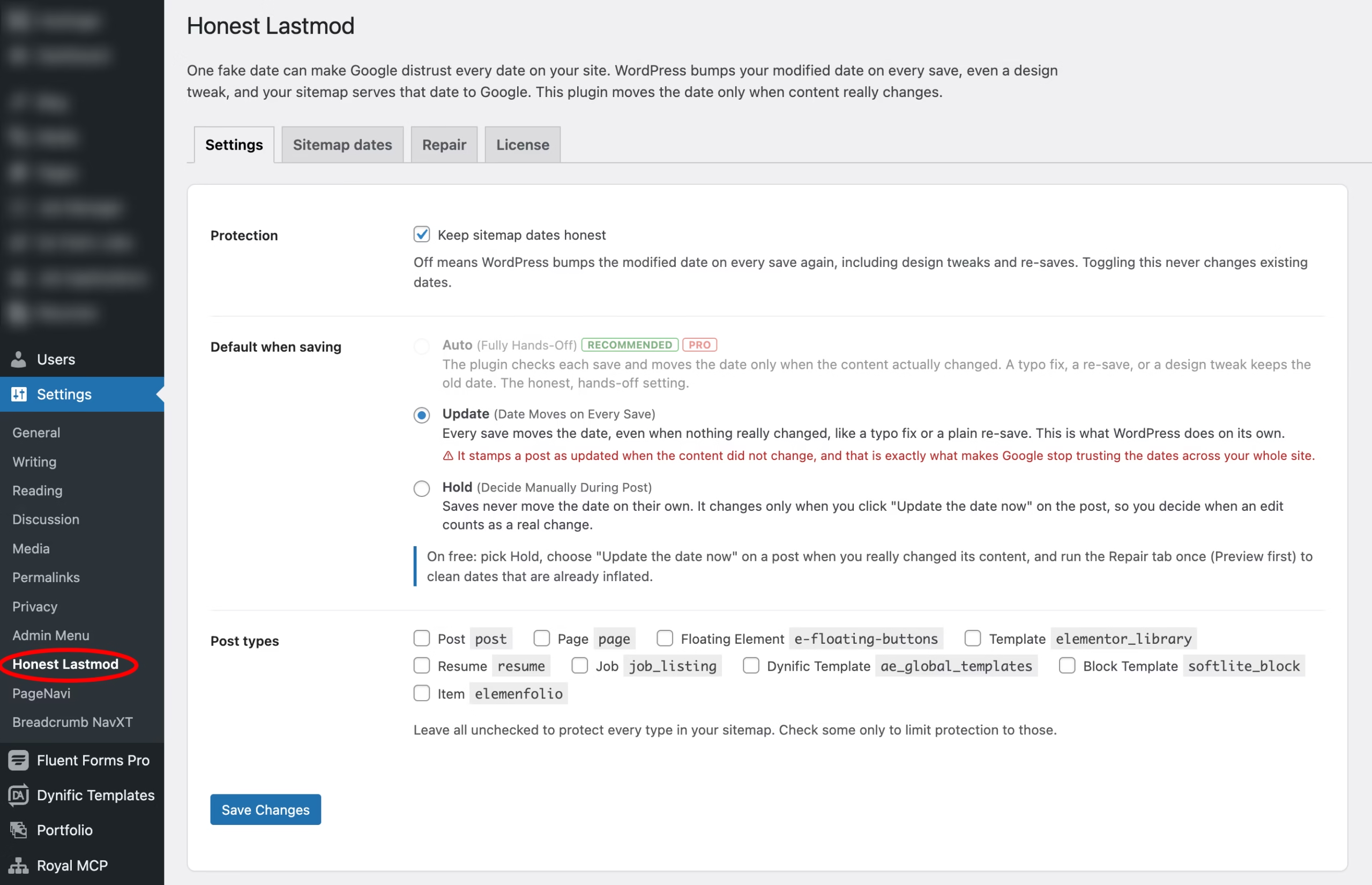The settings screen: Settings, the Sitemap dates viewer, the Repair tab, and License. Free vs Pro
## The free version is real. Pro makes it hands-off.
| Feature | Free | Pro |
| --- | --- | --- |
| Per-post control on every save | Yes | Yes |
| Live Sitemap dates viewer with verdicts | Yes | Yes |
| One-time history repair (admin and WP-CLI) | Yes | Yes |
| Works with Yoast, Rank Math, SEOPress, core | Yes | Yes |
| Auto mode, decides every save for you | No | Yes |
| Automation API (REST, meta, PHP, filter) | No | Yes |
| Direct support from the developer | No | Yes |
Pricing
## One-time payment. Lifetime license. Never a subscription.
Every plan is the same Pro download. Pick by how many sites you run. The launch price on a single site holds until October 3, 2026, then it goes to $50.
Launch offer, ends Oct 3
1 site
$20 $50
One time, lifetime license and updates.
- Auto mode and the automation API
- Everything in the free plugin
- Every future update, forever
- Direct support from the developer
[Get Pro for $20](https://www.wpconsults.com/checkout-2/?edd_action=add_to_cart&download_id=8030&edd_options[price_id]=0)
5 sites
$100
One time, for a small portfolio
- Everything in Pro, on 5 sites
- One license key for all of them
- Auto mode and the automation API
- Every future update, forever
[Buy 5 sites](https://www.wpconsults.com/checkout-2/?edd_action=add_to_cart&download_id=8030&edd_options[price_id]=1)
Unlimited
$250
One time, for agencies and networks
- Everything in Pro, unlimited sites
- One key across every install
- Auto mode and the automation API
- Every future update, forever
[Buy Unlimited](https://www.wpconsults.com/checkout-2/?edd_action=add_to_cart&download_id=8030&edd_options[price_id]=2)
Licenses are lifetime, so there is nothing to renew. You buy it once and keep every update.
Questions
## Frequently asked
Does activating the plugin change my dates?
No. Activation stores settings only. Dates change when you run the repair, or on saves according to the mode you choose.
Will it work with my SEO plugin?
Yes. It corrects the modified date at the source, so Yoast, Rank Math, SEOPress, or WordPress core all serve the honest value with no extra setup.
What does the repair use to rebuild dates?
Your revision history. It finds the last revision where the words really changed and uses that date; with no usable revisions it falls back to the publish date. Run it before any tool that clears revisions, because revisions are the evidence it reads.
What is the difference between free and Pro?
Free gives you full manual control, the live Sitemap dates viewer, and the one-time repair. Pro adds Auto mode, which decides every save for you, and the automation API for your own scripts.
Does it slow down my site?
No. It runs only when you save a post and when you open its admin screens. It adds nothing to your front-end pages.
What happens if I deactivate it?
Nothing breaks. WordPress goes back to bumping the modified date on every save, exactly as before, and your existing dates are left as they are.
## Stop teaching Google to distrust your dates.
One plugin, a few minutes of setup, and your freshness signal stays believable. Start free, or go hands-off with Pro.
Get Pro for $20
### Not ready to pay? Take the free version.
It is not a trial and it does not expire. You get per-post control, the live Sitemap dates viewer, and the one-time repair. If manual control is all you need, take it and go. Pro only adds the hands-off Auto mode and the automation API.
[Download the free version](https://www.wpconsults.com/wp-content/uploads/2026/07/honest-lastmod-free.zip)
### Requirements
WordPress 5.8 or newer (tested to 7.0), PHP 7.2 or newer, and a sitemap from Yoast, Rank Math, SEOPress, or WordPress core.
---
### One honest note
**No plugin can force Google to recrawl or to rank you higher, and Honest Lastmod does not pretend to.** What it does is stop your site from sending a false freshness signal, which is the part that is actually in your control. A believable lastmod is a foundation, not a magic wand. Your content still has to earn the ranking.